Since the most recent server update(Version 1.32.6.7371) when I play a video file using the web-player in my browser and I check the dashboard it shows that the local connection is 10Gbps even though I don’t have equipment to support that speed.

Is this a bug?
I think it just means the file hasn’t been analyzed yet. A bitrate hasn’t been detected so that’s what it displays
After a deep scan during maintenance, it should correct itself
If you want that file to direct play instead of transcode I suggest you try it on Plex for Windows or Mac. The apps direct play a lot more content than a web browser
I normally don’t watch anything from my web-browser, just decided to test it from my desktop using a web-browser. It seems when I use the desktop app(or my Shield) it doesn’t show that 10Gbps speed.

It’s because the other clients are direct playing the file
I don’t know for sure but I have to assume…if you need to transcode the file Plex has to determine what the bitrate is, in order to convert it
Your file isn’t being transcoded due to a bandwidth limit, but rather a codec issue so it’s just displaying a generic 10mbps since the file hasn’t been analyzed yet
Again, I am just guessing. If someone has a more detailed technical explanation of what’s happening, I wouldn’t mind hearing about it.
The end result will be the same though. It’s just misleading, there’s nothing actually wrong and the issue will correct itself during maintenance
First of all I appreciate your replies but I don’t think that’s it because I’ve had this file on my Plexserver for weeks so it has already been anlayzed. Also when I play the file using the plex-desktop player and force it to play in 480p it also trans-codes and then it doesn’t show the 10Gbps but the a normal speed.
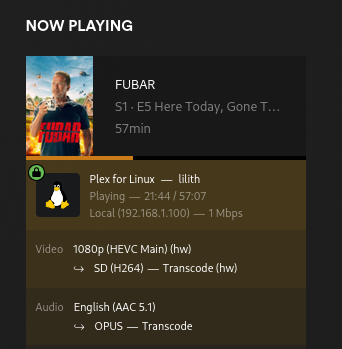
I would too since it doesn’t make much sense right now.
I get that as well.

If I force a transcode to a lower quality (such as 480p) it shows the speed as 1 Mbps just like the OP sees. Only when it auto-transcodes on it’s own (due to browser not supporting HEVC) does it show a full 10 Gbps. I know for a fact that I barely got a 1Gbps wire and switches.
Pretty sure that’s showing what Plex sees your current connection speed set to (either manually in settings or just left at default). I’m thinking if you have it set to “Maximum”, then Plex probably assumes the maximum connection speed you have is 10 Gbps.
The file is transcoding then direct streaming hence the 10gbps. Direct Play will display correctly. It doesn’t mean anything.
That doesn’t make any sense, if your change your web-player quality from maximum to another resolution it’s the same result since trans-code is force as well then. Also Plex should only be able to go up to your maximum supported network speed, kind of strange where there is no 10Gbit equipment on the lan.
This isn’t correct before the recent update when I played it through the web-browser and it trans-coded it would show the expected speed and not 10GBps.
A Transcode requires the server to Direct Stream the file to the client after conversion. All my Direct Streams that require a transcode show up as 10Gbps. Even if it’s just the audio transcoding.
I have never seen a trans-code go up to 10Gbps, the network speed shouldn’t be above what your network hardware supports. This is another example but from a different client where I forced a trans-code.

It’s not showing up as 10GBps, I’m not using conversion, it’s trans-coding on the fly using a gpu. So it currently only happens in the the browser when a trans-code is needed, when I force a trans-code on other client it doesn’t happen.
It doesn’t mean anything and can be ignored.
It’s not normal something similar has happened in the past before.
