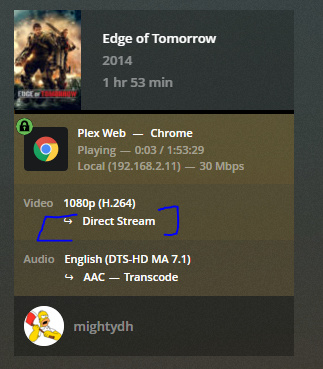
I’m able to reproduce broken behavior by resuming a bluray remuxes (2 of 3). I see video artifacts and the audio jumps. I’ve been unable to reproduce the issue when not seeking/resuming.
Yes: I am seeing what you are seeing (video artifacts are new from when I replied last week - but I notice them now as well) - both from resuming and also when starting a film from the beginning.
It’s interesting. I’ve reproduced the problems in PMS 1.15.8.1198-eadbcbb45 on macOS. This predates the troubles that flared in this thread around 1.16. It’s the exact same behavior I shared from in 1.19 above.
Chrome has artifacts/audio skips against 1.15.8 and 1.19. Suggests there wasn’t a behavior regression somewhere in 1.16.x
Chromium browsers are affected; I’ve reproduced in Chrome, Opera, Edge. Firefox 75 and Safari 13.1 are fine. All are streaming from PMS using the same format.
This is looking an awful lot like a video decoder change in Chrome is hurting us.
I see above that some users, especially on Windows, are also indicating a problem occurs in Firefox on Windows. I don’t presume to know why.
It’s very possible there are multiple issues at play. For now I’m focusing on the decoding problems in Chrome (artifacts, poor audio) on macOS. It’s a clear repro case.
Does playback still display artifacts and audio skipping?
Please let me know.
Locally I’ve remuxed my Edge of Tomorrow MKV (H.264+DTS-HD7.1) to an MP4 file with stereo AAC. So, direct play compatible container and codecs. The video stream is untouched.
With hardware-accelerated decoding enabled I see the same artifacts even when direct playing. With hardware-accelerated decoding disabled the artifacts disappear.
Why is this important? Direct Stream playback converts the movie container (MKV, AVI, etc) and converts audio format (codec, channel count, etc). The video stream is copied as-is. The Direct Play test eliminates the container and audio conversions as a source of trouble. The video artifacts demonstrating in both Direct Stream and Direct Play strongly suggests we’re dealing with a Chrome issue.
If you all can confirm a positive/negative/neutral behavior change with hardware-accelerated decoding off it would be a big help characterizing the issue.
Negatory here, running Vivaldi 3.0.1874.33 on Plex Web 4.22.3 running off the local Plex Server direct from the Webapp access - not off the Plex Web app directly nor off the Plex Desktop Win10 app - at 0:53 sec had a skip to 1:01 sec. Rewinding back also skipped over the missed section as before, and when played back before the skip, skip repeated identically. Same error I had previously.
Vivaldi 3.0.1874.33 on Plex Web 4.22.3 running off the local Plex Server direct from the Webapp access - not off the Plex Web app
This is super interesting. I have a few aspects that I can look into; thanks!
Excellent, @punkey0, @szaimen, @mightydh thank you all very much for testing. Will you all please let me know some specifics and lets work out a way for us to test on the files you’re playing.
OS and browser name and version and Plex Web version. I’ve got a general idea here after reading back but there are holes.
I’d really like to test on the same files you all have found most troublesome. It could be easiest to DM me a Google Drive link to the file or original file name. Generating a sample file and sharing that instead is most common but requires some command line and testing time to be sure the sample reproduces the same problem.
Win10 10.0.18362, Vivaldi 3.0.1874.33, Plex Web 4.22.3 running remotely via gigabit Ethernet in Docker in Unraid 6.8.3
It’s really almost any file for me, but especially for 4K files. Honestly, I have a similar issue but as the issue vanishes when I run either Plex Web via accessing plex.tv directly, or via the Plex Desktop app, I wouldn’t be surprised if it’s a network issue rather than a Plex issue. Still, I’m reporting here because it is the same issue.
Thanks @punkey0. What’s a general bitrate for those 4K files? And, I totally agree, playback issues like this are typically hard to find/fix. There’s a fair bit of “now you see it now you… wait what the heck?!” involved.
I’ll be trying to reproduce the problem on the asset from @szaimen and from my own library.
We’ve identified that hardware-accelerated decoding in Chrome causes the video artifacts but does not cause the audio skipping. There’s one more step to completely eliminate Chrome’s decoder.
Below is an ffmpeg command that remuxes an MKV into direct playable MP4. Theory is, if this file plays correctly then the issue is caused by direct streaming. While if this file plays poorly then it’s a decoder issue.
I leave this here for anyone that’s interested in the details and wants to sherlock along with us.
-i "input file.mkv": name of the input file, be sure to quote paths with strings
-c:v copy: copy the video stream untouched
-c:a aac -ac 2: convert audio to stereo AAC
-metadata:s:a:1 title="": set the title of the first audio stream to an empty string. I noticed in my testing that the original title was used by default. It was confusing to see the original title on the new audio stream.
"output file.mp4": name the file anything you choose so long as it ends in .mp4
I will try to contribute the next time I run across this problem. that being said, I only have the skipping ahead issue, I don’t have the video corruption issue in your recording.mov file.