I am having the same issues with video skipping only happens in chrome browser plex app works with no issues.
Version 4.33.1
Version 1.19.3.2764
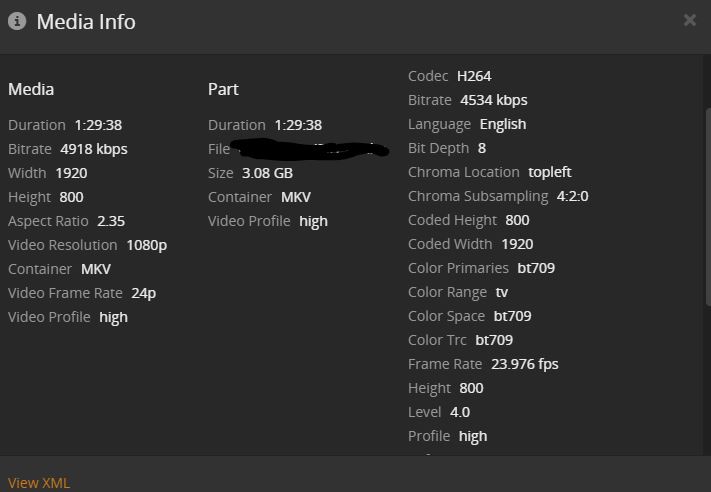

Let me know if there is any other info I can provide
I am having the same issues with video skipping only happens in chrome browser plex app works with no issues.
Let me know if there is any other info I can provide
Ok disclaimer this only works for people using pfsense or other routers with a dns resolver turned on. I was facing this exact same issue and it was extremely frustrating. I realized what was happening was it was dropping packets but I couldn’t find the reason until last night. I stumbled upon the fix by accident when I was messing around in a config file in my dns resolver. I had added a line in my dns resolver a while back so it would stop throwing errors whenever I tried to play content over a secure connection. The line I had added was domain-insecure: "plex.direct" this “fixed” my issues. However little did I know this wasn’t the only line I needed to add. I found the other piece of the puzzle in a post on Reddit when I was looking at an image of someones config file I noticed they had another line I did not which was private-domain: "plex.direct" so I added that and boom butter smooth playback and not only did it fix the browser it fixed the stuttering on high bitrate files. I don’t exactly understand why that would fix this issue since those setting just tell the router that it’s ok if plex runs a secure connection with invalid and technically “insecure” packets through my internal network while bypassing my dns. However it does so I figured I would post it and see if it helped anyone. I am so happy to have this finally fixed so I hope it helps find a solution to everyone else’s problem.
the fulle code for the fix is
server:
private-domain: "plex.direct"
domain-insecure: "plex.direct"
private-domain: "plex.direct" should be sufficent.
The “Why” is explained in here: https://support.plex.tv/articles/206225077-how-to-use-secure-server-connections/
Theoretically however with DNSSEC setup you can fail silently but with a SERVFAIL error with just private-domain however to remove DNSSEC checks for that domain you need to add the domain-insecure as outlined in this thread Unbound + DNSSEC + Domain Overrides | Netgate Forum
just noticed that if you have a domain override for some internal domain (“example.local”) and DNSSEC enabled at the same time the unbound server does respond with SERVFAIL.
You have to include
server:
private-domain:"example.local"
domain-insecure:"example.local"
for every domain.
This is correct, because these domains are not validated by DNSSEC. But this should happen automatically if you add a domain override (or a checkbox where you can control it) in my opinion.
Greets
Is it possible to implement this fix some other way? I am experiencing this issue but my router does not allow access to these settings. I really don’t want to flash DD-WRT or setup a pfsense server to solve this issue. Maybe something on the plex server side? My router is TP-Link Archer C9 v3.
If your router doesn’t offer you a menu item for it, you can only
This cannot be the solution.
It would mean that for some people this problem is not solvable until they buy a new router, which is obviusly out of scope.
Also couldn’t @deactivated reproduce the skipping error with my videofile example?
It might not be but all I know is mine works fine now with no settings changed on Plex and removing those lines make it start right back up again. The interesting thing I noticed was before adding those lines of code I would start playing something and the bit rate would always start out at 3 and cap itself at 3.4Mbps the only way to get it to play higher was by setting it manually. Now it either plays at the original bit rate or plays at a something higher than 3Mbps automatically.
So really its not a plex issue just a router issue and there is nothing on plex’s side to fix the issue?
Lemme get back into this today. Maybe there’s a side effect that’s present (or not present) re DNS resolution.
I’ve gotten two more example files to work through.
First thing to finish resolving is if a directly-playable MP4 shows the same problem as a direct streaming (or transcoding) MKV. This post above describes how to go about the remuxing: Plex Skipping forward by a few seconds on Web Player
Will report back.
I think what was happening was the plex.direct misconfiguration was causing us to consider the connection to your server as being remote. Is remote access enabled on this PMS? The default quality setting for remote playbacks (called Internet Streaming in settings) is 2MB/s 720p.
Ive been having this issue happen from a remote client. Would this fix still work? Should it be performed on the servers router or the clients?
The .mov file below is a 20s screen recording of playback of a particularly hard hit file in Chrome (Chrome 81.0, macOS 10.15.4, PMS 1.19.2.x).
This attached video line up with what you all are seeing?
Recording-6.mov.zip (4.7 MB)
Yes, that is exactly what I am experiencing 
This is what I am getting on chrome. It doesn’t seem to happen always on my vc1 bluray rips. This stuttering happens every 30 seconds on plex for windows and the plex iphone app and every 8 seconds on chrome.
Possible since I do have remote access however all streams showed up correctly as local and that doesn’t account for the fact that on other players they never started out at 3Mbps and didn’t get capped at 3.4Mbps. Also the video file shows exactly what I was seeing before.
Yes, exactly that.
Yes, this is exactly what I am experiencing
Yes this is what I am experiencing as well.
Is there a public source available that I can use to test? I have not run across this problem in a week or so and would like to be able to reproduce it. PS I am also on pfsense, but I can confirm that my plex server didn’t confuse remote / local players. the dashboard always correctly plotted local / remote accurately.
Okay, updates. It’s possible there are multiple bugs being discussed in this thread. I’ve been working to understand the behavior captured in this screen recording.
Hardware accelerated video decoding and network configuration aren’t contributing factors to the skipping forward.
Micro stalling to buffer looks similar but doesn’t jump the user forward.
We’re doing 2 things:
4.34 will be available on https://app.plex.tv first. It will arrive in the Plex Web version bundled with PMS at a later date. The setting can be enabled by:
Show Advance within the Settings viewDebug within the Settings view left-side barUse alternate streaming protocol for video playback checkboxBest option is to use Firefox, Plex for Windows or Plex for Mac for playbacks until 4.34 arrives.
Disabling Direct Stream in Debug settings or converting your media to be directly playable is a valid but less pleasant workaround.
You can download two 60s videos that reproduce the issue. In our testing this bug:
skip-batman.mkv video above has a 12s skip at the beginning followed by 5 more smaller skip forwards.skip-avengers.mkv has multiple small jumps forward.Affected videos are not being buffered correctly by Chrome. Browsers buffer data in ranges; each is defined by a start and end time. Chrome should buffer 5 second non-overlapping continuous segments. Videos affected by this bug are not buffering continuous segments. Instead there are gaps in the browser’s buffer. Our player sees this gap and skips forward over it.
The skip forward behavior is typically good. Playback would otherwise halt waiting for data that may or may/not buffer. Regardless, skipping forward should be a rare occurrence.
