Yes and no. To confirm, running newest build, analyzed entire 4K library, refreshed all metadata.
For films whose name contains a colon:
On iOS if I select the file version that sits along side the srt subs (in Movies-4K), the srt subs become available for use during playback. If I select the version contained in Movies-4K-Original, which does not contain the srt sidecar subs, they are not shown as available. Confirmed same behavior on Safari in macOS using browser based player.
For films whose name does not contains a colon:
In the browser, the behavior is the same as above for movies with a colon. On iOS mobile, the srt files show available for selection from the movie screen, but I suspect because it is selecting the lower bitrate file as the default for playback. Once actually in the film and playing, the srt subs are only available for the lower bitrate files contained in Movies-4K. They are not available for the version contained in Movies-4K-Original.
Assumption / conclusion: The player software still isn’t associating the srt subs with all versions of the film but instead only using the ones that sit in the same folder (sidecar) with that version.
I’ve been having the same problem. The change that I made to fix it was renaming my files from this :
The Fate of the Furious - Velozes e Furiosos 8 (2017)/
├── The Fate of the Furious - Velozes e Furiosos 8 (2017).eng.srt
├── The Fate of the Furious - Velozes e Furiosos 8 (2017).mp4
└── The Fate of the Furious - Velozes e Furiosos 8 (2017).por.srt
to this:
The Fate of the Furious - Velozes e Furiosos 8 (2017)/
├── The Fate of the Furious  Velozes e Furiosos 8 (2017).eng.srt
├── The Fate of the Furious  Velozes e Furiosos 8 (2017).mp4
└── The Fate of the Furious  Velozes e Furiosos 8 (2017).por.srt
Just removed the hyphen and refreshed metadata and boom. Very frustrating.
by the way, I’m running Version 1.20.1.3252
Also tested 1.20.1.3252. No change for me.
I just added five movies to my server and all of them have hyphen in their names. For some reason, one of them had its subtitles found, which contradicts what I said before. I really don’t understand where the problem is.
I would need to see the logs to know what’s going on here.
First make sure Debug logging is enabled in the general server settings:
Then perform a metadata refresh on the problem item, once that’s done go to Settings -> Troubleshooting -> Download logs and post it here.
Plex Media Server Logs_2020-08-30_17-02-59.zip (885.0 KB)
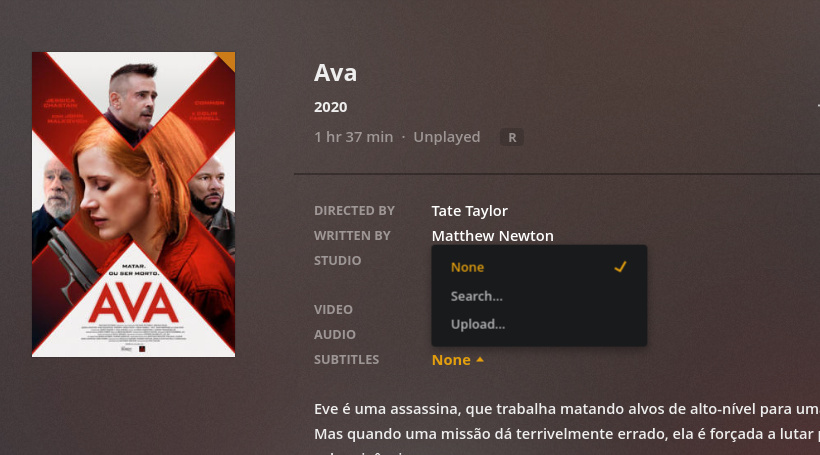
Here it is. I enabled debugging and refreshed metadata for the movie below
../Ava - Ava (2020)/
├── Ava - Ava (2020).eng.srt
├── Ava - Ava (2020).mp4
└── Ava - Ava (2020).por.srt
The result:
Ok, I did another test. Apparently the problem is not with unrecognized characters, but some subroutine that is not triggered when we first add the movie to the library.
My steps:
../Tesla - Tesla (2020)/
├── Tesla - Tesla (2020).eng.srt
├── Tesla - Tesla (2020).mp4
└── Tesla - Tesla (2020).por.srt
The agent hadn’t found the subtitles for this movie, so I renamed it to
../Tesla - Tesla (2020)/
├── movie (2020).eng.srt
├── movie (2020).mp4
└── movie (2020).por.srt
The agent immediately found the subtitles and when I renamed it back to its correct name, the agent kept the subtitles on the list.
The logs of this second test:
Plex Media Server Logs_2020-08-30_17-15-29.zip (971.9 KB)
Please, let me know if you need any other data or tests. I’m very interested in the solution of this problem because it is affecting not only me but many other users.
Interesting. Looking at the case with Ava I can see that there is file hash mismatch between the one we had in the database and the one we then refreshed. This is why I specifically added a check for this a few builds back but we only try to recompute a file hash during a refresh if the file has been updated since the last check (the timestamp on the file altered) - clearly this is not sufficient in your case.
Do you know why the contents of these files would be changing? Do you have any tools that replaces the files or makes changes to the embedded tags?
Running an analze on this item should however resolve the issue but I would like to know how the file is changing so I can figure out a better way to refresh the hashes.
Well, I bet, it is part of the parent folder name or the file names.
I believe I have another theory on why your file hashes are mismatching. You are using the “Scan my library automatically” option which triggers a scan when new media is added. The problem here is that the initial value we set for the file hash is based on the incomplete file which then doesn’t match when we save the subtitles.
A work around for this is to ensure you have the files fully copied to the target filesystem and then move them into your library path. This will ensure the scan only gets triggered on the complete file.
I’m working on a fix to make the hash re-checking more thorough.
Do you have any tools that replaces the files or makes changes to the embedded tags?
I use MKVToolNix to fix tags and sometimes to embed subtitles, but all changes are made before I add the file to the library.
Do you know why the contents of these files would be changing?
Once the file is added to the library, I don’t touch it again. My files are moved from my laptop to my NAS through the LAN, which takes about one minute to complete. I have noticed that the Automatic scan is triggered 3 seconds after a change in the filesystem is detected, for this reason, as you said, you are calculating the hash of an incomplete file, causing the mismatch later on.
To prove your theory I did two tests following the steps below:
First test
- Stop Plex service
- Delete Logs
- Start Plex service
- Enable debug
- Disable Scan my library automatically
- Move folder Archive - Archive (2020) with its content to my laptop
- Refresh library manually to remove the movie from the library
- Empty Trash and Clean bundles
- Movie folder Archive - Archive (2020) back to my library
- Once complete, refresh the library manually
- Success, subtitles found.
Logs of this test:
Plex Media Server Logs_2020-08-31_13-17-06.zip (92.6 KB)
Second test
- Stop Plex service
- Delete Logs
- Start Plex service
-
Enable Scan my library automatically
- Move folder El robo del siglo - O Roubo do Século (2020) with its content to another folder, but still in the same HD
- The movie was automatically removed from the library
- Empty Trash and Clean bundles
- Movie folder El robo del siglo - O Roubo do Século (2020) back to my library
- Automatic scan initiated
- Success, subtitles found.
Logs of this test:
Plex Media Server Logs_2020-08-31_13-21-33.zip (112.3 KB)
Your theory is correct. Plex is calculating the hash before the copy is finished, what doesn’t happen when you are moving files locally because it takes less than the 3 seconds.
My suggestions are:
Check if the OS can tell you if a writing operation if finished before you start scanning for new content in the library. If not, my other suggestion is a workaround in the code on your side:
 +-------------------+
 | Filesystem change |
 |     detected      |
 +---------+---------+
           |
           |
           v
 +---------+---------+
 |      Monitor      +--------+
 |     new files     |        |
 +---------+---------+        |
           |              +---+---+
           v              |  Yes  |
 +---------+---------+    +---+---+
 |     File size     |        |
 |    increasing?    +--------+
 +---------+---------+
           |
       +---+--+
       |  No  |
       +--+---+
          |
+---------v-----------+
|   Start scanning    |
|   of the library    |
+---------------------+
Let me know if you need any other tests.
Thank you for confirming, this helps a lot. The next release should have fixes for this.
do you have any idea on when the next release with the fixes be released? i have the same problem.
also, i have a vip status on opensubtilles.org but in the new agent i cant find the “credentials” tab ?
There is no date yet for the next release but I’ll update this thread when there is news. For now you can resolve the issue by just running an analyze on the affected media items.
The new movie agent doesn’t utilize any of the old python agents anymore (including the Opensubtitles one) - you can use the on-demand subtitles feature by selecting the subtitles dropdown on the item and selecting “Search…”, this uses Opensubtitles as the source.
allrtight thanks, but to be clear there is no way in the new agent to pre download subtitles instead of on-demand? because it is already hard enough for me to explain my grandma how she can watch. could be a pain to have to explain to her that she has to “search” for subtitles.
Not right now but the topic has come up and we may look at adding this in a future release.
Dear drzoidberg33… will the be a way in the future to use other data sources or additional data in cooperation with the new agent? Any plans on that?
updated to the latest release, search and using opensubtitles do not seem to work. Always the same transcoder message  Please fix this asap…