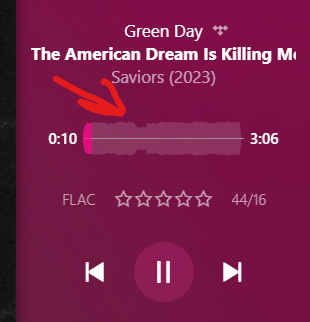
I’m encountering a problem with Plexamp’s loudness leveling feature affecting playback of both my local music files and the TIDAL music in my library. TIDAL tracks consistently play at a volume approximately 2dB higher than my local files, even with loudness leveling enabled. This discrepancy was confirmed by directly comparing the same album available on TIDAL, against my local version, ensuring both had the same mastering, and TIDAL version was always a bit louder. This issue was consistently replicated across 7 different albums by various artists.
Further testing on different devices, including Windows 11 and iOS through the Plexamp app, revealed the issue was not device-specific. The volume difference becomes particularly noticeable in noisier environments, such as when using Apple CarPlay, where I find myself having to adjust the volume up for local tracks to match the loudness of TIDAL tracks. I also want to confirm that all of the TIDAL music and local music that I tested, had the loudness analysis waveform.
These are the rest of my Playback settings:
Loudness leveling: on
Sweet fades: off
Equalizer: off
Preamp: 0dB
Limiter: off
Is this inconsistency a bug, a limitation of the TIDAL integration within Plexamp, or something else? Has anyone else experienced a similar issue with loudness leveling between local files and TIDAL music on Plexamp?
I have kept loudness leveling on, but I suspect that Plexamp has different values for loudness leveling local music vs TIDAL music, since even when it is playing back the exact same track locally or through TIDAL, the TIDAL one is louder.
Do you see a loudness plot under the album art in Plexamp? Only then, Plex has information about the loudness of the Tidal track and can adapt the volume accordingly.
If there is only a straight line, then this track on Tidal hasn’t been analysed yet by Plex and you will hear it as it is produced – in all its loudness-maximised glory.
Yes, I can confirm that I see the loudness waveform plot for both the TIDAL and local version of the music. It is not a straight line so I know some type of loudness leveling is going on.
Are you comparing the exact same version of the album, of local vs. Tidal?
There is no difference? Not even a difference between regular and “deluxe” or “extended” release, with added bonus tracks?
Are you certain that your version of the album has been ripped from the same disc, at the same time, with identical settings in the ripper/encoder?
Are there no sonic glitches or distortions in any of thetracks of that album, i.e. is the rip 100% error free?
Or is your version cobbled together from different sources?
Did you create your very own, custom album by combining songs of various artists or various albums into a common album in Plex?
Then we can only proceed by looking at the Plexamp logs.
Play one track from tidal, then play the same track from your local files directly afterwards.
Then fetch the plexamp logs, zip them and drag them into this forum window.
We’re using the exact same code to analyze in both places, so I wouldn’t expect there to be a difference unless they are different versions of the same album (which is more common than you might think).
Here are the Plexamp logs, I have attached a summarized version which only includes lines that mention ‘gain’, ‘loudness’, ‘level’, or ‘audio’, and the full logs. I played the track Me and Michael by MGMT from their album Little Dark Age, first from TIDAL, and followed it up with my local file. Attached also are my Playback settings:
Mar 15, 2024 01:38:47.496 [0x000041b4] INFO - BASS: Queueing stream (1 total, 0 handles) with identifier 2643, gain -10.2 dB, overlap duration 0 ms, start offset 0 ms (paused: 1).
Mar 15, 2024 01:38:47.498 [0x00003e34] INFO - BASS: Queueing stream (2 total, 2 handles) with identifier 2644, gain -11.1 dB, overlap duration 0 ms, start offset 0 ms (paused: 1).
Mar 15, 2024 01:39:20.737 [0x000041b4] INFO - BASS: Queueing stream (2 total, 4 handles) with identifier 2658, gain -13.0 dB, overlap duration 0 ms, start offset 0 ms (paused: 1).
I’m not sure which of the three represent the two tracks you’re comparing, but it doesn’t matter much, because they’re all different.
More importantly, though, compare these two lines:
Mar 15, 2024 01:38:51.430 [Javascript] INFO - Player: Sending state changed [A] MGMT - Me and Michael (0/289880) in state playing with artwork true.
Mar 15, 2024 01:39:20.577 [Javascript] INFO - Player: Sending state changed [A] MGMT - Me and Michael (0/289853) in state playing with artwork true.
See how the durations are slightly different? Those are different base files, with slightly different loudness, and duration. I’m not sure why, but it’s not weird for there to exist different versions of tracks/albums.
Found tracks within my library that have the exact same base file with same duration, but still have different gains. I have attached the plexamp logs for those instances. same-file-different-gains.zip (26.6 KB)
i’m guessing … but TIDAL’s FLAC files might need a little extra headroom to avoid clipping when someone chooses a lower bitrate version for mobile streaming
(vs a lossless digital download or CD rip … these don’t necessarily need the extra headroom … so they can be a bit louder)