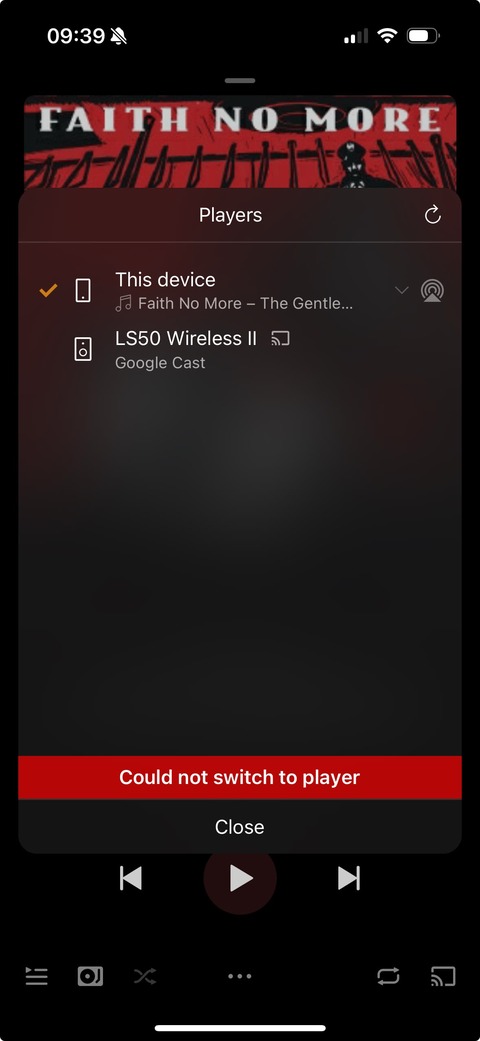
I’ve been having this problem for months, maybe 6, and I assumed Plex Amp was just an unsupported research project but I’m a Plex pass member and my kids are being driven nuts so I thought I’d check in and it looks like others aren’t having the same problem.
Simply put, I have loads of Google devices. Plex Amp plays fine to this device and can see all the devices to cast to.
But 9 times out of ten, it won’t connect to any device. It connects to groups more often.
YouTube music connects to them every time. It’s just Plex Amp that struggles.
I used Symfonia for a while as an article on the web said this was a chronic problem for Plex Amp, claiming there is a new Chromecast standard and Plex didn’t adopt it, where Symfonia had. It worked for a couple of weeks reliably then it too stopped.
It’s a weird one, it seems to work fine for some people, not for others. In the next release we’ve updated some libraries to hopefully improve the issue, let’s see if it does.
I’m having the same problem lately. It takes forever to connect—if it even connects at all. More often than not, it just never does.
All my devices are wired via Ethernet and grouped as a single speaker system. You can cast to one, hear the beep, and… that’s it. Anything with a screen won’t work because it insists on being either a router or some other unnecessary “smart” device, causing handshake failures. Basically, the connection never fully establishes. And yes, every device I use for casting is wired via Ethernet.
The Only Workaround I’ve Found (For NAS & Plex Users)
If you’re using a NAS and Plex, the only thing that works for me is an old program called “Hi-Fi Cast - Music Player.” It’s outdated, hasn’t been updated in ages, but it still works.
Open Hi-Fi Cast
Go to “Browse Media Sources”
Go to “upnp/dlna” to “Plex home server”
Pick a folder (random, album, playlist—whatever works for you)
Select your casting playback device (“All Speakers” or whatever you’ve named them)
Enjoy your music the way you want it.
Honestly, I think Google just wants to force people onto their own services—YouTube Music, Spotify, or whatever pays them. But I prefer playing my music, my way, on my own speakers.
“But please please please fix this” speakers are absolutely useless if you have to listen to what “Google”“demands” you to listen to a.k.a. “YouTube music Spotify”, or any other that “pays them”
Honestly, I think Google just wants to force people onto their own services—YouTube Music, Spotify, or whatever pays them. But I prefer playing my music, my way, on my own speakers.
@elan - I was wondering if there’s any update on this issue? I’ve reported issues with Chromecast last July. There hasn’t been a plexamp release since December and playing via Chromecast is completely broken (at least on my setup).
Yup agree, I could have done a much better job describing it, apologies for that! attaching the recent log file and a couple of screenshots. Some more information:
This is me trying to connect to one of my chromecast targets at home. I have multiple endpoints (KEF LS50 Wireless II, WiiM pro etc) and it’s the same behavior and failure when using PlexAmp.
The spin during ‘connecting’ will go for a few minutes without ever changing state (in this example, listened to the full song) - and then failing.
No sound is going at any point in time to the cast device.
I can confirm I am able to connect and cast from other supported apps (e.g. Qobuz or MusicStreamer).
AirPlay from PlexAmp works fine
Thanks, and Looking forward to the next release - is there an ETA? Plexamp.log (474.1 KB)
Unfortunately we’re just getting these back from the (lovely) speaker:
Mar 17, 2025 09:39:51.737 [Javascript] INFO - Cast: Failed to play again Disconnected from receiver
It’s the Plex cast receiver code running on the speaker, at some point we might write a new Plexamp receiver, but that’s not being worked on at the moment.
Alright, thanks for looking into it. browsing for a bit i bumped into ‘headless’ and decided to check it out, and it works even better for me then casting to the speaker! I know it’s off-topic but would be great to get an official docker image for it
This is the exact same issue I’m having, casting to Chromecast Audio, Cambridge Audio CXNv2, Android projector… in fact, anything Google Chromecast just simply does not work!
It’s the main reason I won’t buy a subscription… until this is fixed, all those lovely subs-only features are of no use… as the Moderator said “competing priorities”. Making your product work and taking my money should be a business priority, but if it’s not then I’ll continue with BubbleUPNP, thanks.
I am not sure whether we are experiencing the same bug, but I’ve been having a lot of problems Google Casting to WiiM Amp for over a year.
It seems that it fails randomly, as simple restart of the Plexamp iOS app often does the trick. Moreover, another iOS device does not encounter this bug at all, despite the same OS and Plexamp version, networking settings and casting the same tracks to the same WiiM Amp.
I’m the OP and I’ve bought a new router since posting and it’s definitely made a difference.
I wish it was as easy as asking Plex to fix it, but now I realise often YouTube music doesn’t work, although less than Plex doesn’t work
And since reducing the number of devices off the 2ghz band, so mainly my Google devices get it, and getting a much better router, I have the issue far less often.
And, frustratingly, yes, rebooting the router or phone often helps.
I know it’s easy to “blame” the Plex guys, when your phone and WiFi seem to be working fine, but I’ve now seen enough cases where reboots fix the problem, I have concluded Chromecast is very sensitive to “everything being tiptop”. Strong WiFi, no contention, recently rebooted, etc.
I may be wrong, just wanted to share my recent experiences.
Buying a better router has been the biggest improvement, and dumping the Google nest wifi. I bought a GLinet Flint 2 after a load of research. It’s great. Open source firmware too.