I wanted this to be released before 1.15.4 went out. That was out of my hands.
Here is my release announcement . Please feel free to ask if there are any questions.
I wanted this to be released before 1.15.4 went out. That was out of my hands.
Here is my release announcement . Please feel free to ask if there are any questions.
@ChuckPa thanks for your patient dedication!
hello
yes i just updated my plex server and it cant play any file. How du i come back to the last version. please help
@FribergPlex1 what i did is: uninstall PMS 994 via the Package Center. After that i installed PMS 993 which i downloaded from:
[https://luenepiet.de/public/Synology/Plex%20(Server)/Intel%20-%2064-bit/?C=M;O=D ]
Good luck!
thank you yoeps
can you please tell me how i uinstall the 994 in the package center i cant find the way?
At some point you will have to fix the permissions or be frozen on .993.
Might I make a suggestion?
Wouldn’t it be best to actually stay at 1.15.4.994, click the boxes in Control Panel - Shared Folders, and understand how to properly use the Synology ?
Thanks for getting this info out there. I wasn’t thinking about a permission problem with the error I was getting but it was a simple fix. The communication of what needed to be done by the users might have been a little tardy.
Tiebierius and ChuckPA are both right.
If you stll want to reinstall 993: go to Package Center, click on Installed, click on Plex Media Server, uninstall.
After that manually install the 993-spk package.
Good luck!
As I clearly stated:
PS: I apologize for the update having been released before this announcement and any inconveniences it may have caused.
Given this is a Post Script attached to the bottom of the document, it should be apparent the notification was expected to be released to the community before the update was.
Thank you ChuckPA,
I appreciate your work! But I simply cannot believe that anyone is angry about the update even after you posted what’s going on and how to fix it - it just was ignored completely.
To all who still think the update is bugged: it is not the update - just check the permissions on your Synology like ChuckPA posted above!
Thanks Chuck, I thought it had to be something simpler than changing the permissions on the folders at the command line. Your instructions above have solved it for me.
@omarkettani, I removed Plex from the administrators group. You can treat the Plex User just like any other user now (think of it as human) and tune the permissions however you would like to.
eg: you can give it read only access to the photos and music so that you don’t accidentally delete anything via the Plex interface.
Thanks @Guy_B! Actually I just restarted my NAS so make the plex user be removed from the administrators group, as published in the announcement.
Hi ChuckPa, in may '19 you helped me a lot with the “permissions issue”.
I’ve installed PMS PlexMediaServer-1.16.2.1297-4b7ace214-x86_64 om my Synology 218+ and …same problem as before. I uninstalled PMS, removed plex everywhere on my NAS, installed PMS again and rebooted the latest DSM several times.
Plex does not scan any files and in a log i can see that permission is denied on the files i was trying to scan. This all allthough i followed your advise from may '19 how to set permissions.
What am i (or is my NAS) doing wrong?
Your help is very much appreciated!!!
Thanks in advance,
yoeps
If Trumpy’s instructions do not resolve the issue, please provide.
Thanks
Thanks trumpy81.but the response i got is “Permission denied” ; >)
Here they arePlex Media Scanner.1.log (2.2 KB) [Plex Crash Uploader.log|attachment
(upload://1rxT6tVGFE5zM3fsCfn3v91wN6S.log) (199 Bytes) Plex DLNA Server.log (8.8 KB) Plex Media Scanner.1.log (2.2 KB)Right away, I see one issue with the Plex share itself.
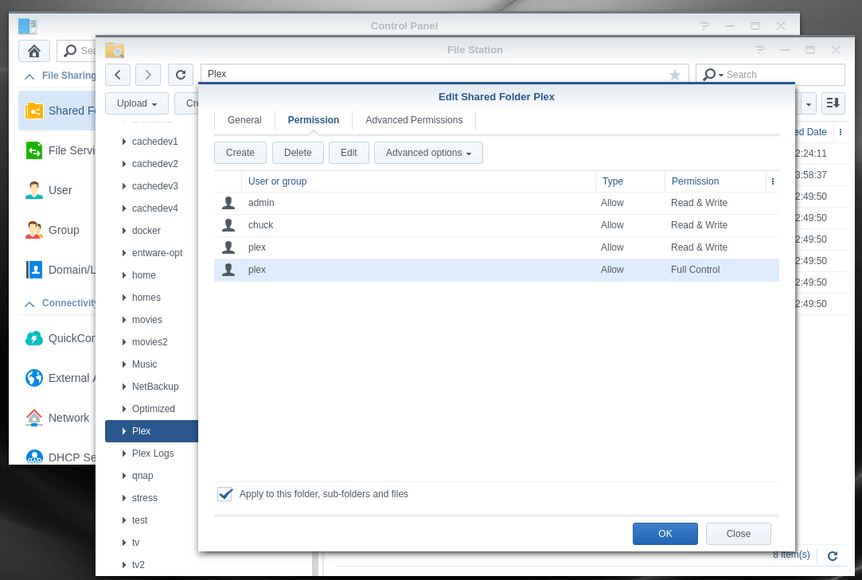
User plex must be R/W, not Custom. Custom tells me something/someone was in the Plex share and got it messed up.
In the above, R/W or Full Control is fine. Please do remember, I also do development on this system so my machine isn’t ‘production pristine’
Regarding the Plex share, “Apply to this folder, sub-folders and files” and OK that (takes a bit of time to complete)
Secondly,
May I have the ZIP ?
Thanks, i changed it