Thanks Tiebierius for the suggestion. I deleted the EPG databases after stopping Plex. When it restarted Plex the database began rebuilding. It’s not finished yet but it’s not stuck at 0% either. I’ll report back when it’s done or if it gets stuck.
It took awhile but my guide data updated completely. I think my issues are fixed. Thanks again Tiebierieus!
My HDHomeRun has disappeared as well, I am running 1.16.4.1469 When i go into manage the DVR there is nothing listed and it just searches to add a new one forever. From the logs i can see it is finding my device on the network but it never advances
Plex Media Server.zip (55.2 KB)
Add me to the list of those with the same issues.
Thanks for looking into this!
Do you have any idea when a fix will be written for this problem? Because as you can see in my list there are a lot of TV channels in The Netherlands with a space character in it 
This was exactly my problem. A power outage caused PMS to corrupt my database. Had to start from scratch, but following the instructions in the link you provided did the trick for me. Now I’m happy  Thank you Tiebierius for the suggestion
The XML TV issue with space characters in channel identifiers is being worked on
Aug 09, 2019 17:32:28.978 [3176] ERROR - Couldn't copy file "D:\Program Files\Plex\Plex Media Server\Resources\com.plexapp.plugins.library.db" to "D:\Program Files\Plex\AppData\Plex Media Server\Plug-in Support\Databases\tv.plex.providers.epg.onconnect-2112ccae-ff8b-4c25-8271-5cf856de850a.db": The request is not supported
Aug 09, 2019 17:32:29.000 [12028] DEBUG - Auth: authenticated user 1499480 as Vredesbyrd
Aug 09, 2019 17:32:29.001 [11240] DEBUG - Request: [76.25.5.13:61100 (WAN)] GET /:/eventsource/notifications (31 live) TLS Signed-in Token (Vredesbyrd)
Aug 09, 2019 17:32:29.008 [3176] DEBUG - Running migrations. (EPG 1)
Aug 09, 2019 17:32:29.008 [3176] ERROR - SQLITE3:0x54f17f45, 1, no such table: schema_migrations in "select version from schema_migrations order by version"
Aug 09, 2019 17:32:29.031 [3176] ERROR - Thread: Uncaught exception running async task which was spawned by thread 4588: sqlite3_statement_backend::prepare: no such table:
I suspect it is to do with where you located the app data for Plex Media Server
We have this error
ERROR - Couldn't copy file "D:\Program Files\Plex\Plex Media Server\Resources\com.plexapp.plugins.library.db" to "D:\Program Files\Plex\AppData\Plex Media Server\Plug-in Support\Databases\tv.plex.providers.epg.onconnect-2112ccae-ff8b-4c25-8271-5cf856de850a.db": The request is not supported
The application data is normally in %LocalAppData% and should not be in Program Files
Can you look into moving your app data away from Program Files
It is not in the normal “program files” that you are thinking of. It is on a secondary drive in a folder that is just named program files. It running on a Dell R510 and the Main C drive is too small to have the Plex App data on it. It has been setup this way and functioning since i last reinstalled the os back in 2017
Strange that “copyfile” is now erroring - must be getting windows error code
50 (0x32) ERROR_NOT_SUPPORTED : The request is not supported.
can you get me directory list of this directory showing file names and last modified date/time
D:\Program Files\Plex\AppData\Plex Media Server\Plug-in Support\Databases
I’m still having the issue with version 1.16.4.1469. I’m on docker, but if you have a patch, I can try to apply it and see if it works… I really miss the DVR functionality
Thanks for sending the directory listing. Posting here what i sent you by PM

tht timestamp coincides with the error during copyfile
Aug 09, 2019 17:32:28.845 [3176] DEBUG - Installing Library Database from ["D:\Program Files\Plex\Plex Media Server\Resources\com.plexapp.plugins.library.db"] to ["D:\Program Files\Plex\AppData\Plex Media Server\Plug-in Support\Databases\tv.plex.providers.epg.onconnect-2112ccae-ff8b-4c25-8271-5cf856de850a.db"]

Aug 09, 2019 17:32:28.978 [3176] ERROR - Couldn't copy file "D:\Program Files\Plex\Plex Media Server\Resources\com.plexapp.plugins.library.db" to "D:\Program Files\Plex\AppData\Plex Media Server\Plug-in Support\Databases\tv.plex.providers.epg.onconnect-2112ccae-ff8b-4c25-8271-5cf856de850a.db": The request is not supported
Check that only one Plex Media Server process is running
Then shutdown Plex Media Server
and delete the 3 files
tv.plex.providers.epg.onconnect-2112ccae-ff8b-4c25-8271-5cf856de850a.*
and launch Plex Media Server and see if we still get the error
If we do, i would like to capture this sequence also with procmon.exe as well as server logs
(download Process Monitor from Systinternals microsoft web site)
The last set of logs here PlexTV Server can no longer see HDHomerun tuner - #165 by malevolent were prior to the fix being released
Could you get me fresh logs when attempting to setup the DVR. Please ensure debug logging enabled beforehand, Relaunch Plex Media Server and then attempt to recreate the problem and get me screenshot and server logs zip
Thanks
EDITED: It works now… I’ve upgraded to the latest version ( 1.16.5.1488) in docker, (that is stopping the docker, deleting it, deleting the image, and re-download everything again against the latest version), I tried and it failed, so I put the Logs and executed the Setup DVR wizard again to post you the screenshots. I don’t know why, but now it works… 
When I click on Setup DVR, it doesn’t find any, so I need to enter the address manually

After the animation on the orange button finishes, appears the word “connect” once again, but OI can click on “continue”

On the next step of the wizard, if I click on “Scan Channels”, the error message appears

If I click on “continue” I can continue with the the wizard

and map the channels

But it seems it stays in “Initializating” forever.Plex Media Server Logs_2019-08-20_17-05-44.zip (3.1 MB)
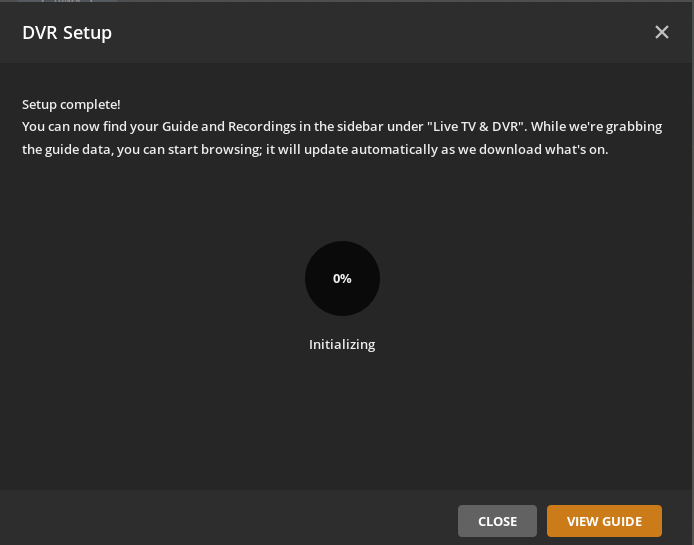
Not sure if it’s related but i see the following error in Plex Tuner Service.log:
Plex Media Server\Resources\Tuner\Private\devices\dvb\file\drv_file.ini does not exist
The folder ‘file’ does not exist.
With the latest update I can now manually enter the DVR’s IP and click through the setup process but it never actually becomes available for use or to manage settings it just shows me the same ‘setup a dvr’ page. In the attached zip is a Folder structure screenshot, Procmon log, and the Plex logs folder.
Logs.zip (5.8 MB)
Would like to understand what IP addresses are being used.
The server log shows the server being on 192.168.1.100
Aug 20, 2019 17:04:05.781 [0x7fe672e2a740] DEBUG - Detected primary interface: 192.168.1.100
Aug 20, 2019 17:04:05.781 [0x7fe672e2a740] DEBUG - Network interfaces:
Aug 20, 2019 17:04:05.781 [0x7fe672e2a740] DEBUG -  * 1 lo (127.0.0.1) (loopback: 1)
Aug 20, 2019 17:04:05.781 [0x7fe672e2a740] DEBUG -  * 2 eno1 (192.168.1.100) (loopback: 0)
But you have a DVR on 192.168.1.100 ??
Aug 20, 2019 17:04:13.737 [0x7fe6617fa700] DEBUG - HTTP requesting GET http://192.168.1.100:5004/discover.json
Aug 20, 2019 17:04:13.739 [0x7fe6617fa700] DEBUG - HTTP 200 response from GET http://192.168.1.100:5004/discover.json
Aug 20, 2019 17:04:13.739 [0x7fe6617fa700] DEBUG - HTTP requesting GET http://192.168.1.100:5004/lineup_status.json
Aug 20, 2019 17:04:13.741 [0x7fe6617fa700] DEBUG - HTTP 200 response from GET http://192.168.1.100:5004/lineup_status.json
I had the same issues for months with an emulated HDHomeRun via tvhProxy (working completely fine but couldn’t access channel lineup in the settings) and suddenly without changing the server version (still 1.16.4.1469) it works fine now.
Anybody else where it suddenly works now? I didn’t change any router/modem/etc. settings at all.
Hi there, Im located in Australia. HDHomerun used to work perfectly with Plex, it stopped working weeks or months ago, not sure as I was away for a long time.
I am on latest version of PLEX, 1.16.5.1554 on a QNAP and Plex can no longer even see the HDHomeRun tuner. When I search in the DVR settings it locates nothing and won’t let me manually locate it either.
Can anyone help?
Logs attached.
Plex doesn’t provide an EPG for Australia any more, you should have received an email with your options.
I can see an error communicating with 192.168.0.2 - the HD Homerun device
Sep 10, 2019 21:52:56.520 [0x7f3f13447700] DEBUG - HTTP requesting GET http://192.168.0.2/discover.json
Sep 10, 2019 21:52:59.526 [0x7f3f13447700] WARN - HTTP error requesting GET http://192.168.0.2/discover.json (0, No error) (Failed to connect to 192.168.0.2 port 80: No route to host)

Sep 10, 2019 21:52:59.547 [0x7f3f13447700] ERROR - DVR:Device: Error refreshing existing device device://tv.plex.grabbers.hdhomerun/12305864, marking as dead.
May be there is an issue where it is not being picked up later when it becomes available.
Could you confirm that the device is accessible within the 192.168.0.xx network though http://192.168.0.2/discover.json and then restart Plex Media Server and see if it connects to it ok.
Once Plex Media Server sees the device then when you go through setup, you would need to choose the xmltv option as there is no EPG available for Australia - as from July 2019
See
https://support.plex.tv/articles/226463767-frequently-asked-questions-dvr-live-tv/
https://support.plex.tv/articles/using-an-xmltv-guide/
