You should never have needed to Split the series.
When someone needs to split items apart, I immediately challenge the naming because in 90% of the cases, naming is the problem.
Please show me exactly how you have them named and structured.
You should never have needed to Split the series.
When someone needs to split items apart, I immediately challenge the naming because in 90% of the cases, naming is the problem.
Please show me exactly how you have them named and structured.
 Killjoys - S01 E01 - …
Naming doesn’t matter, because this issue, i named it like you can see in the Screenshot.
Otherwise my naming is different, i use to give more information to te main folder like “Killjoys - Season xx - resolution and audio - year”, for each Season separately.
Killjoys - Season xx - resolution and audio - year
Thats why i can split the Seasons and i never had any issues, neither with the Series i matched after Killjoys and NCIS.
If named like in the screenshot, it will get Metadata by itself, but still like i showed you, always the wrong (second row) Cover.
Moved from HDD - Rescan - Troubleshoot cleaning - Reboot NAS - Moved (HDD) - Rescan - Matched by itself with the issue.
My naming is per spec.
drwsr-sr-x. 87 chuck chuck 4096 Nov 21 11:13 ../
drwsr-xr-x.  2 chuck chuck 4096 Nov 22 12:32 Season 01/
drwsr-xr-x.  2 chuck chuck 4096 Nov 22 12:33 Season 02/
drwsr-xr-x.  2 chuck chuck 4096 Nov 22 12:33 Season 03/
drwsr-xr-x.  2 chuck chuck 4096 Nov 22 12:33 Season 04/
drwxr-xr-x.  2 chuck chuck 4096 Nov 22 12:34 Season 05/
drwxr-xr-x.  2 chuck chuck 4096 Nov 22 12:34 Season 06/
drwxr-xr-x.  2 chuck chuck 4096 Nov 22 12:34 Season 07/
[chuck@lizum Killjoys.213]$ ls -la *1
total 34357348
drwsr-xr-x. 2 chuck chuck       4096 Nov 22 12:32 ./
drwsr-sr-x. 9 chuck chuck       4096 Nov 22 12:34 ../
-rw-r--r--. 1 chuck chuck        153 Nov 22 12:32 Killjoys - S01E01.mkv
-rw-r--r--. 1 chuck chuck        153 Nov 22 12:32 Killjoys - S01E02.mkv
-rw-r--r--. 1 chuck chuck        153 Nov 22 12:32 Killjoys - S01E03.mkv
-rw-r--r--. 1 chuck chuck        153 Nov 22 12:32 Killjoys - S01E04.mkv
-rw-r--r--. 1 chuck chuck        153 Nov 22 12:32 Killjoys - S01E05.mkv
-rw-r--r--. 1 chuck chuck        153 Nov 22 12:32 Killjoys - S01E06.mkv
-rw-r--r--. 1 chuck chuck        153 Nov 22 12:32 Killjoys - S01E07.mkv
-rw-r--r--. 1 chuck chuck        153 Nov 22 12:32 Killjoys - S01E08.mkv
-rw-r--r--. 1 chuck chuck        153 Nov 22 12:32 Killjoys - S01E09.mkv
-rw-r--r--. 1 chuck chuck        153 Nov 22 12:32 Killjoys - S01E10.mkv
-rw-r--r--. 1 chuck chuck        153 Nov 22 12:32 Killjoys - S01E11.mkv
-rw-r--r--. 1 chuck chuck        153 Nov 22 12:32 Killjoys - S01E12.mkv
-rw-r--r--. 1 chuck chuck        153 Nov 22 12:32 Killjoys - S01E13.mkv
-rw-r--r--. 1 chuck chuck        153 Nov 22 12:32 Killjoys - S01E14.mkv
-rw-r--r--. 1 chuck chuck        153 Nov 22 12:32 Killjoys - S01E15.mkv
-rw-r--r--. 1 chuck chuck        153 Nov 22 12:32 Killjoys - S01E16.mkv
-rw-r--r--. 1 chuck chuck        153 Nov 22 12:32 Killjoys - S01E17.mkv
-rw-r--r--. 1 chuck chuck        153 Nov 22 12:32 Killjoys - S01E18.mkv
-rw-r--r--. 1 chuck chuck        153 Nov 22 12:32 Killjoys - S01E19.mkv
-rw-r--r--. 1 chuck chuck        153 Nov 22 12:32 Killjoys - S01E20.mkv
i.e. remove the space character immediately before the capital E.
It’s S01E01, not S01 E01
Have tried several things again.
First of all i took different .avi and .mkv files from other series and named it exactly like the requirements.
It didn’t changed anything, always just got the only one Cover.
And still always the long way with cleaning everything etc.
Found out that when i change the Main Cover (big one) all the Seasons will get it also (like your Season 6 and 7)
If i upload a Cover over my Computer, it will stay (S01).
And now its getting weird.
If i Move the Series and do all the long way until it will get the Metadata by itself again, the S01 Cover will stay empty, and the other series will still take the main Cover.
But even if i moved the Series away, optimized the DB and cleaned the Pakages, i can still see this Cover which i Uploaded over my computer.
(It doesn’t worked to add the cover over the URL, just showed me an empty field which also appears again and i can’t delete it.).
It looks like PLEX has in some cases still trouble with the assignment, but more problematic would be that it won’t clearly clean old (deleted) data and linkages.
(In my opinion and experience one of the most important points to avoid trouble in the future.)
Is there a way getting the folders where this Series will save all the Data to delete all the Stuff manually and see if this will be the solution?
I guess the Integer is coupled with the name “Killjoys” (or an ID behind) and as long as i can’t delete the relationship it won’t get solved, except you know another way?
Do you have Personal Media Assets or TMDB set as the Agent here and/or is it higher in the priority list than TheTVDB ?
Either one of those will cause what you’re seeing.
One user had this exact scenario a few hours ago.
As Agent i use under Series - TheTVDB with the standard configuration.
Local Media Assets (TV) tells me it’s for Music Videos, i should enter a “Local music video path”.
(It’s the same order unter “Movies” and “The Movie Database”)
If i understand it right, i should change the order and put TheTVDB at first?
Or better deactivate it because i didn’t use it?
EDIT: It doesn’t made any difference.
Also i opened a new mediathek with just this Series.
Crazy, it is exactely the same behavor, i will get just this only one main Cover for S02-05
Since i upped manually a Cover for S01 it will always be added as empty, but the Cover is still saved under the Settings.
Not sure if this is the right thread, but after deleting cache and pulling fresh metadata i am having trouble with metadata for the last season of Arrow, The Blacklist, Supergirl, Supernatural and the walking dead. Plex Media Server Logs_2019-11-22_23-25-50.zip (1.8 MB)
@ChuckPa
Some interesting lines of logs which may help, you will know it better if this should be right.
They start here right now after the last Episode got their Metadata.
Took a Series which i have added Months ago and Killjoys S01.
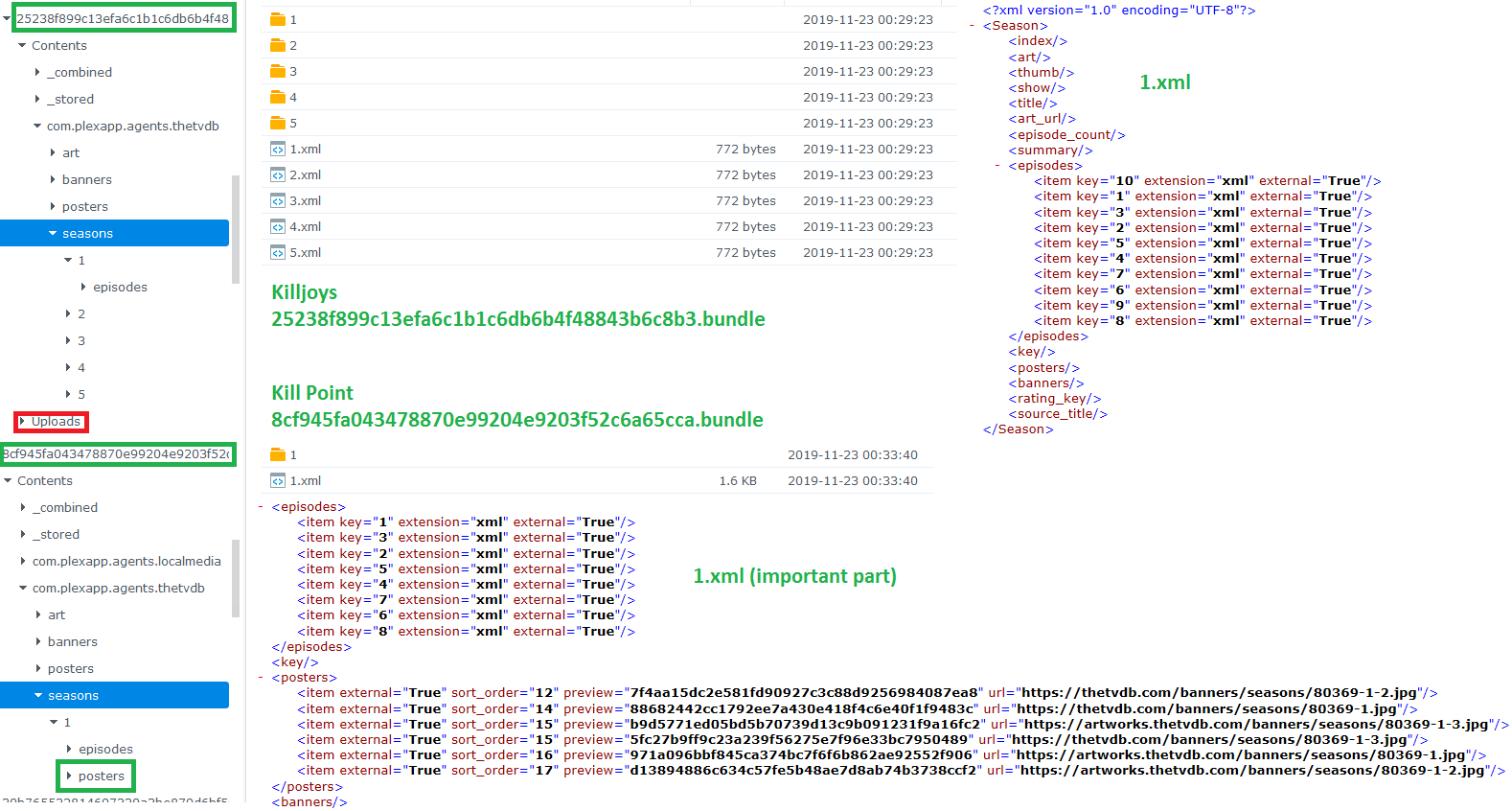
Nov 23, 2019 00:33:41.331 [0x7fab0d6fb700] DEBUG — Loading season 1 from "/volume1/Plex/Library/Application Support/Plex Media Server/Metadata/TV Shows/0/8cf945fa043478870e99204e9203f52c6a65cca.bundle/Contents/_combined/seasons/1".
Nov 23, 2019 00:33:41.331 [0x7fab0d6fb700] DEBUG — Item 19295 (Season 1) Scanning metadata graphic elements in XML file "seasons"/1.xml
Nov 23, 2019 00:33:41.332 [0x7fab8d6be700] DEBUG — HTTP requesting GET http://127.0.0.1:41790/system/agents/media/get?guid=com%2Eplexapp%2Eagents%2Ethetvdb%3A%2F%2F80369%2F1%3Flang%3Dde&mediaType=3&url=metadata%3A%2F%2Fseasons%2F1%2Fposters%2Fcom%2Eplexapp%2Eagents%2Ethetvdb_7f4aa15dc2e581fd90927c3c88d9256984087ea8
Nov 23, 2019 00:33:41.340 [0x7fab8d6be700] DEBUG — HTTP 200 response from GET http://127.0.0.1:41790/system/agents/media/get?guid=com%2Eplexapp%2Eagents%2Ethetvdb%3A%2F%2F80369%2F1%3Flang%3Dde&mediaType=3&url=metadata%3A%2F%2Fseasons%2F1%2Fposters%2Fcom%2Eplexapp%2Eagents%2Ethetvdb_7f4aa15dc2e581fd90927c3c88d9256984087ea8
Nov 23, 2019 00:33:41.340 [0x7fab0d6fb700] DEBUG — Brought media local (metadata://seasons/1/posters/com.plexapp.agents.thetvdb_7f4aa15dc2e581fd90927c3c88d9256984087ea8) in 0.0s.
Nov 23, 2019 00:33:41.341 [0x7fab0d6fb700] DEBUG — Item 19295 (Season 1) Scanning metadata graphic elements in XML file "seasons"/1.xml
Nov 23, 2019 00:33:41.341 [0x7fab0d6fb700] DEBUG — There was a change for metadata item 19295 (Season 1), saving.
Nov 23, 2019 00:33:41.341 [0x7fab0d6fb700] DEBUG — Updating metadata item (save) () with ID 19295
Nov 23, 2019 00:33:41.347 [0x7fab0d6fb700] DEBUG — Loaded metadata for Kill Point (ID 19294) in 350.000000 ms
Nov 23, 2019 00:33:41.347 [0x7fab0d6fb700] DEBUG — There was a change for metadata item 19294 (Kill Point), saving.
Nov 23, 2019 00:33:41.347 [0x7fab0d6fb700] DEBUG — Updating metadata item (save) (Kill Point) with ID 19294
Nov 23, 2019 00:33:41.349 [0x7fab0d6fb700] DEBUG — Done with metadata update for 19294
Nov 23, 2019 00:33:41.376 [0x7fab8e771700] DEBUG — Auth: authenticated user 1 as
Now the same part from “Killjoys”
Nov 23, 2019 00:29:30.013 [0x7fab8d6be700] DEBUG — Loading season 1 from "/volume1/Plex/Library/Application Support/Plex Media Server/Metadata/TV Shows/0/25238f899c13efa6c1b1c6db6b4f48843b6c8b3.bundle/Contents/_combined/seasons/1".
Nov 23, 2019 00:29:30.013 [0x7fab8d6be700] DEBUG — Item 25103 (Season 1) Scanning metadata graphic elements in XML file "seasons"/1.xml
Nov 23, 2019 00:29:30.013 [0x7fab8d6be700] DEBUG — Item 25103 (Season 1) Scanning metadata graphic elements in XML file "seasons"/1.xml
Nov 23, 2019 00:29:30.014 [0x7fab8d6be700] DEBUG — There was a change for metadata item 25103 (Season 1), saving.
Nov 23, 2019 00:29:30.014 [0x7fab8d6be700] DEBUG — Updating metadata item (save) () with ID 25103
Nov 23, 2019 00:29:30.020 [0x7fab8d6be700] DEBUG — Loaded metadata for Killjoys (ID 25102) in 520.000000 ms
Nov 23, 2019 00:29:30.020 [0x7fab8d6be700] DEBUG — There was a change for metadata item 25102 (Killjoys), saving.
Nov 23, 2019 00:29:30.020 [0x7fab8d6be700] DEBUG — Updating metadata item (save) (Killjoys) with ID 25102
Nov 23, 2019 00:29:30.022 [0x7fab8d6be700] DEBUG — Done with metadata update for 25102
Nov 23, 2019 00:29:30.096 [0x7fab8e771700] DEBUG — Completed: [192.168.1.2:59918] 200 GET /player/proxy/poll?deviceClass=pc&protocolVersion=3&protocolCapabilities=timeline%2Cplayback%2Cnavigation%2Cmirror%2Cplayqueues&timeout=1 (9 live) TLS GZIP 20001ms 5 bytes (pipelined: 6)
Nov 23, 2019 00:29:30.104 [0x7fab8e771700] DEBUG — Auth: authenticated user 1 as
If you look nearly, you will see the difference between the “Item” lines.
Kill Point Series will get the Season 01 Cover between this Lines.
Nov 23, 2019 00:33:41.331 [0x7fab0d6fb700] DEBUG — Item 19295 (Season 1) Scanning metadata graphic elements in XML file "seasons"/1.xml
Nov 23, 2019 00:33:41.332 [0x7fab8d6be700] DEBUG — HTTP requesting GET http://127.0.0.1:41790/system/agents/media/get?guid=com%2Eplexapp%2Eagents%2Ethetvdb%3A%2F%2F80369%2F1%3Flang%3Dde&mediaType=3&url=metadata%3A%2F%2Fseasons%2F1%2Fposters%2Fcom%2Eplexapp%2Eagents%2Ethetvdb_7f4aa15dc2e581fd90927c3c88d9256984087ea8
Nov 23, 2019 00:33:41.340 [0x7fab8d6be700] DEBUG — HTTP 200 response from GET http://127.0.0.1:41790/system/agents/media/get?guid=com%2Eplexapp%2Eagents%2Ethetvdb%3A%2F%2F80369%2F1%3Flang%3Dde&mediaType=3&url=metadata%3A%2F%2Fseasons%2F1%2Fposters%2Fcom%2Eplexapp%2Eagents%2Ethetvdb_7f4aa15dc2e581fd90927c3c88d9256984087ea8
Nov 23, 2019 00:33:41.340 [0x7fab0d6fb700] DEBUG — Brought media local (metadata://seasons/1/posters/com.plexapp.agents.thetvdb_7f4aa15dc2e581fd90927c3c88d9256984087ea8) in 0.0s.
Nov 23, 2019 00:33:41.341 [0x7fab0d6fb700] DEBUG — Item 19295 (Season 1) Scanning metadata graphic elements in XML file "seasons"/1.xml
If i look up the filename “com.plexapp.agents.thetvdb_7f4aa15dc2e581fd90927c3c88d9256984087ea8” i will find the Cover of Kill Point.
But Killjoys won’t do this step
Nov 23, 2019 00:29:30.013 [0x7fab8d6be700] DEBUG — Item 25103 (Season 1) Scanning metadata graphic elements in XML file "seasons"/1.xml
Nov 23, 2019 00:29:30.013 [0x7fab8d6be700] DEBUG — Item 25103 (Season 1) Scanning metadata graphic elements in XML file "seasons"/1.xml
Would you consider that a TheTVDB bug or a Plex bug?
It looks like a TVDB bug to me but am super busy and unable to verify right now.
What concerns me is that I can get the correct info and you appear not.
It’s really difficult to say, also because it will work in your case and we don’t know if there are some others with this issue.
I spent some more Hours with this case.
When you look at the Screenshot, you will see the differences to a working Series.
Here was something happened with PLEX.
When i moved the Series away and did all the cleaning, the folder and whole structure was still there with all files and folders, also the manually Uploaded Files.
So i have had to manually delete the whole bundle.
Now its getting another Bundle number, probably is this the INT because when i now delete the Series and do the cleaning, this bundle will disappear.
And after i added it again it took the same bundle number but still like the old Bundle just with the “Episodes” folder and not the “Posters” folder.
Sadly the issue will be still the same, for some reason PLEX can’t get the Posters neither with a new bundle ID, there is not even an empty folder.
Interesting is, that after i moved and “deleted” S01-04, it also affected this Seasons.
So i am not sure if it will be really just these ones at my NAS or if there will get more in trouble.
What can be different to you?
Guess the Multilanguage won’t be affect anything.
One thing i know its maybe different to you, i deactivated the Synology “admin” login which should do everyone who can reach the NAS from outside, otherwise this would be a big security problem.
But the point is, PLEX locks after every Update my Admin Account out from the folder.
I always need to override the rights when i will access the “plex” Folder.
Usually this should not be a problem, but it should be fixed to avoid the possibility of trouble.
I know there were a long time ago some disscusions about Synology NAS and issues because the rights.
So i am still a kind of surprised that such a simple fix won’t be done.
Did also some tries with NCIS, but just the one with the issue, it’s handled similar, no “posters” Folder will show up.
I hope its in order, i am really tired, after my work i almost only spent the time whit plex, i know how difficult it can be to find someting out.
Also difficult to know if this is just happened to my NAS by some reasons or if it will affect others too.
Just for me i could maybe override the Covers manually, but who knows.
In conclusion, PLEX won’t create the “posters” Foilder, but here is the big question, what has to be fulfilled that plex is creating one with the correct .xml?
(The Kill Point query will get the S01 Cover exactly here)
[0x7fab0d6fb700] DEBUG — Brought media local (metadata://seasons/1/posters/com.plexapp.agents.thetvdb_7f4aa15dc2e581fd90927c3c88d9256984087ea8) in 0.0s.
@tgasker Check the season poster images on the TVDB and see if you can click on them and see the full version. It seems to me that if you change the season poster to one that returns an error of:

results in the blank box. If you pick one that loads the full version of the image without an error, Plex updates the season poster as it should.
@ChuckPa
Did some more research.

(Under _combined you can set up the .xml and put the Cover under _stored., ut you have to choose a name for the file, so it may not be a unique name.)
Now i set up the .xml under com.plexapp.agents.thetvdb like the orange arrow will show.
Replaced #< posters/ > with
  <posters>
    <item external="True" url="https://thetvdb.com/banners/seasons/5bd36bf0a9f0d.jpg" preview="" sort_order="11"/>
    <item external="True" url="https://thetvdb.com/banners/seasons/281534-2.jpg" preview="" sort_order="12"/>
    <item external="True" url="https://thetvdb.com/banners/seasons/281534-2-2.jpg" preview="" sort_order="13"/>
  </posters>
saved an started getting new Metadata.
PLEX modded the file and shows me now the unique preview IDs
  <posters>
    <item external="True" url="https://thetvdb.com/banners/seasons/5bd36bf0a9f0d.jpg" preview="4bd7741379ad1c62d6d2ab3ae9de05fcd15bc2cc" sort_order="11"/>
    <item external="True" url="https://thetvdb.com/banners/seasons/281534-2.jpg" preview="dd5a1e497d3f88684ff28ef8275daa6f00df401e" sort_order="12"/>
    <item external="True" url="https://thetvdb.com/banners/seasons/281534-2-2.jpg" preview="17c62401abb7593b926276c72656ecf319116592" sort_order="13"/>
  </posters>
Also PLEX created the folder “posters” and put in corrupt 4KB files with the unique number.
If you are lucky you already will see one cover and 2 issued covers which can’t be choosen.
Now you have to Download the covers manually, match the unique numbers and upload it into the “posters” Folder.
Rescan Metadata and you will be fine.
The missing info is because of the errors encountered during the week.
The corrupt info is because of partial retrieval as they were fixing.
Clearing Cache removes what Plex knows of the info
Forcing “Refresh All Metadata” will delete what’s existing in the bundle by pulling fresh & overwriting
Thank you.
With Cache do you mean everything inside this folder?
/Plex/Library/Application Support/Plex Media Server/Plug-in Support/Caches/com.plexapp.agents.thetvdb/HTTP.system
Just to be sure what “Refresh All Metadata” exactly will do.
Created a seperated Series Media libary with Killjoys but it also wasn’t working, maybe because of the Cache.
Refresh All Metadata won’t delete everything. It will double check the existing match status. If it’s not matched, it will attempt to do so.
Manually matched, unless locked, will be attempted .
If locked, they will stay as is.
In my experience, Refresh All Metadata is a great way to lose your manually edited metadata. The locking of fields is not reliable.
True, if you did not match the item previously to the Personal Media Agent.
If you do this prior to manually adding metadata, they will persist.
(Use ‘Match’ - ‘Quick Match’ - ‘Personal Media’)
Thank you Otto but i am not really sure what you mean?
Do i have to change the Agent?
Or do i need to add a series manually to go with?
Kinda.
Let’s assume your default agent for this library is NOT “Personal Media”, but e.g. “Plex Movie”.
If you have an unrecognized video (or one which got “mismatched”), you will have to tell Plex to assign this item to the “Personal Media” agent.
Only then, it will not try to match the item anymore on next library scan. (It is this matching attempt where your manually edited metadata are lost.)
(Use ‘Match’ - ‘Quick Match’ - ‘Personal Media’)
Once you have done that, your manually input metadata are safe.
This method is NOT necessary if the default agent of the library is already the “Personal Media” agent. Which is the case in a “Other Videos” library.