@overlawled ok because all testing bluray 4k experts , are saying that ps5 4k bluray drive is a lot better than microsoft one. ps5 is actually the best 4k bluray player on earth now. very strange that physical blurays are working like a charm on ps5, and the exact same thing digitalized in plex not.
it looks like a buffering issue, but it may be also a cpu issue, maybe the ps5 system is limiting to the percentage of cpu used to app. very strange, i dont know as i am not a developper.
debug activate on ps5 app
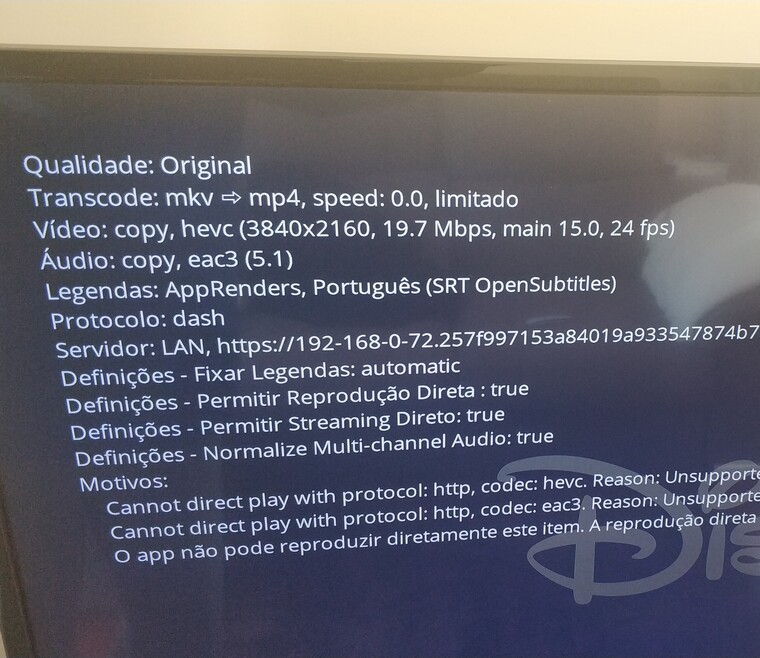
quality original
transcode mkv->mp4 (only container)
copy hevc (3840x2160, 41,4 mbps,main 10 15.3, 24fps)
copy ac3 5.1
protocol dash
Updated to 5.10.0
Constant buffering is back. Though it’s inconsistent. Playing 21mbps 4K HDR file here. Some times it could play for 20mins not interruptions. But then it can start buffering every minute. Restarting ps5 helps actually. But after some time buffering’s back.
Pleating the same file of 20 mbps through samsung Plex tv app works just great, when switching to ps5 keeps buffering like I gave him 10 terabytes/s to chew. Incredible… Please fix this
Pleating the same file of 20 mbps through samsung Plex tv app works just great, when switching to ps5 keeps buffering like I gave him 10 terabytes/s to chew. Incredible… Please fix this
If you check your Plex Media Server logs do you see your PS5 connecting via your router’s IP address rather than the PS5’s LAN IP? I have a theory as to why this issue is happening. Not too certain why Plex won’t acknowledge it, if I’m right.
Thank you for your feedback, however, I have no idea how to read all the huge amount of data showing in the console. If you can educate me then I can confirm what’s the result.
Really all you’re looking for is a message with an IP address in it. Open your Plex Media Server console (you can access from Settings of the web player or any other player) and then open Plex on the PS5.
The key being that 192.168.1.1 is my router, and not my PS5.
Because the Plex Media Server is seeing my router IP, I believe what’s happening is the PS5 is making a connection with my local server outside of my local network. Because its making a connection outside my local network my streaming quality is at the mercy of whatever my upload speed is. I came to this conclusion based on a few things.
Streaming anything from my NAS to my PS5 was using the Remote Quality settings. Switching that to Original allowed me to at least stream lower quality files without transcoding.
@Moussa has previously posted that the PS5 requires a secure connection for all connections, and it’s possible to get just basic playback going they’ve got everyone connecting to their Plex Media Server using the relay system they have.
@tiagoduarte21 how do I open that screen? Interested to see what mine shows. Also wondering what the rest of that LAN string is.
Edit: Nevermind, got it. Mine does indeed show my WAN IP. And that was a simple fix, so there goes that theory
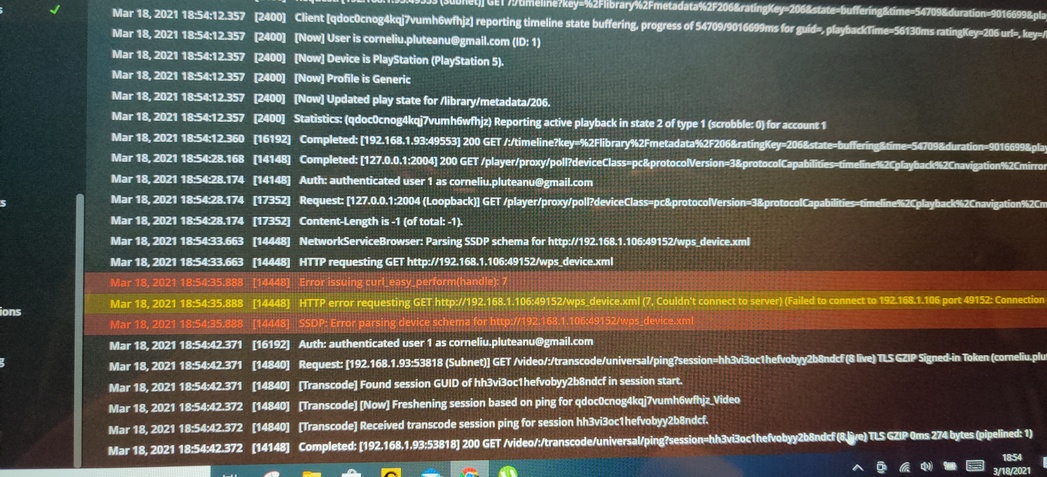
I’ve just uploaded 2 screenshots with the console reading while trying to play Tenet in 4K with 20mbps and buffering.
Weird enough, my main server is on PC with IP…1.63 whereas in logs is showing an additional 1.106 device. What would that be? Please let me know what do you see in here:) appreciated
Hi Guys… I’ve been suffering with this for sometime and never found the answer… till now.
It was something some one eluded to with regards to routing of data that got me thinking i.e. its not going direct from the NAS > Plex Server > PS5 (as you’d hope).
So I decided to fix ‘Remote Access’, It’d been messed up on my box for sometime but due to COVID I had no need (not like I could go anywhere lol) nor appetite to fix it on the Plex Server.
So I spent the best part of the day networking to fix it and “Hay-presto” I had a 4K film running with no stutter, buffer and I’m able to skip without crashing, plus no colour fall out.
Happy days
I hope this works for someone else, I know everyone’s setup is mixed but I thought I’d share.
Hi PapaBoogy, the fix you posted with all due respect is not a fix, this is just standard operating procedure. Remote access is fundamental to the functioning of any plex player interfacing with a plex server on a different device.
Please remove you posts to avoid confusion.
The PS5 Plex application still remains barely useable despite numerous updates.
I tried something different. I converted the file in Plex with “Optimize” in the Original Quality.
It actually worked… Without stuttering or buffering. Details below.
It’s not a permanent solution but it might mean that there are some codecs that work and some that doesn’t.
i have tried several hevc files with 4k original 60mb /s bluray bitrate , even lower bitrate around 19 mb/s still sucks.
the big pain is that even my old ps4 pro with plex can handle 19mb hevc files with no buffering or stuttering direct steam. but ps5 still sucks with that.
a 30$ libreelec raspberry pi 4 stil beats a 500$ machine lol.