Does rasplex has to cache each time that it boots? I plugged it in my TV, so that it will automatically boot when my tv is running. But I still think that Rasplex is not running that fast enough, due to the low framerate in transitions. Is it better to plug my RPI in a wall socket, so it keeps its cache?
Has anyone had luck getting multi-channel LPCM output? I'm still not seeing an option to enable multichannel LPCM, so FLAC 5.1/7.1 and AAC 5.1 gets downmixed to LPCM 2.0 when sent to the receiver. Any suggestions or has this issue not been fixed? DTS and AC3 bitstreaming work fine.
Running on a Pi2, I've found AC3 bitsreaming works OK, but it downmixes all DTS content to 2.0. The same content was bitstreamed fine usig Kodi on the same Pi2.
Running on a Pi2, I've found AC3 bitsreaming works OK, but it downmixes all DTS content to 2.0. The same content was bitstreamed fine usig Kodi on the same Pi2.
DTS passthrough works fine for me. Playback of mkv with dts audio works correctly via hdmi to my Denon receiver. Make sure you enable the option in plex client (something like my receiver supports AC3, DTS, etc..)
Not recommended to use a TV USB port, not enough stable power, use a minimum of 2A separate power supply and a decent micro USB cable, at least 1m in length. There is no need to power down the Pi, most users leave it running 24/7 as it has negligible power consumption, especially when not being used.Does rasplex has to cache each time that it boots? I plugged it in my TV, so that it will automatically boot when my tv is running. But I still think that Rasplex is not running that fast enough, due to the low framerate in transitions. Is it better to plug my RPI in a wall socket, so it keeps its cache?
Cache on the Pi will only be updated if you have added any new media.
Regards
Not sure if this has been mentioned in this thread yet, but can't find it by searching on "sound" so here goes:
I have a new Pi2 running RasPlex 0.5.1 and am experiencing random sound drop-outs during playback.
It is very weird the sound just decreases quickly to nothing for about a second and then increases back again.
It happens randomly about once a minute. Sound is over HDMI to my amp.
This is when playing a standard def MP4 TV show, and also on 720p H264 MKV files as well.
If I swap out the Pi2 with my PiB+ running RasPlex 0.4.1 the same shows all play fine without any sound issues.
(I haven't yet tried the PiB+ running 0.5.1)
I thought it may be related to the 1000mhA power supply I originally had, but using a 2000mhA power supply has not made any difference.
Is this is a known issue?
anyone else experienced this?
I’m experiencing significant issues with the Pi2 playing VC-1 videos. I have installed both MPEG 2 and VC-1 Codecs and the Pi direct plays the MPEG 2 files and wants to play VC-1 (ie, the “unknown codec transcoding” box no longer appears.)
Two problems have occurred so far: in one BD rip, the video will play, but with no sound; in another, there is no sound and the video pixelates and turns a green shade before stopping completely.
The Pi is wired to Ethernet and my PMS is running off of OSX. Could the issue be solved by over clocking? I know that VC-1 codecs have been problematic for some time. Any ideas?
DTS passthrough works fine for me. Playback of mkv with dts audio works correctly via hdmi to my Denon receiver. Make sure you enable the option in plex client (something like my receiver supports AC3, DTS, etc..)
AC3 works fine and both AC3 and DTS passthrough are enabled. It's a Sony amp and DTS works fine with every other device, including the same Pi running Open Elec Kodi.
Installed on Samsung MicroSD Card and running on RaspBerry Pi 2... Works like a dream !
Although.. When tryin to select audio output it froze... so much i had to hard reboot !
Don't know if this is mentioned or not, but in the system setting, the label on the bluetooth checkbox is wrong. (I am not at home so some of the desc may be slightly off).
I think the text says "disable bluetooth", and it's checked/enabled (meaning bluebooth should be disabled) by default. But the few bluetooth items after this box is shown, indicating that bluebooth is in fact enabled. This can also be confirmed by going to the bluetooth screen and notice it says "no bluetooth adapter found".
If you disable the "disable bluetooth" checkbox, then the bluebooth specific configuration menu disappears, and the bluebooth screen says "bluebooth is disabled" instead of "no bluebooth adapter found". But this conflicts with what the selection box is saying.
I feel the bug is the text on the bluetooth configuration item needs to be changed from "disable bluetooth" to "enable bouetooth", then everything would make sense.
This is not an issue on openelec 5.0.5.
Don't know if this is mentioned or not, but in the system setting, the label on the bluetooth checkbox is wrong. (I am not at home so some of the desc may be slightly off).
I think the text says "disable bluetooth", and it's checked/enabled (meaning bluebooth should be disabled) by default. But the few bluetooth items after this box is shown, indicating that bluebooth is in fact enabled. This can also be confirmed by going to the bluetooth screen and notice it says "no bluetooth adapter found".
If you disable the "disable bluetooth" checkbox, then the bluebooth specific configuration menu disappears, and the bluebooth screen says "bluebooth is disabled" instead of "no bluebooth adapter found". But this conflicts with what the selection box is saying.
I feel the bug is the text on the bluetooth configuration item needs to be changed from "disable bluetooth" to "enable bouetooth", then everything would make sense.
This is not an issue on openelec 5.0.5.
In the next release this works as expected, just checked.
Text actually says Enable Bluetooth, if checked it's enabled, if unchecked it's disabled.
See below:
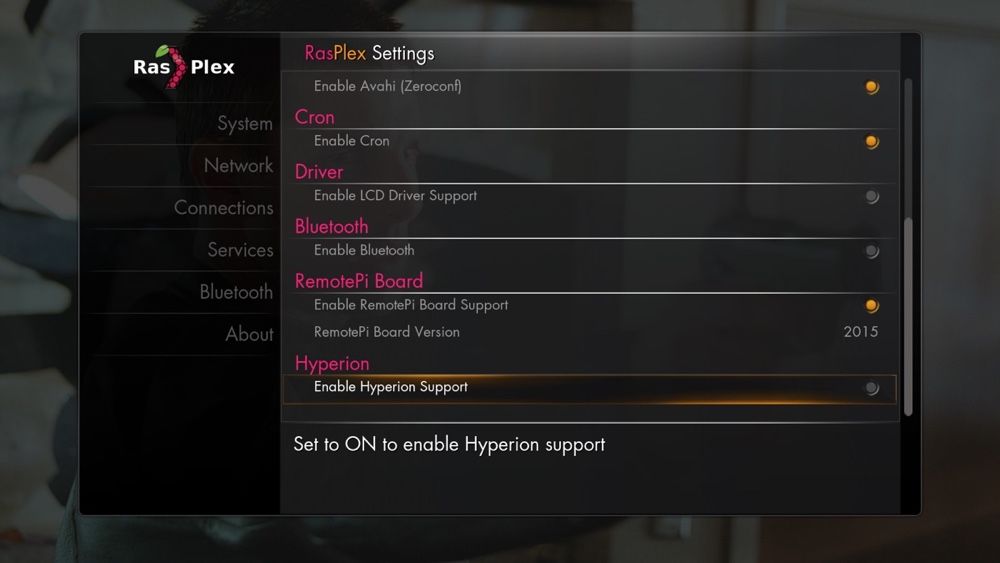
Regards
Hi,
I'm also a new user of RPi2 and rasplex. Many thanks for the great job you've done. For me everthing works fine except for the channels. A few of them work, like the daily show, but most of them don't (ign, funny or die, giant bomb, twitch, etc). Whenever i try to play a clip it's processing for a few moments, after which it says "Playback failed one or more items failed to play". The channels work ok from the android app, PHT or the web plex, all in the same network.
Thank you
Hi,
I'm also a new user of RPi2 and rasplex. Many thanks for the great job you've done. For me everthing works fine except for the channels. A few of them work, like the daily show, but most of them don't (ign, funny or die, giant bomb, twitch, etc). Whenever i try to play a clip it's processing for a few moments, after which it says "Playback failed one or more items failed to play". The channels work ok from the android app, PHT or the web plex, all in the same network.
Thank you
Channels work outside of the Plex Media Server framework, they just provide a video / audio stream directly to the player, looks like those channels you are trying to play aren't working with RasPlex because they are delivering a stream it doesn't understand.
Hi,
I'm new to the plex community but have been playing with the r pi for a while and used to use xbmc.
For xbmc on a pi b+ was too slow, so I liked the idea of separating client and server. Having ordered a pi 2 and not using it having an image that runs on it is great. Your installer is fantastic, every image for the pi should have one!
At this point I've been using plex for 48 hours and I'm really impressed.
I have it running on a VM of server 2012 and have been able to flawlessly access my music from work or out and about on my windows mobile.
I set the pi2 up last night to see how iplayer compares to the tv's iplayer and also test plex on the pi. The install was a breeze and more or less everything worked well.
A few issues I'm having however:
When I try to sign in to my plex from the pi, which I did with the manual username and password, after staring at a black overlay that said retrieving code, for a few minutes. Again I was back to watching a black overlay. I gave it half an hour before giving up.
I was still able to access my media so thought it must be some quirk, but it was only when I tried to control the pi from my windows tablet I realised the full benefit of the sign in feature. So I tried again, no joy. I then tried power cycling, no joy. And finally setting up a pin, no joy (same retrieving code/ black overlay).
So this morning I think right I'll give it another go, boot my pi (which is impressively quick) and my menu just says search, search, search, search, search and so on all the way down, no other options and all display the search page. The back arrow correctly displays the options menu mind.
I will also say I tried the login again to no avail.
I thought something has perhaps corrupt and after a power cycle to the same issue I reflashed. I'm using the same san disk ultra sd's I've always used. So I'm back up, but still no login and a little unsure about the search menu issue, maybe someone knows?
I also found the skip/fast forward/ rewind whatever you want to call it, a little unusable but read a fix is on the way so no worries there.
Can anyone help me get up and running with the login?
Also how would you deal with multiple plex servers in terms of specifying which one to connect to on the same domain?
Finally off topic but I hope you can excuse an excited new user, is there any support as in channels? (I think thats the correct terminology) for spotify, love film, netflix, and other uk on demand services. Most important to me is spotify.
Many thanks and great work
Andy
Channels work outside of the Plex Media Server framework, they just provide a video / audio stream directly to the player, looks like those channels you are trying to play aren't working with RasPlex because they are delivering a stream it doesn't understand.
Thank you for the answer. I suspected something like this, but almost all chanells have a stream that rasplex can't play? I mean not even youtube works. Maybe i need to install some extra codecs or it is already planned for a future update? I couldn't find any info about my channels problem on the forums. Thank you
Thank you for the answer. I suspected something like this, but almost all chanells have a stream that rasplex can't play? I mean not even youtube works. Maybe i need to install some extra codecs or it is already planned for a future update? I couldn't find any info about my channels problem on the forums. Thank you
Streaming channels normally use MPEG2, have you purchased the licence from RaspberryPi.org and installed it correctly?
Regards
Streaming channels normally use MPEG2, have you purchased the licence from RaspberryPi.org and installed it correctly?
Regards
Ah, i see. I didn't know i have to purchase this for the channels. Thank you very much for the info.
Ah, i see. I didn't know i have to purchase this for the channels. Thank you very much for the info.
I have bought both codecs, installed them, checked that they are enabled, but still no luck with the channels. Same thing as before, not even youtube works. Thank you
I have bought both codecs, installed them, checked that they are enabled, but still no luck with the channels. Same thing as before, not even youtube works. Thank you
All my channels work perfectly, including YouTube. In preferences, what have you set for the quality setting for online videos? Mine is set to always ask.
Sent from my iPad using Tapatalk
All my channels work perfectly, including YouTube. In preferences, what have you set for the quality setting for online videos? Mine is set to always ask.
Sent from my iPad using Tapatalk
I have always ask, too. I tried playing with different settings and i always get the same error. Thank you
This is clearly due to a failure of the RasPlex client to reach the myPlex server for login.A few issues I'm having however:
When I try to sign in to my plex from the pi, which I did with the manual username and password, after staring at a black overlay that said retrieving code, for a few minutes. Again I was back to watching a black overlay. I gave it half an hour before giving up.
That in turn may be due either to a fault at the server end, or (more likely) some networking issue in the RasPlex client LAN and/or how this connects to the Internet.
Please clarify whether you use WiFi or wired Ethernet connection.
The default settings for a PMS server allow Plex clients in the same LAN to connect and play media without being signed in to myPlex, but media 'casting' connection is always achieved through myPlex, so for that feature both server and clients should be signed in.I was still able to access my media so thought it must be some quirk, but it was only when I tried to control the pi from my windows tablet I realised the full benefit of the sign in feature.
The fact that such an error persists during a period when other users have no such issues with myPlex suggests that there is a networking error at your end, either inside your LAN or in how it connects to Internet. Your router configuration is the prime suspect in this.So I tried again, no joy. I then tried power cycling, no joy. And finally setting up a pin, no joy (same retrieving code/ black overlay).
That result usually indicates that the RasPlex client no longer has a LAN connection to the server. This may be due to physical connector problems at either end (or a break at any point between them), or shutdown/sleep mode of the server or any LAN switches between the server and the RasPlex client.So this morning I think right I'll give it another go, boot my pi (which is impressively quick) and my menu just says search, search, search, search, search and so on all the way down, no other options and all display the search page. The back arrow correctly displays the options menu mind.
Given what you've said above, that result is what I would expect. A networking error as indicated above will not disappear of itself. You'll need to find the cause and eliminate it, probably by reconfiguration of the router or other equipment in your LAN.I will also say I tried the login again to no avail.
None of the symptoms you've described give us any reason to suspect your SD card or its flashing.I thought something has perhaps corrupt and after a power cycle to the same issue I reflashed. I'm using the same san disk ultra sd's I've always used. So I'm back up, but still no login and a little unsure about the search menu issue, maybe someone knows?
The symptoms all point to some LAN networking problem.
When having multiple PMS servers in the same LAN it is best to have each of them require authentication (== login), even for clients on the same LAN.Also how would you deal with multiple plex servers in terms of specifying which one to connect to on the same domain?
One way of accessing them is to simply reconfigure your login data in RasPlex to switch between them.
But all users doing so will share the same data for 'watched' flags, and 'On Deck' listings etc, which is a bad idea...
A better way is for each of the PMS accounts to share some (or all) media library sections to the other PMS accounts.
Any Plex client logged in to either of those servers can then access both all media sections of the PMS server account they logged in to, as well as all media sections shared to that account from other PMS servers.
And the PMS servers can then keep the activity records of different accessing users separate (individual 'watched' flags etc).
It is also possible for PMS servers to share their media library sections to Plex user accounts not owning any PMS server of their own.
The user of such a Plex account will still be able to access all media library sections shared to that account from any PMS server accounts.
And the sharing PMS servers can still keep the activity records of such users separate.
There is a 'channel' system implemented for PMS servers, though I'm unsure of the extent to which it may support paid subscription channels.Finally off topic but I hope you can excuse an excited new user, is there any support as in channels? (I think thats the correct terminology) for spotify, love film, netflix, and other uk on demand services. Most important to me is spotify.
It should be noted that access to a Plex channel can not be shared from one Plex account to the other, like local media sections can be shared.
Best regards: dlanor
