@JTWMCA I see it finally cleared up for you about 24 hours ago. Can you confirm?
@davidcheung100885 I don’t see you’ve updated your password or that there is an active server on this account. Do you have another Plex account?
@JTWMCA I see it finally cleared up for you about 24 hours ago. Can you confirm?
@davidcheung100885 I don’t see you’ve updated your password or that there is an active server on this account. Do you have another Plex account?
Hey all, having the same sort of issue. Anything external is showing an Indirect connection. Internal is fine. The server itself shows remote access as solid. Canyouseeme.org can see the port open and the service running. Updated my password today for the server account and tried disabling remote for 10 minutes or so and reconnecting as mentioned previously. Any thoughts?
Edit: some of my users have reported not being able to access it all through their apps now but web browsers working with indirect. Haven’t visually confirmed it myself yet
It did not clear up “naturally”, but I hopped over to the API Rate Limit Exceeded thread and @ChuckPa fixed it up for me (& thanks again!). Back in business now.
@Keggarr Your logs indicate that your certificate is fine. It looks like something is blocking your server contacting Plex to publish your IP info.
Aug 30, 2022 13:20:42.130 [16544] DEBUG - [EventSourceClient/connectiontester/45.56.116.228:443] Failure: 10065 - A socket operation was attempted to an unreachable host.
Aug 30, 2022 13:20:42.130 [16544] DEBUG - [EventSourceClient/connectiontester/50.116.51.249:443] Failure: 10065 - A socket operation was attempted to an unreachable host.
Aug 30, 2022 13:20:42.130 [16544] DEBUG - [EventSourceClient/connectiontester/172.105.203.197:443] Failure: 10065 - A socket operation was attempted to an unreachable host.
Aug 30, 2022 13:20:42.130 [16544] DEBUG - [EventSourceClient/connectiontester/178.79.165.194:443] Failure: 10065 - A socket operation was attempted to an unreachable host.
Aug 30, 2022 13:20:42.130 [16544] DEBUG - [EventSourceClient/connectiontester/184.105.148.117:443] Failure: 10065 - A socket operation was attempted to an unreachable host.
Aug 30, 2022 13:20:42.130 [16544] DEBUG - [EventSourceClient/connectiontester/139.162.57.189:443] Failure: 10065 - A socket operation was attempted to an unreachable host.
Aug 30, 2022 13:20:42.130 [16544] DEBUG - [EventSourceClient/connectiontester/172.105.29.107:443] Failure: 10065 - A socket operation was attempted to an unreachable host.
Aug 30, 2022 13:20:42.130 [16544] DEBUG - [EventSourceClient/connectiontester/45.33.119.35:443] Failure: 10065 - A socket operation was attempted to an unreachable host.
Aug 30, 2022 13:20:42.147 [16540] DEBUG - [EventSourceClient/connectiontester/172.104.152.89:443] Failure: 10065 - A socket operation was attempted to an unreachable host.
It also shows that PMS has detected 2 network connections.
Aug 30, 2022 13:20:45.061 [17076] DEBUG - * 3 wgpia0 {0695B14B-DBF7-0AD7-D2D7-EF9E329450D6} (10.13.218.32) (00-00-00-00-00-00) (loopback: 0)
Aug 30, 2022 13:20:45.061 [17076] DEBUG - * 20 Ethernet {EF49762F-D25B-48CF-BF93-6FA42BADF9A8} (192.168.254.24) (34-97-F6-82-70-F0) (loopback: 0)
I don’t know what that wgpia0 refers to but PMS seeing multiple network connections can be an issue.
Thanks for the reply! That’s the WireGuard connector for my PIA VPN. Worked up until recently. I did try disabling the VPN as a workaround but no dice. I currently have split tunneling set up with Plex going out my actual NIC and Plex set to favor the real adapter. Is there a way via settings I could hide that NIC from PMS to see if that helps?

I can’t help with VPN’s so not sure what to advise.
Just swapped PIA over the OpenVPN so the adapter is gone. Gonna give it a bit and try again and will follow up with results.
my acc is davidcheung1985@yahoo.com
@davidcheung100885 This is in your log. Has nothing to do with the password reset. Please start a new thread if you need further help.
mapping failed due to potential double NAT configuration
Hi and thanks in advance for all your hard work making this great application.
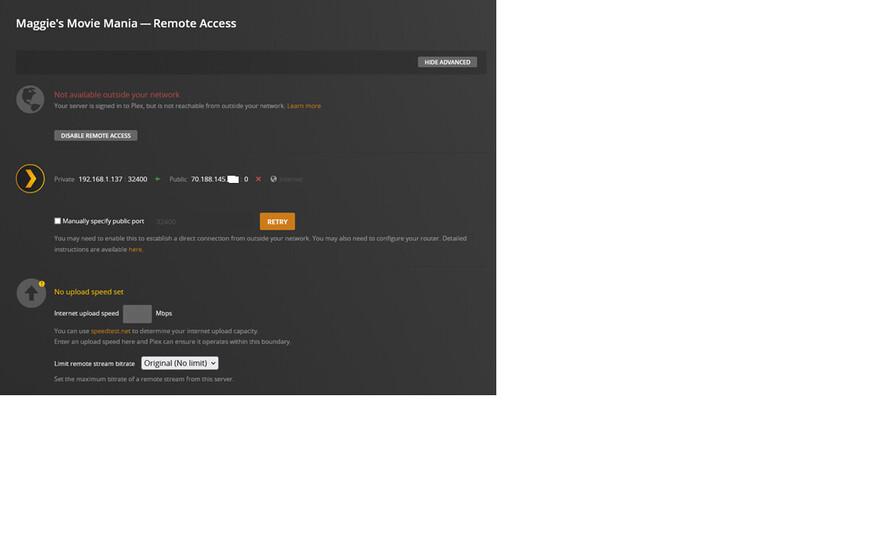
I have been unable to keep the remote access part of the program running since the recent mandatory PW change.
My technical knowledge is very much limited, so I am respectfully requesting any advice you might be able to offer.
If this is still related to the tsunami of requests that must be happening, I can wait another week to see if this gets resolved by another method.
After i disable and enable:
Very soon after it changes to this state:
I have been repeating the process on and off for a while now.
Thanks again for any help you can provide.
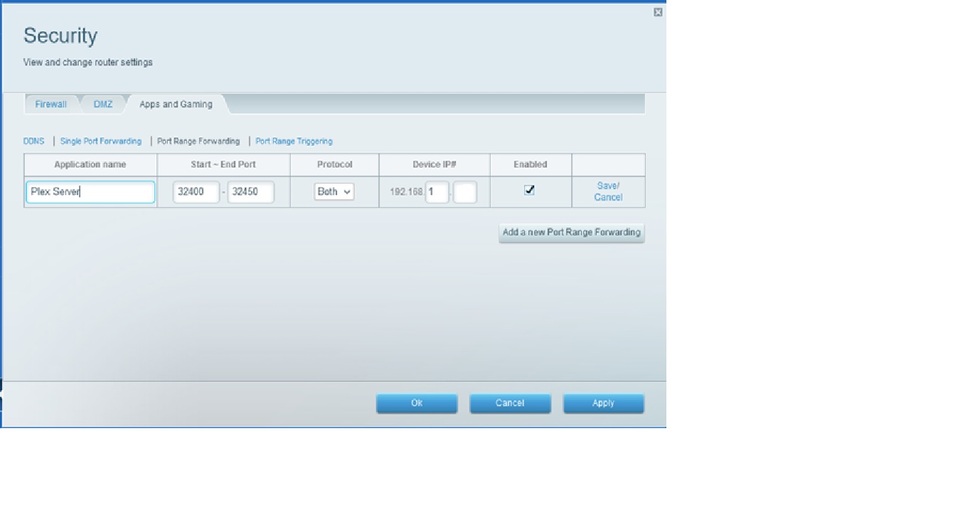
You have not enabled “Manually specify port” which means it’s using UPnP. It’s possible your router is not configured for UPnP or it’s just not working properly. Try enabling that setting and add a port forwarding rule in your router.
I have tried many times about opening the port for remote access, it just happened a week ago. With this configuration, last week I still had normal remote access. can you guide me how to fix it
Plex Media Server Logs_2022-09-01_16-59-23.zip (2.8 MB)
Hi,
I tried to look over the server log and remove things that seem to be unrelated to the remote access function.
You probably will hate this, but I’m trying to be helpful. I noted the time that I disabled the remote access and waited 20 minutes to try and re-enable it.
As previously noted, it was online for a short time and the dropped offline.
This are messages in the log:
WARN - [Req#aa16b] NAT: PMP, got an error: NATPMP_ERR_RECVFROM.
Sep 01, 2022 11:05:27.159 [3080] WARN - [HttpClient/HCl#3a0] HTTP error requesting GET https://70-188-145-141.f5cc33d854b24a1d9c7d318deba68ba7.plex.direct:0/identity (3, URL using bad/illegal format or missing URL) ()
Sep 01, 2022 11:05:27.338 [24988] WARN - [Req#be40d] MyPlex: we have an existing connectivity refresh request for async identifier 59696f10-0e96-4608-b8cc-24cdc8b6641d, but it has expired so we will try again
I will try finding out more about this on this link:
https://support.plex.tv/articles/200931138-troubleshooting-remote-access/
Plex Media Server 930on_and_off.txt (145.2 KB)
Once again, thanks for any help with this .
@davidcheung100885 There are a few options to fix when double NAT is involved. You can search these forums for “double NAT”. If you need help with a specific option, let me know.
@Rob_rocheleau_cox_net Did you try enabling the manual connection as I suggested? Those errors you pointed out are due to plex.tv not knowing which port to contact your server at.
Sep 01, 2022 11:05:27.159 [3080] WARN - [HttpClient/HCl#3a0] HTTP error requesting GET https://70-188-145-141.f5cc33d854b24a1d9c7d318deba68ba7.plex.direct:0/identity (3, URL using bad/illegal format or missing URL) ()
“plex.direct:0” That 0 should be the port, but that info isn’t getting to plex.tv. This relies on PMS getting the port information from your Router through UPnP, which isn’t working. UPnP can be flakey at times, which is why I always recommend users use the manual option with port forwarding in your router.
Thanks, I am still trying to figure out how to create the port forwarding rule. Sorry, this is pretty new to me but I really appreciate your time and suggestion.
I’m sure you have been inundated with pleas for help all over the world.
I’m also new to the forum, is there a way to show appreciation for your help?
Glad to see you got it working. No extra appreciation needed. Your thanks is enough.
Hey, I’ve been experiencing similar issues with remote access dropping out after a minute or so since the password change. Attempted manually specifying the public port as previously mentioned, as well as resetting the PMS and disabling remote access for extended periods of time, but every time I come back to it remote access still drops out. Unsure what else I can do, any advice would be greatly appreciated.
(Edit)
I also set up a port forwarding rule in my router and toggled the UPnP setting off and on a few times but still no change.
@julianlubin Looks like the issue is DNS Rebinding. See https://support.plex.tv/articles/206225077-how-to-use-secure-server-connections/ for more info.