Server Version#: 1.27.2.5929-a806c5905
Player Version#: 1.47.1.3086-6c3d964f
I have seen others post about recent problems using Plex, especially the ability to add new content to media libraries and Search feature not finding local content. I am having a similar problem that I want to bring to the attention of Plex. I am pretty inept when it comes to technical fixes on my end, since I am technically challenged, so advice from other users needs to be limited to what I can and cannot do using the app and its features. From what I’ve read online in the last few days, it appears that what I’m experiencing is being seen in similar fashion by lots of other users.
I only use Plex to access and manage my music collection, which is on a Synology server. I don’t use it for video or movies at all. I have the Plex app and Plex Media Server running on my Windows 10 desktop computer. I also use the Plex app on my Android phone and with my Roku streaming stick. Around July 1 I started having problems. Since that time, here is what I can and cannot do with each app.
For Plex on my computer:
- I can see my music collection (albums, playlists);
- I can play my music; but,
- it NO LONGER scans for and adds new albums that I add to my collection on my Synology server, and,
- I CANNOT search for tracks, artists, or albums. When I enter a selection criteria (example: “Bob Dylan”) I get back that there was nothing found. It can only find items on the web if I toggle on the new “Discover” feature, and even then, it only returns movies, videos, etc. So, essentially, the Search feature is totally useless now. And, another thing: the Activity icon at the top right of the screen is always grayed out now. It used to be orange, and spinning when it was scanning my library.
- Lacking the Search function, there is no feasible way for me to create playlists anymore using the Plex app on my computer.
For Plex on my Android phone:
- I can see my music collection (albums, playlists);
- I can play my music;
- I CAN scan for and add new albums that I’ve added to my collection; and,
- I CAN search for tracks, artists, or albums, and - therefore - create or edit playlists.
For Plex on my Roku:
- I can see my music collection (albums, playlists);
- I can play my music; and,
- I CAN search for tracks, artists, or albums.
So, for now - until whatever Plex has done on their end with the application is fixed - my workaround for adding new music to my collection is to use my phone app to scan and add the music to my library, and use the phone app to build and edit my playlists. I much prefer to do these things on my desktop. And the Roku version is doing what it’s designed to do.
Incidentally, when I started having these issues, I downloaded and also am now using PlexAmp, which works fine on both my computer and my phone. PlexAmp DOES allow me to search and build playlists, but it is limited in the playlist editing capability (i.e., moving songs up and down).
These issues need to be fixed by Plex, or I will need to cancel and try and use something else. It is not workable for me as it is at this time.
What happens when you try to scan for files from Web? Can you reproduce and provide your server logs?
I should have mentioned that, from the Plex Web App, I don’t see my library at all. And, when I attempt to follow the instructions for providing you with my server logs, the instructions don’t match what I see. Here are the instructions:
- Go to Settings > Manage > Troubleshooting in Plex Web App
- Click the Download Logs button
- Save the resulting zip file
I don’t see the option to click on “Manage” when I open Settings. See attached screenshot.
If you are on 4.85.1 that means you are loading the hosted Plex Web client from app.plex.tv. Load your local Plex Web client that comes with PMS, Opening Plex Web App | Plex Support.
Sounds like your server may have gotten signed out. The hosted Web app can’t see a signed out server.
Okay, I’ve tried two ways and I get two results, neither of them good.
First, I tried this instruction:
Accessing Plex Web App Directly in the Browser
On all platforms, you can access Plex Web App on your local network. From any computer on the local network:
http://[Local Plex Media Server IP Address]:32400/web
And I got this error:
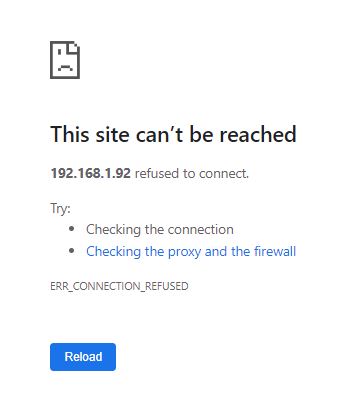
Then, I tried this instruction:
Or locally, from the computer running the server:
http://localhost:32400/web
or
http://127.0.0.1:32400/web
And this is what I get when Plex Web App opens:

The Motherlode is my Synology server. It lists it twice and the circles are going around continuously. The library never loads.
Any ideas?
Are you sure that’s the right IP for your server? That error message means PMS is either not running or is not responding.
The info on getting the server logs also included info on getting them manually. Could you try that?
Here’s screenshot of my Synology Assistant page. Looks like it’s the correct IP address.
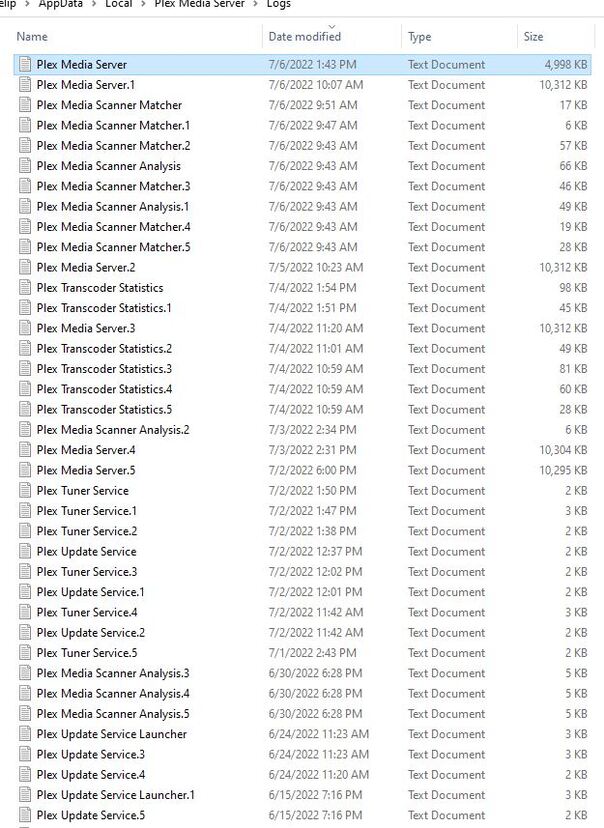
As for accessing the server logs manually, here’s the list. Which of these do you need? How do I send them to you? There’s more beyond this screenshot. (As I said, I’m not very tech-savvy.)
Wait a minute. The log files you are showing me are for PMS running on Windows. I thought PMS is running on the Synology? Did you install PMS on both your Synology and your Windows computer? That would explain why you have 2 servers listed.
That error message would indicate PMS isn’t running on your Synology. Check in your Synology’s app page and see if PMS is installed and running.
I don’t know where PMS is running. Here’s what happened, as pieced together with the help of my Stanford-educated computer science major son who’s tried twice to walk me through fixes to this problem over the phone and via remote assistance. On July 1, our power was out for several hours due to electrical work being done on our house. I shut my computer down before that started. When it came back on, my son thinks that the Synology server booted up before my computer, and certainly before I opened Plex again. It didn’t see my library. So, I installed Plex Media Server - I think on my computer. At one time he surmised that I might have the server running on Synology, too. We’ve been through too many attempted fixes that I can’t honestly tell you where PMS is running, except that it obviously is running on my computer. The issue now, when you ask me to see PMS is installed and running in my Synology app page, is that I don’t know how to search for and find that out. I can open the Control Center in the Synology Assistant, but I don’t see an icon labelled Apps. So I don’t know where or how to find that out. This is where it would really help is there was an option to talk with someone about these issues at Plex over the phone so they could walk me through things like this. If that’s not an option, then walk me through these steps one at a time, I guess.
I just noticed in Synology Assistant that there is an External IP Address. I tried that IP Address to access via the Web Plex App, and now I DO see my media library. Previously I used the Internal IP Address, I guess. But the Library is still not searchable, just like on my Windows Plex App.
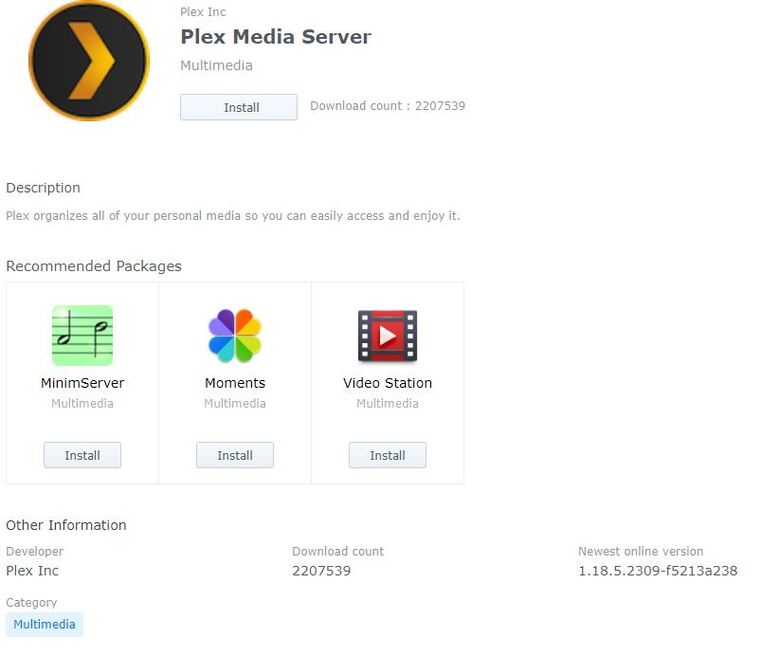
Okay, I poked around a bit in the Synology Assistant, and I found the attached list of Installed Packages (their word for App, I guess…). And I don’t see PMS listed.
So, should I go ahead and install it from their list of Third Party Packages? Or should I first uninstall PMS from my desktop? What I don’t want to risk is losing my 94 playlists, some of which I just created in the last couple of weeks. I mean, I can recreate them because I have them also saved in MediaMonkey, but that’s hours of work…
The first question is where do you want PMS to run? If it’s already running on your PC and that’s what you want then we can ignore the issue with the Synology. If you want PMS to run from your Synology, then we should remove it from your PC so you don’t get confused what you are accessing.
I’m fine with it running on my PC, unless running on my Synology allows me to access my files when I’m away from home and my PC is turned off. Would that be the case if I do this?
On the other hand, will setting it up on Synology mean that I lose the playlists I’ve compiled using the PMS that’s on my PC? Or will the playlists survive the PC uninstall and Synology install?
Beyond these considerations is the more basic issue that I’m having trouble with: scanning and adding media to my library, and the ability search my library, which I can’t do at this time.
PMS needs to be installed and running to access it from anywhere, so if you normally turn off your computer but leave your Synology on, then installing on the Synology is better.
There are ways to transfer your data from the PC to the Synology, but that’s advanced and quite complicated. It may be easier to recreate the playlists on the new setup.
Before removing PMS from your PC, let’s make sure PMS is running on your Synology. What model do you have? Your image is showing the page for packages (apps) installed. Not seeing Plex would indicate it got removed/uninstalled. You’ll need to reinstall it. Is there another page for their store?
Here’s the info on the PMS available via my Synology Third-Party Packages page:
I guess I’ll trade the work of rebuilding my playlists for the convenience of accessing the server when my PC is turned off. I’m retired anyway…
Yup, that indicates it’s not even installed. 1.18.5 is an old version. Let me check into that first. You might need to manually install a newer version.
Okay. Hopefully that’s not too complicated. If it is, then I’ll leave PMS running on my computer. But we’d still need to fix the library scan/update and search functions that aren’t working.
Hi. I have found instructions online on how to install PMS manually on my Synology NAS. But, before doing that, I’d like to first diagnose why the search function isn’t working with the PMS installed on my PC. If that can be fixed, I may want to just continue using the app with PMS installed on my PC. I need help figuring this out.
3 things to check to make sure things show up when searching.
1 - The library is pinned to the sidebar
2 - In the library’s “Advanced Settings”, the visibility is to to “include …”
3 - Click on the icon on the right edge of the search box, make sure your server is enabled (check marked)
In response to your questions:
1 - The library is pinned to the sidebar
See the following screenshot. I think this shows that it is pinned, right? However, I also have a question here. I noticed when I started having these problems about a week ago, that the word “null” appears next to the name of my Server. See where I’ve circled in red. I never noticed this before, but I don’t remember what it used to say here (if anything). Might this give a clue as to what is the problem?

2 - In the library’s “Advanced Settings”, the visibility is to to “include …”
Where do I find this? See the following screenshot of my Settings Menu options. I can’t see where to find “Advanced Settings.”
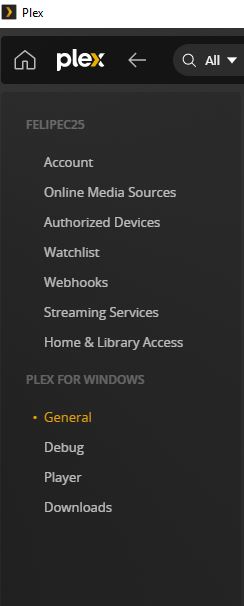
3 - Click on the icon on the right edge of the search box, make sure your server is enabled (check marked)
See the following screenshot. Clicking the icon on the right of my search bar only gives me the option of selecting the “Discover (Beta) / More Ways to Watch” feature. I don’t see my server listed as an option.