Hover over your music library, an icon with 3 vertical dots will appear to the right of it, click that, then “mange library”, then “edit”, then the “advanced” tab. The visibility will be the third option from the top.
I’m not sure why your server doesn’t show up in the list for search. I am looking into something that may be wrong with your account. I will get back to you.
You see how in that last image it has null * The Motherlode. That is wrong. I haven’t heard back about the issue I see with your account. Can you try following the instructions in this support article, Why am I locked out of Server Settings and how do I get in? | Plex Support.
Hi, I tried the solution you proposed 9 days ago, but it didn’t solve my problems. Have you found anything about why the screen shows “null > The Motherlode”? You also thought there was something wrong with my account. Find anything there?
I’m just about ready to give up and uninstall both the player and the server, and start all over again, even though it’ll mean I will will need to rebuild about 90 playlists and correct dozens of multi-disc albums where Plex doesn’t tag tracks to the correct discs in those sets. It’ll be literally days of work on my end, a second time. But I thought I’d check in one more time before I take this step.
You directed me to create a new account using my email address after you deleted my account. But I CANNOT. I get error messages saying that email address is already taken. So, I’ve created a new free account using another of my email addresses just so I can continue communicating with you. WHAT DO I DO NOW? I need you to explain to me what I need to do so I can login again using my standard email address (not the one I just used to create a temporary account, because this is the one I use for work only). And then you need to walk me through step by step, in the correct order, what I need to do to set up my library again.
Please be aware that your forum account and your Plex account are linked but separate. You can continue to sign into our forums using your account to keep this discussion going, but you cannot use that when signing into your Plex Media Server or Plex Web. You will want to open a separate browser window to use the forum and another for trying to access your server. For your server, follow the steps from the link I provided previously to remove all your old account information from your server. Then:
- Open the local Plex Web (in a separate browser window from the forum), Opening Plex Web App | Plex Support
- you will be asked to sign in, use your new account
- you should see your server at this point if you removed the account information properly
- go to the settings, then the general tab (there should be 2, you want the one lower down
- you should see the option to claim your server, click on that
That’s it. You should now have access to your server again. Once this is working, I can help you change your email to the proper one.
Okay, there have been so many efforts on this case, and it has been over a week since I last tried to fix this, so you’ll need to give me the link again that you reference in the following statement: “For your server, follow the steps from the link I provided previously to remove all your old account information from your server.” Only after you do that, can I attempt to follow the steps you listed above.
And, yes, I will use my second (work-related) email address that I used to create a new Plex account with to claim my music server. Are you sure that after I set up my library under this new account under this second email address, that you’ll be able to switch it back to my primary email address? I really don’t want to use Plex via that work-related email address over the long term.
Here is the link. Why am I locked out of Server Settings and how do I get in? | Plex Support
It was just 3 posts up? Are you reading this through email? That can be confusing. If you use the forum, you can see all the comments easier.
No, I’m using the forum. But I’m tired of all of this, so forgive me. This has been so incredibly frustrating. I’ll give it a try now.
Okay, it’s scanning my library now. But it will take a while. I have over 90,000 tracks in about 10,000 albums. So I’ll see what I’m dealing with in the morning.
Huh? Did you create a new library? It should have reused your old information and not needed to rescan your files. Or did you not have all these in a library before?
I did not create a new library. It’s already found all my playlists. It just takes it awhile to load all of my 10,000 albums. It’s usually done this in the past when I’ve shut down the computer, restarted it, and opened Plex. This isn’t normal?
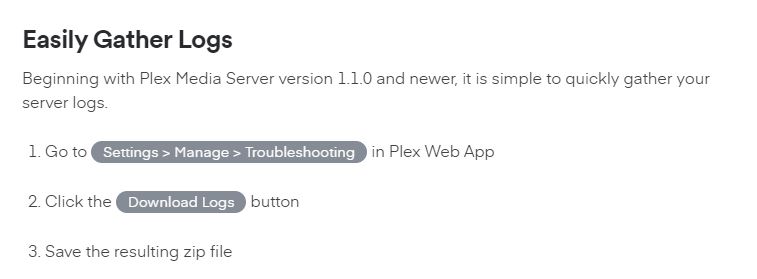
No it’s not. Once added to a library, the content is always there. It should only be scanning the files to look for new ones and only when you tell it to, or if you have the feature enabled to automatically scan for new files. But this should be relatively quick if there is nothing new. The only reason it should go through every file is if you hit the “Refresh All Metadata” option for the entire library. Can you grab the server logs right now and attach it to your next comment? I’d like to see exactly what’s it doing.
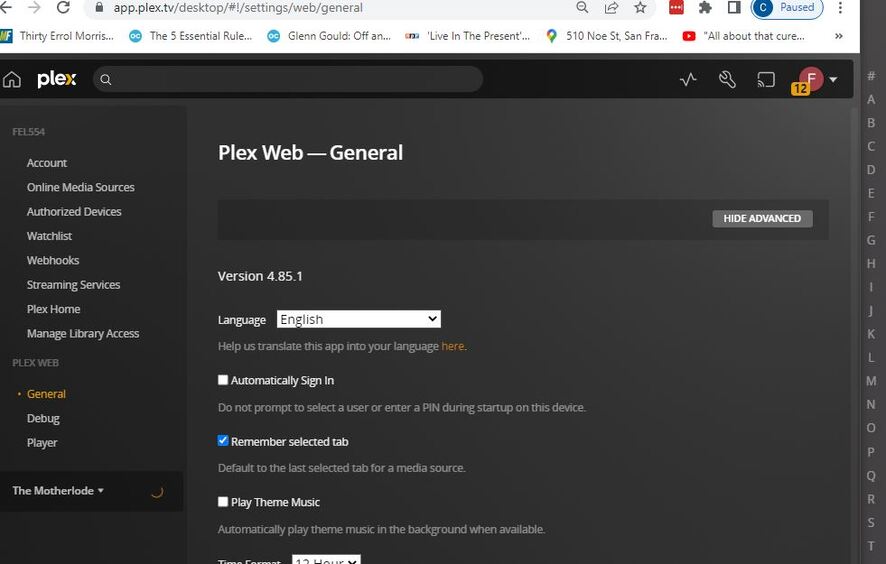
I can’t find “Manage” and “Troubleshooting” when I open the Plex Web Server, as per these instructions.
Here’s what I see when I click on the “Settings” tool icon:
Where do I find “Manage” and “Troubleshooting”?
It should be down there under “The Motherlode”. That spinning circle to the right would indicate it’s doing something and it’s not ready. Can you follow the steps on " Manually Finding Log Files"? Zip the entire folder and send me that.
I’m going to have to continue with this tomorrow. It’s 1 a.m. here and I need to get to sleep.
For your future reading when you wake up. I see a few problems with your setup.
1 - Your computer has both it’s WiFi and ethernet connection enabled and working. Plex is not designed to work with 2 connections. Plex appears to be jumping between the 2 connections.
Turn off your WiFi on the computer.
2 - The remote access connection is not configured properly. This is causing Plex to open and use it’s Relay connection feature, which redirects all remote traffic to your serer through Plex. This works, but is not a fast connection. This is likely caused by 1 above and should go away if you fix 1.
3 - Your music library is pointing to the root Z drive. This will cause problems as noted in our support article https://support.plex.tv/articles/200288926-creating-libraries/.
Do not use the root of your drive as a folder location. It will cause problems. Make an appropriate folder and put your media in that, such as D:/Movies.
You also have it set to automatically update your library when changes are detected in the library folder (i.e. Z drive). This is troublesome and why it’s scanning. So you should have done something make a Z:\Music\ folder and put your music there. The only fix would be to delete the library, move your files, and recreate the library or just completely start over.
Conclusion:
- Fix number 1 first by turning off your WiFi. Then restart PMS. The spinning circle should go away and you should see the rest of the setting menu, including the Remote Access tab for 2.
- Check if 2 is working properly now.
- For 3, this is optional but highly recommended. At the least, turn off the option to automatically scan your library.
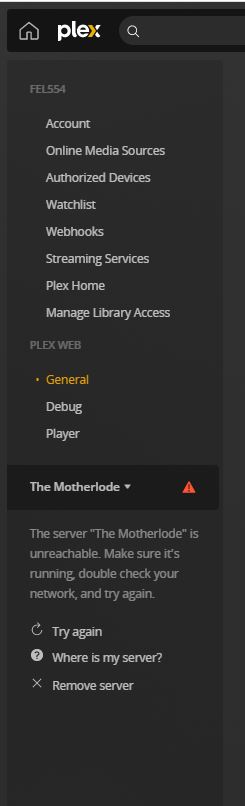
Okay, I’ve turned off wi-fi. I tried to log out of Plex at that point, but the spinning circle kept on going, and it was not logging me out. So I used Task Manager to end the Plex task. I then logged in again, but it isn’t able to reach my music server. See attached screenshots.
Is this because it’s set up as a Z drive? If so, what happens to my playlists when I remap to another drive, such as D? Will I need to rebuild them? And, even though its not your product, will I lose my playlists in Media Monkey when I rebuild the library there mapped to the new D drive? I use Media Monkey to rip new CDs and add them to my library. If I lose the playlists there, I won’t have a reference to rebuild them in Plex. If that’s what I’m up against, then I will first have to build them all using my Synology Audio Station app to have as a reference to recreate them in Plex. And only then will I remap the library into the D drive.
Which Plex task did you close? If you closed Plex Media Server, you need to restart it.
Also, how are you accessing Plex Web? You need to use the bundled Plex Web that comes with PMS. You do that using the computer’s IP address (i.e. https://192.168.1.75:32400/web) or if you are on the server machine, you can access it at http://127.0.0.1:32400/web