Just got Plex back after suffering the above problems - ended up having to remove the usb, factory reset, reinstall everything, reformat the usb drive, reinstall usb as device storage, make sure PMS permissions were set to allow which they were last time I tried, but this time i turned off the reset permissions switch - started PMS and it worked - just about to reinstall DB and blobs and hopefully I’m back - hope this helps someone else.
What do you mean by “reformat the usb drive”?
Do you have it formatted as Adopted Storage? Or did you format it in Windows/MacOS and then just connected to the Shield TV and run PMS?
I think the main issue is with External USB Storage Devices, that are not formatted as “Adopted Storage”. It seems that PMS cannot recognize them.
I tried the Plex Media server update fix mentioned above…still not working
Update: so, still an issue which is now a network problem I think. Using fx browser locally, I can see the Plex media server folder, however, on my desktop that folder is not viewable I’ve the network and even more strange, when I transfer the backups to the usb drive those files are visible over the network but not from the shield so i can’t transfer them to the correct directory.
Hope this helps a dev or does anyone have another suggestion?
Well PMS is recongising mine as I could set it as adopted internal storage. However as per my new post though the folders are visible locally, they aren’t on the network which is really strange.
thanks for letting us know, I am still unable to get PMS to see the USB drive but will follow your instructions. I didn’t have the 1TB metadata backed up only DB so will have to start again!
Actually - more info. When the shield goes to sleep, you can’t access it on any other client so, it’s FUBAR.
thanks man, I guess we really need to wait for an update (either from Plex or NVIDIA)…
PMS in my case is showing Internal storage (2 internal locations) this is all internal to Shield.
My Samsung SSD USB 1TB on Port 2 was formatted by Shield and is visible in Shield storage as per usual.
The update has screwed PMS seeing the USB drive when attempting to modify storage location.
Also checked permissions to media devices for both Plex and Plex Media Server apps and its all enabled so thats it.
Good advice why give yourself a headache it’s got me demented trying this and trying that hopefully either Nvidia or Plex will sort this fix out soon…… Even though I’m on a Plex Pass subscription I’m looking at changing over to Emby to see if that’s working any better
Did you try connecting to the storage over a network and seeing if you can see the PMS folders? If not, could you try and transfer any small file to documents and then seeing if you can view that file locally on the shield.
I think Plex and Nvidia have an issue which means a fix might not be as quick as they both need to push it updates which explains why, when I updated last night shield wasn’t able to Mount my approved by nvidia usb drive. Nightmare
I confirm I’m using an external ssd for plex
Something has changed but I can’t pin point it atm.
Yes @bellamyFortescue I was able to connect to the USB drive from my MacBook over LAN.
I might format the USB drive externally using Linux and put it back see if that helps.
Connecting isn’t the problem….can you transfer a file to it and then view that file using a browser on the shield?
OK yeah your right,
I can create a folder on the USB drive remotely but can’t copy an image for example to that folder.
Interestingly I can delete from the drive, so someone (Nvidia) have set the permissions wrong for the device.
From the network can you copy a file to the usb drive (internal storage) in a pre existing folder then go to the physical shield open the folder containing the file you just transferred and see the file? Because I can’t - it shows as empty. But if I go back to my desktop I can see the file.
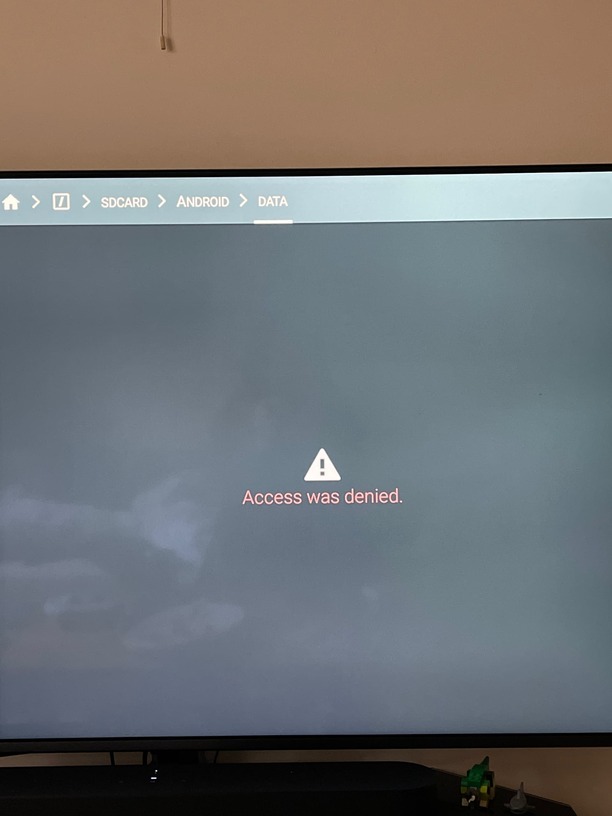
this might hold the answer which would throw it back to Plex
https://nvidia.custhelp.com/app/answers/detail/a_id/5303/kw/permission
PS I’d rather not install any file management apps have had system issues due to them in the past.
Doesn’t work
I have the same issue, also have an external drive as adopted storage and Plex is there.
