Yes, it appears that the DLNA might still be down. Samsung and other smart devices stream via DLNA
All my mobile devices are Samsung and on every one I use the android client app to consume my media. If you tell me what are you doing to stream your way I can try that as well.
Thanks, I was finally able to get it to work… I had to uninstall PMS version 1.25.3.5448 that was sideloaded and replaced with the official one from the app store Plex Media Server: 1.25.3.5575. All system’s a go now. Hopefully it stays that way.
On the latest Nvidia hotfix release, 9.0.2(33.1.0.291)
After upgrading Plex Server to 1.25.3.5448, the channel guide info for my HDHomeRun Prime would hang halfway through updating the last two nights.
Just upgraded to the new Play Store Plex Server version 1.25.3.5575 and after restarting the 2019 Nvidia Shield Pro, I see the Plex Server is rebuilding the guide info again.
I can not find the changelog for 1.25.3.5575 so I have no way of knowing if the channel guide info issue I am seeing has been addressed.
Otherwise, the media, which is stored on an external Western Digitial drive, has remained available the last several days without needing to restart the Nvidia Shield, so it appears the paragon update has substantially helped with external exFAT/NTFS drive stability.
just tried Plex on Shield Tube, MacBook, iPhone 13, all working as expected.
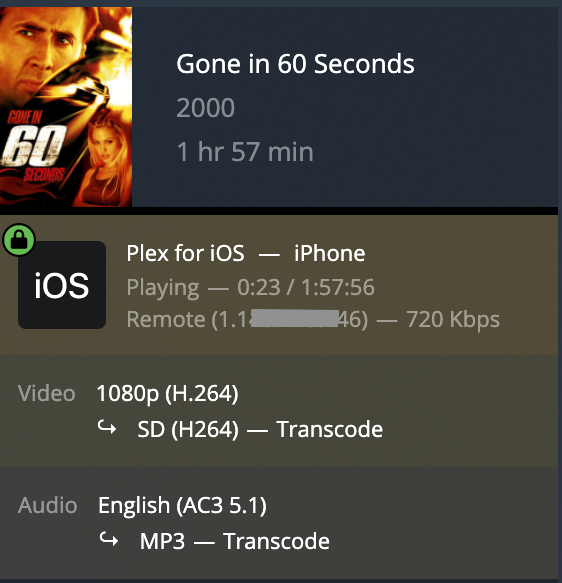
Also tried 1080p movie externally on iPhone 13, Plex transcoding was working. Will try another Shield externally this afternoon.
Upgraded mine to the same version yesterday and re-built my PMS db and libraries. It quit working again today. Once again the Plex client doesn’t show the PMS.
Mine is still going strong also.
I went through the same thing until I installed hot fix one. If you’ve already installed it then I’m not too sure what could be wrong.
After migrating to version 9.0.2(33.1.0.291) and PMS 1.25.3.5575 I still have very big delays.
Sometimes playback stops in the middle of a movie, the hourglass spins indefinitely in the middle of the screen.
Forced to restart to regain normal operation, it’s just getting unbearable !
In addition, the transfer rates from the PC to the Shield are very slow, 2 MB/s instead of 50 before the update.
In the other direction it is however very fast (from Shield to the PC).
I would like to point out that my installation is very simple: PMS on Shield TV PRO and Plex player on the same machine.
All my medias are stored on a Maxtor 4TB external hard drive formatted in NTFS (no choice since I record a lot of TV programs via HDHomerun and Plex Pass which are over 4GB very frequently)
like many others, theres no icons under the PMS section on the shield client. the only way i can get it back is to delete the server and download again. it makes me set up a new server and then works for a little bit until it scans. after about 3 minutes, the scan just freezes. spinning ring at the top but no progress in the titles. i (regretfully) did the standard OTA update and currently on 9.0.1 and the current version of plex client and PMS from the play store. i see other people are on 9.0.2 but i dont have the option to upgrade. i thought that it was a hotfix and i had to sideload it somehow. in the nvidea forums theres a google docs link for the hotfix but its not available anymore. funny thing is that it just started acting up yesterday. before then it was all good and i updated to experience 9 a few weeks ago. ive seen vids on how to roll back to 8.2.3, but im a bit scared to do that. anyways, my question is: has 9.0.2 fixed most of the bugs and is it usable again? i dont mind a reboot every now and then, but other than that, i have a $150 paperweight.
Before the recent update (shield experience 9.0.2 and PMS 1.25.3.5575) I had never had this problem: PMS is now totally inaccessible even after disconnecting the plug and 3 restarts!..
What should I do ?
Cancel my plex pass?
Oh yes that’s for sure!
works?
IpPlexServer:32400/web
I tried this, but no “answer”

On the other hand via the network I can access my Shield, for instance
\shield\internal\Plex Media Server\Logs
Log files don’t help me to find what’s going wrong…
Plex Media Server.log (384.3 KB)
ok no panic!!!))))
check the following
find the place where pms is located - go to app x-plor - App manager - Installed -
is there Plex Media Server file?
Few days ago I’ve upgraded shield from 9.0.0 hotfix #3 to 9.0.1 and got fed up that there is still no PMS starting (still zero log file activity since the first crash), so I “deleted” PMS from apps, reinstalled PMS and set up a new empty server (defaulted to internal system storage).
For the first time in a month start/stop PMS option was visible within settings together with an option to relocate PMS to user accessible location, but missing an external option to adopted storage. Well I let it relocate at least into “internal (user accessible)” and PMS options to start/stop disappeared after that. At least relocation was completed, PMS database files were accessible in Android/data and PMS was running.
Next step was to create libraries again and let it grab metadata overnight. Worked. Then I tried to move watched status according to PLEX official documentation (by dumping metadata_item_setting as SQL inserts), but watched status was either not adjusted or PMS not starting at all with various attempts to modify SQLite DB file (logfile showed some errors with selecting maximum from changed_at column).
I was not losing hope, so I ended up trying to restore from older backup of metadata database files (…library.db + blob) and that just worked like it was supposed to. Restored all libraries, configurations, watched stats and Live TV & DVR. Finally! 
Probably not an important note: I was testing those DB files with SQLite “PRAGMA integrity_check” and dropped some index, but I don’t think it was relevant. It seems that early shield experience updates and following crashes must have corrupted my database files including it’s latest backup! So if you have some older backups and still willing to experiment, it may be worth to try recovering from them. I have set PMS to upload them to my NAS regularly.
Btw: If your library items are missing image covers after recovery from backup, you will easily select them through Web UI and click “Refresh metadata” to load those missing images again.
I also updated to 9.0.1+hotfix #1 and PMS is still running for a few days without any crash now. I’m still waiting for another update to be able to start/stop PMS within settings menu manually and to move it to external storage - unless something changed and “internal (user accessible)” means adopted storage now. Because transcoding can have issues when shield does not have enough free space available for temporary files. Updated PMS to 1.25.5.5492 with the same results.
The controls to start/stop disappeared from the options in Plex after latest updates.
It was kinda working - albeit with the need to reset it every two days - but this is a step back.
I’m on 9.0.1 plus Hotfix 1.
PMS 1.25.6.5577.
How do posts like this help? It’s well established the NTFS and exFAT filesystem issues are due to software that Nvidia relies upon from Paragon. Blaming Plex is like blaming the postman because Amazon does not mail your package for a week and then blaming the postman because your package shows up later than you wanted.
On the latest Nvidia hotfix release (9.0.1 +hotfix 1) aka 9.0.2(33.1.0.291),
On Plex Server to 1.25.3.5448 Plex would freeze when downloading the channel guide info overnight on my 2019 Nvidia Shield Pro, for my HDHomeRun Prime; however, the Plex Server itself would remain up overnight.
Now that I upgraded the Plex Server to 1.25.3.5575, the Plex Server froze and I had to restart the Nvidia Shield to bring the service pack online.
If on Nvidia hotfix release (9.0.1 +hotfix 1) aka 9.0.2(33.1.0.291), I would advise sticking with Plex Server 1.25.3.5448 for now. It appears 1.25.3.5575 does not work as well with the updated Paragon filesystem driver as 1.25.3.5448 does.
I have a shield and have waited to move my server to it. That being said, I cannot comprehend why folks are so upset at Plex for Nvidia’s problem. Nvidia is such an enormous company, Plex is a very, very, very minor part of what a Shield does. Nvidia really doesn’t care about Plex (no offense, but its far less than 0.1% of their customer base of Shields, which is less than 0.1% of their total business).
Honestly I have no issues at all with PMS 1.25.3.5575 and 9.0.1+hotfix #1 on my Shield Pro 2019.
I also have the HDHomeRun and use it for recording some tv shows and all is working fine last 4-5 days
I only mis the ability to access the /Android/data/*** folders like com.plexmediaserver.smb/ (or something like that) on my external USB SSD drive
Both via network access (smb share on my MacBook Pro) or directly on Shield with X-Plore
Hope NVIDIA can fix that soon so i can use my backup script again to make a full backup of the whole “Plex Media Server” folder
