I understand, I just don’t know how to fix
May I be of assistance?
Sure, but I have tried just about everything and Plex still don’t see my server
I built a few features into the installer for Synology.
I’ll go check your account at Plex.tv and compare with your logs.
I’ll have something for you in a couple minutes.
As confirmation?
- The Server has LAN IP address of 192.168.1.52 ?
- Model: RS1221+
- DSM versionL 7.1.42661 Update 4
Correct?
(Your logs confirm CPU and LAN IP)
Your logs from above show the server was throttled when talking to Plex.tv (HTTP 422 return code)
Sep 16, 2022 17:37:25.861 [0x7f5d63059b00] DEBUG - [HCl#30] HTTP requesting POST https://plex.tv/servers.xml?auth_token=xxxxxxxxxxxxxxxxxxxx
Sep 16, 2022 17:37:26.021 [0x7f5d62b41b00] DEBUG - [HttpClient/HCl#30] HTTP/2.0 (0.2s) 422 response from POST https://plex.tv/servers.xml?auth_token=xxxxxxxxxxxxxxxxxxxx (reused)
Sep 16, 2022 17:37:26.021 [0x7f5d63059b00] DEBUG - MyPlex: Published Mapping State response was 422
Plex.tv does not show you throttled now (it resets each hour)
As first step:
- Restart the server
- Close all browser windows (clears the browser’s cache)
- Reopen the browser
- Open http://192.168.1.52:32400/web
- Let me know if:
a. Plex/web loads normally
-or-
b. Plex/web does anything other than that. Include screenshot please.
I do see other errors in your logs but those logs are probably outdated at this point so I will delay until we get the server responding properly to you.
Hello,
Restarted the server
Restarted the PC - clears everything out
Plex loads normally
Server had no issues
Still no images - no nothing
Sorry
Please grab the logs ZIP file for me and attach.
It must be barking some error in there 
I hope it helps
It helps a great deal.
You have permission problems on two shared folders showing up immediately.
Sep 17, 2022 20:47:36.244 [0x7ff423511b00] ERROR - Couldn't check for the existence of file "/volume1/Videos - Dogs/.grab": boost::filesystem::status: Permission denied: "/volume1/Videos - Dogs/.grab"
Sep 17, 2022 20:47:36.244 [0x7ff423511b00] ERROR - Couldn't check for the existence of file "/volume1/Photos/.grab": boost::filesystem::status: Permission denied: "/volume1/Photos/.grab"
Sep 17, 2022 20:47:40.986 [0x7ff41e956b00] ERROR - [Notify] Failed to add watch for "/volume1/Photos" (13: Permission denied)
Here’s how to set that.
Are you using the Synology-supplied shared folders? ( I think you are )
If so, make new ones and move your media files to them then set Plex to look in the new shared folders.
DSM 7 , in anticipation of using VideoStation, PhotoStation, and AudioStation, claim permissions of those shared folders and REMOVE Plex’s permissions almost as soon as you add them.
It’s been a constant conflict with those Synology apps and their insistence on not sharing the media.
Everything I can see has read/write permissions
I have read your FAQ but the images don’t mach anything I see - there is no permission editor like in your picture - and there is no group or user called PlexMediaServer
there is a folder called PlexMediaServer but my directories are outside of it
My directories are in the root
still nothing
You’re missing it.
-
Open FileStation
-
Right-click on the shared folder → Properties
-
Permissions tab
-
You won’t see PlexMediaServer listed so we need to CREATE a rule
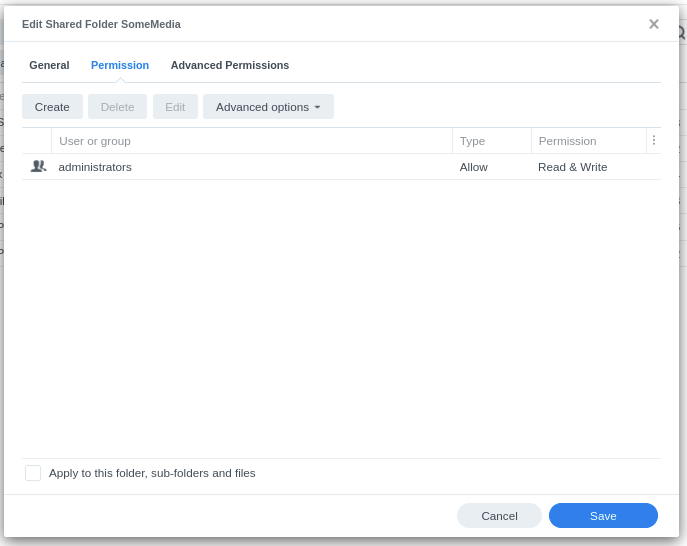
-
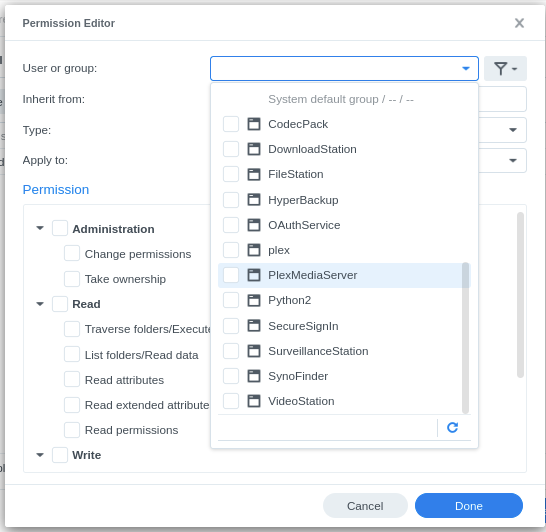
Click Create to open the Permission Editor

-
The “User or Group” box is blank. Click the scroll down and find
PlexMediaServer
-
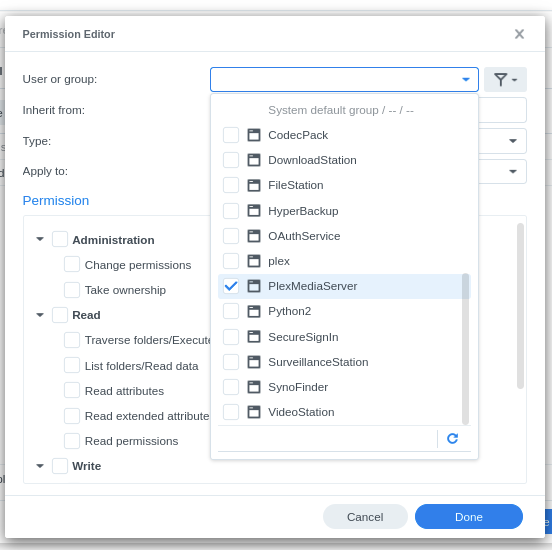
Click it
-
Now click anywhere else inside the editor (over near the Read permissions works)
-
Click the Read box and click the Write box. PlexMediaServer does not need Administrative permissions

-
Click Done to save the new rule and return you to the Shared Folder menu
-
Click “Appy to this folder, sub-folders and files”
-
Click SAVE and let it apply the new permissions rule for PlexMediaServer
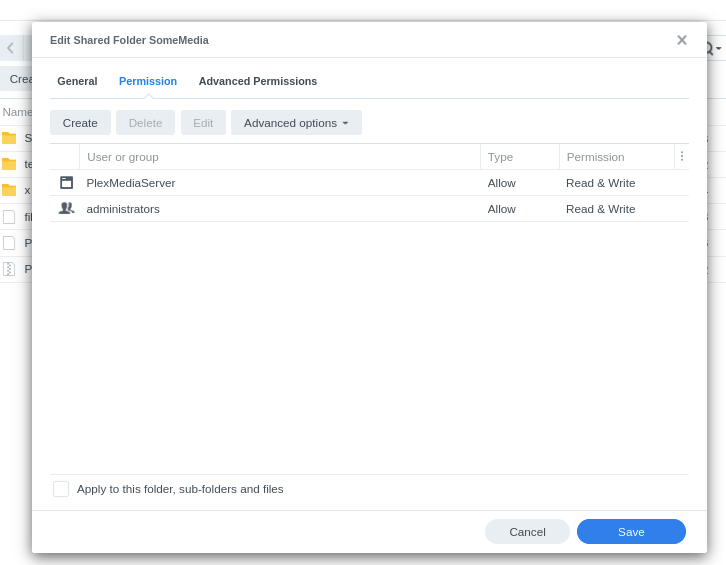

Working NOW!!!
WOW
So that’s all there was to it
I want to thank you so much for everything
Thanks Everyone
David
Yep,
That’s all it was.
Linux, which DSM is built on, is a stickler for permissions.
If you don’t give User A permission to read User B’s files, Linux will flip you off without raising an eyebrow.
In this case, give PlexMediaServer permission to read Your files
Permission is never implied on Linux. Everything must be expressly granted.
I thank you
