Same thing here, suddenly no access via plex.tv, same for a friend’s server.

May I enquire where you go to see that?
I truly don’t understand why these Plex Forums don’t have a great big “status” link at the top so we can pinpoint whether it’s a local user issue or a Plex site related issue which might eliminate some posts and needless clutter in the forums.
I assumed it was something on the Plex side as I can access some of my remote servers fine with phone/tablet apps but am having various degrees of success using app.plex.tv which varies between different computers tried.
status.plex.tv.
It is linked at the bottom of the page, under Resources.
Disabling hardware acceleration did the trick for me.
@vir2oso I’m using an Nvidia shield as the server…i had no problems in the past. This thing started a few weeks ago. I don’t know what started it. How about you?
Yes, i am using the Nvidia Shield for my server as well. I am not sure when this issue started for me. but it was relatively recent.
@vir2oso I’m pretty positive I had hw acceleration enabled when it was working before. Can you confirm?
Hey I think I need my certificates reset too or something. I can’t get my server to work no matter what I try and I’m losing my marbles. Every time I try to connect via https://127.0.0.1:32400/web I get the message SSL_ERROR_RX_RECORD_TOO_LONG
I hate to pile in with a me too post, but a few days ago I suddently lost connectivity. Originally I thought this was due to me making some changes in the networking, but I’ve confirmed that the networking is working as intended. Yet I see this odd message:

“Fully accessible” yet “Unknown IP” and no connectivity.
I do have a bit of an oddball setup here with multiple plex servers in the same network and the fact that the server is running under Kubernetes. What makes me suspect server side issue is that all of the servers seem to have fallen off the edge of the world at the same time. This includes the non-Kubernetes server as well.
I looked at your Plex.tv account (for this email)
I don’t find any server’s listed.
You had one which was deleted about 3 hours ago.
For this:
I will need to see the log file for context.
This isn’t a typical Plex.tv message
The server was deleted bc I totally uninstalled everything trying to fix it and I think I just made it worse lol.
Logs.zip (1.8 MB)
Here’s my logs file I hope this makes some sense of this issue
I see why you thought it was a certificate
Aug 29, 2023 21:39:13.769 [4920] DEBUG - [EventSourceClient/pubsub/178.79.145.139:443] Stopping.
Aug 29, 2023 21:39:13.769 [4920] DEBUG - [EventSourceClient/pubsub/178.79.177.129:443] Resolving 178.79.177.129 port 443
Aug 29, 2023 21:39:13.769 [5008] DEBUG - [EventSourceClient/pubsub/178.79.145.139:443] Failure: 1236 - The network connection was aborted by the local system.
Aug 29, 2023 21:39:13.769 [4920] DEBUG - [EventSourceClient/pubsub/178.79.177.129:443] Resolved 178.79.177.129 to 178.79.177.129:443
Aug 29, 2023 21:39:14.120 [5008] DEBUG - [EventSourceClient/pubsub/178.79.177.129:443] Connected in 351 ms.
Aug 29, 2023 21:39:14.121 [4920] DEBUG - [EventSourceClient/pubsub/178.79.177.129:443] Wrote data, reading reply.
Aug 29, 2023 21:39:14.284 [4920] DEBUG - [EventSourceClient/pubsub/178.79.177.129:443] Read HTTP reply header.
Aug 29, 2023 21:39:14.284 [4920] DEBUG - [EventSourceClient/pubsub/178.79.177.129:443] MyPlex: We appear to have regained Internet connectivity.
Aug 29, 2023 21:39:14.491 [4920] DEBUG - [EventSourceClient/pubsub/178.79.177.129:443] Network: 192-168-1-171.abcdefghijklmnopqrstuvwxyz012345.plex.direct failed to resolve to 192.168.1.171 but instead yielded (null)
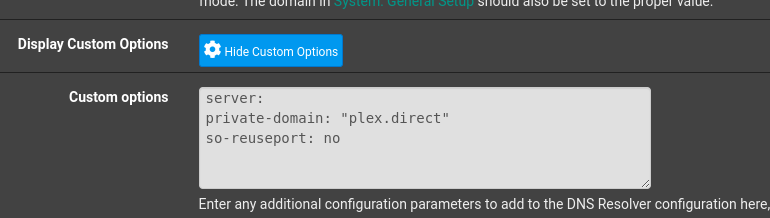
“but yielded (null)” is a firewall or modem/router DNS rebinding block.
Do you allow *.plex.direct private domain exception?
How do I do that?
which make/model modem, I’ll try to look it up in their manual
It’s a BT Home Hub 3. Thank you very much for doing that my heads away
this will take a bit. BT HH 3 is awkward. Been a while since I went digging
UGH… I am not in the right country 
this is probably going to require BT support folks get involved.
I think something is “set too tightly”
plex.direct domain is an address on your LAN… which is exactly what they block.
I had to make the same allowance on my pfsense.
This is what I needed to do.
For other routers, the concept is the same albeit different syntax.
– Allow “plex.direct” private domain to resolve to the local LAN.
(DNS Resolver settings)
About to give up and go to bed and try callling BT in morning (I can’t find any such settings anywhere in the router settings) would buying a new router solve any of this or would I just be throwing money away?
