I have the same issue since last Friday, can you do the same for me ?
Your certificate was updated 2 weeks ago.
Have you restarted since then?
Plex.tv will always have the current certificate. While PMS should also update, I’ve seen a few cases where it doesn’t (not sure why yet)
Yes I have restarted, I’ve updated tried mutiple ports but entirely unable to turn on remote acess attached are my logs
Plex Media Server Logs_2023-09-07_19-06-43.zip (4.1 MB)
Currently on version 1.32.6.7468-07e0d4a7e
I’ve tried signing the sever in and out, sever running Ubuntu sever 22.04.04 installed packages are up to date
When specifying a port has the local port always stated the same, I’ve just noticed alough I have port “9090” specified the local port is still 32400
Having now updated the port forwarding to match this it’s working, but it has been working before this. Has this changed ? Where the local port is no longer the custom specified port?
Hey,
I’ve still had no joy getting Plex to connect via the web.
It connects sometimes for a few seconds, sometimes for a few minutes.
I’ve included port forwarding, firewall and Plex screens.
The firewall and antivirus are deactivated on my computer as is my VPN.
I’m completely at a loss as to what else I can do. My ISP are not blocking any ports either.
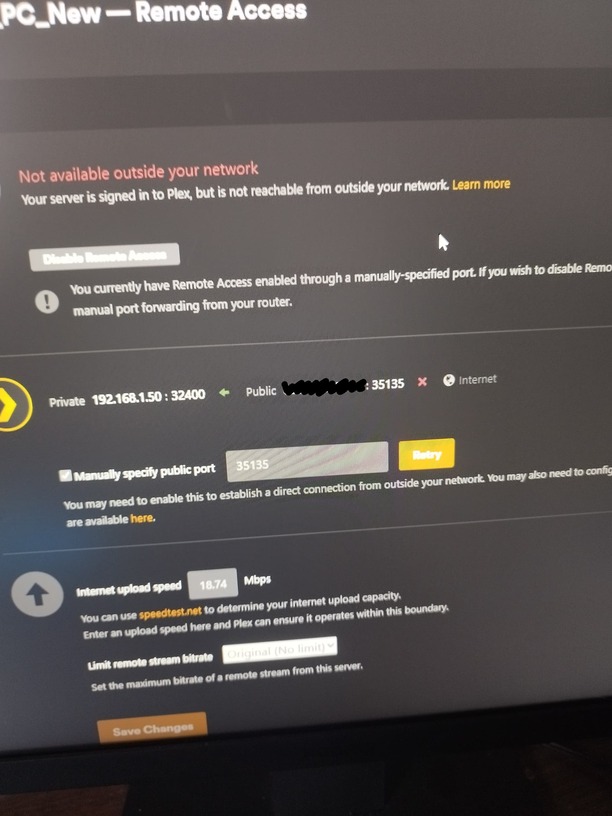

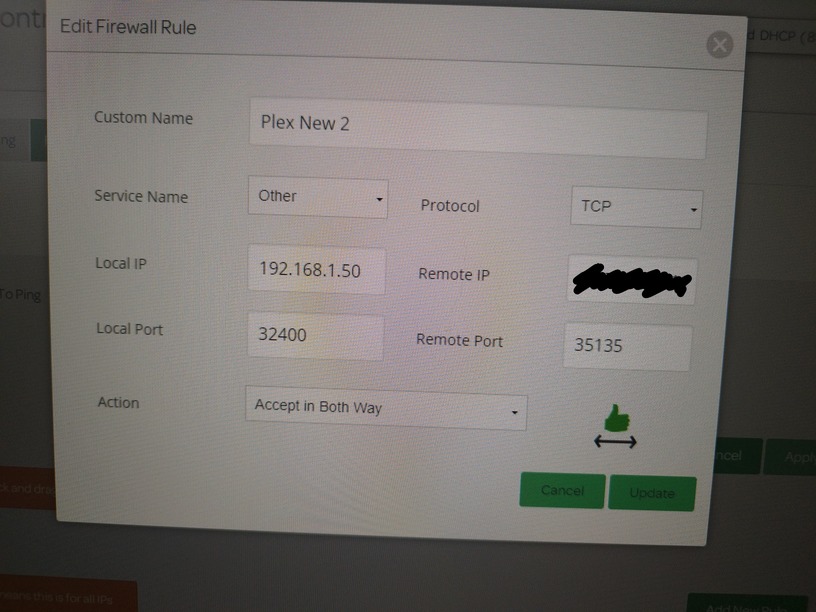
Other the past week or so I was able to use remote access while using expressVPN. Plex is running off a pc and I have expressVPN installed, anyway, it used to work with the vpn on and now it does not. I’m a total noob when it comes to these things so bear with me. I will provide whatever information I can. Help!
I’m not sure what other information I can give you now.
Server Version 1.32.5.7349-8f4248874
Plex Media Server Logs_2023-09-09_21-38-09.zip (7.6 MB)
The screenshots in my other post and the attached logs.
I am having the same issue. Anyway you could take a look at my logs and advise?
PMS & Plex.tv show your server as reachable
Sep 08, 2023 19:29:28.165 [23226453277496] DEBUG - [EventSourceClient/pubsub/XXX.XXX.XXX.XXX:443] PubSub: Got notified of reachability for async identifier fbea4547-c83a-443e-acbc-d8840ab706b3: 1 for XXX.XXX.XXX.XXX:32400 (responded in 531 ms)
“1” = reachable
Perhaps have the remote apps restart ?
Its strange because I am unable to do so. I have restart the remote as well as the container and it doesnt seem to change anything. Maybe a certificate reset?
No, nothing with your certificate.
The only thing I see is this:
Sep 09, 2023 18:28:06.366 [23226453277496] DEBUG - CERT: incomplete TLS handshake from [::ffff:10.0.0.22]:54114: stream truncated
Sep 09, 2023 18:28:06.430 [23226331097912] DEBUG - Request: [10.0.0.22:54115 (Subnet)] GET /diagnostics/logs (21 live) #3091d TLS GZIP Signed-in Token (ianscot1) (Firefox)
You’ve got IPV6 enabled but are on an IPv4 LAN. IPv6 is unnecessary.
Whatever is at that IP needs a restart or software update
Ill disable ipv6 but not sure how to remedy the situation as I have reset most things that could be culprits…any other advice…? It hasnt worked for anwhile…
If it’s not worked for a while, coming in now to fix it is tough.
I do see two servers named ‘Tower’ on your account.
I wonder – How many players are looking for the wrong one ?
Would you like me to delete the one not seen in about 3 months ?
It isnt that its an issue with remote the other server can be deleted but Im not sure whats up with that as it doesnt even show up on my end. When I say a while I mean about 2 weeks…I was unaware of the forums until a friend pointed it out. Are you sure its not a certificate issue? Ive seen mulitple threads were that was tried and it worked out…
I’m positive it’s not a certificate issue.
I’m also positive Plex.tv can contact your server. The “reachability for … : 1” means TRUE. 1 = True, 0 = False.
I’ll conduct a test… One moment please.
EDIT: Sending you a PM. (Results of me manually connecting to your server from your Published IP address)
I’m having the same problem I guess. I disabled remote access a while ago but re-enabled it yesterday and while it seems to work at first, after a few seconds it turn to unavailable. Restarting the server didn’t help.
These are my log files, in case you need them:
Plex Media Server Logs_2023-09-10_16-09-45.zip (6.5 MB)
Thanks in advance!
@ChuckPa Hey dude. have I offended you at some point? You appear to have overlooked my post with requested information and screenshots.
Thank you for your time.
Hey @simon754
Sorry, PT/Rehab distracting a lot .
Just got back now and want to address this first up
- You’ve not offended
- I see you’re created a few things and deleted others
Using the port reported to Plex.t — From my workstation – There is NO connection
Are you using a custom URL which is out of date ?
