Suddenly no remote access

No, not using a custom URL. Literally nothing has changed in my setup other than changing the port forwarding as per your suggestion. Nothing worked until…

It’s the strangest thing but I rolled back to the stable version from September last year and everything is up and running fine using the port in the pics. For now I’ll not upgrade the server and see how it goes.

Hope a solution can be found as I find Plex an incredibly useful platform.

Thanks for your time dude. Appreciate it.

@simon754

Have you seen this?

Hey, Yes I had seen the post.

The tick box mentioned was unchecked so this had no bearing on the connection. The only thing that seems to have solved it was to roll back to version 1.29.2.6364-6d72b0cf6

It might help to know that whilst my setup is working for the moment, it’s only able to do so with Relay activated. If I disable the relay option the server isn’t reachable, so there is still a problem somewhere.

Plex Media Server Logs_2023-09-14_16-57-36.zip (3.1 MB)
Hi, I am also experiencing issues with accessing remotely. I have uploaded my server logs.

Hey dude,

anything further on this problem?

@St0rmFirez

You’re running windows.

More and more, this is turning out to be a Windows problem.

I’m a Linux guy and I can’t recreate it on Linux for folks either. :frowning:

I can only think this is ISP / Modem-router specific and, at this point, other than what was discovered about Windows, I am CLUELESS :cry:

There is a post regarding Windows and how to confirm Windows is not the problem.
(so far it has been)

1 Like

Sorry for repeating myself, but post must have got lost/overseen.

A couple of weeks ago my Android apps suddenly lost access to my Linux Remote Server
Created a post about it: Android App unable to connect to Remote Servers

Locally everything works fine.
Remotely only Android Apps fail to find server.
PlexAmp for Android, Plex App for iOS and WebPlayer (DDNS -plex.mydomain.dom:32400) all work fine.

I looked up everything I could, PMS Network+Remote settings, Router forwarding, nginx reverse proxy X-headers-forwarding, it all seems to check out OK.

Saw some cert errors(CERT: incomplete TLS handshake from 80.187.67.39:15370: sslv3 alert certificate unknown (SSL routines)) in the logs and though it might be my nginx+letsencrypt doing something wrong, but couldn’t find the issue and assumed it was an Android App issue, since everything else works.

After using 3 different versions of the Android App, not so sure anymore.

Not sure if it’s related, also found “MyPlex: Invalid connection URL ‘plex.mydomain.dom’.” in the logs, but the same address works using a browser remotely.

Most details are on my linked post and am willing to provide more info/logs if required.

Would appreciate any help/insight.

Plex Media Server Logs_2023-09-11_16-58-25.zip (4.3 MB)

@ChuckPa
I hate pinging and bothering people but you seem the only Team Member active in this and a couple other threads related to Linux Remote access, it’s been almost a month since my first post/thread and would love if you could take a look at my previous post, maybe something Cert related or something dumb dumb I overlooked.
Sorry again for pinging you and thank you in advance for any effort made.

@Matutanos

Sorry for being slow. It’s been a long, uncomfortable, summer for me with health.

  1. I see your Plex.*.* hostname published at Plex.tv as a Local Address.
    DNS lookup of that name actually resolves as a (..*.215) WAN address

  2. In your log files (Thank you).
    – I do not see where you’ve added this DDNS (which would need be a full cert) to PMS
    – I see where a couple addresses are using your “FQDN DDNS” and are getting “Cert Unknown” errors – which is the correct reply in most cases.
    ( PMS looks at what’s in the HTTP header. If that header contains a FQDN, that’s what it will use first. It’s reporting error because ‘sslv3 alert certificate unknown’ which is correct; you’ve not told / given PMS your custom certificate to use )

This

Router forwarding, nginx reverse proxy X-headers-forwarding,

bothers me. This is what’s triggering Plex.

If you don’t have a certificate, why are you forwarding the full header without rewriting and stripping down to the IP:port/URL_tail?

Thank you for the quick reply.
Regarding the published hostname, I’m guessing that is the “Custom server access URLs” setting, I was dicking around with it tryin to get to work and put both (custom domain and local address), that should have been fixed now. Using “https://plex.mydomain.org:32400/

The reverse proxy used to work without issue, it suddenly broke sometime around 1st week of August
From the router side:
-port 32400 gets forwarded directly to the Plex server
-ports 80 and 443 get forwarded to nginX
nginX upgrades port 80 request to 443 and forwards them to the proper VM depending on sub domain. It also manages the Certs, from Let’s Encrypt with help of their “Certbot” script.

I did a bit of testing with the nginX config but ended up reverting to my last known working config:

server {
server_name plex.mydomain.org;
location / {
proxy_pass https://192.168.178.17:32400;
proxy_set_header Host $host;
proxy_set_header X-Real-IP $remote_addr;
proxy_set_header X-Forwarded-For $proxy_add_x_forwarded_for;
}

listen 443 ssl; # managed by Certbot
ssl_certificate /etc/letsencrypt/live/cloud.mydomain.org/fullchain.pem; # managed by Certbot
ssl_certificate_key /etc/letsencrypt/live/cloud.mydomain.org/privkey.pem; # managed by Certbot
include /etc/letsencrypt/options-ssl-nginx.conf; # managed by Certbot
ssl_dhparam /etc/letsencrypt/ssl-dhparams.pem; # managed by Certbot

server {
if ($host = plex.mydomain.org) {
return 301 https://$host$request_uri;
} # managed by Certbot

server_name plex.mydomain.org;
listen 80;
return 404; # managed by Certbot

Certbot seems to do a nice job with the Let’s Encrypt Certs, working for my other VMs/Apps like Owncloud.

It worked for years so am hesitant of blaming the nginx config unless you can tell me where the issue lies. Do i need additional configs on the nginx or Plex VMs?
And also find the whole thing uncommon is that PlexWeb and iOS Apps (need to test the Win App) work with no issue and several versions of the Android app refuse to find the Server

Once again thank you for the time taken and hope your health issues get better soon.

Be very careful with the ports. and X-Forwarded-For.

X-Forwarded-For will, by default, include the FQDN.

Right or wrong, PMS will look at / evaluate X-Forwarded-For header first.
PMS takes the ‘stricter’ path when evaluating.
(There are two schools of thought with this but this is what we have).

It’s done this now for some time ( a few years at minimum )

I do recommend you ADD your cert to Plex.tv

The logic behind this:

  1. External FQDN ref → Your WAN with cert.
  2. Forward your cert → PMS (which knows your cert)
  3. PMS makes orderly transition to plex cert because the connection is trusted.
  4. Remote access will connect

Ref:

  1. I have my own cert
  2. I give PMS my P12 (cert + key + Let’s Encrypt CA for my cert)
  3. WAN connections come in to my WAN as HTTPS FQDN URLs
  4. PMS sees and acknowledges as valid .
  5. Reverse connection to the HTTPS client is established using my server’s Plex cert

As for Remote Access itself

  1. I have PfSense as my edge device.
  2. It also manages (ACME) my FQDN cert with LE.
  3. I never have any issues whatsoever with it failing to immediately go ready nor does it ever drop
  • My ISP is now hybrid IPv4 / IPv6. My machines are dual stack operational.
    Most times, I get IPv6 traffic direct connects from those I’m sharing with.
    IPv6 isn’t “official” yet but if you’re properly configured. it will work without issue)

Thanks for the comprehensive information, but somehow I managed to mess it up.

First I commented out the line “proxy_set_header X-Forwarded-For $proxy_add_x_forwarded_for;”, reloaded nginx, no improvement.

Afterwards I went on t’internets to figure out how to make a P12 out of my cert files and this seemed to do the trick:

openssl pkcs12 -export -in fullchain.pem -inkey privkey.pem -out plex.mydomain.org.pfx

without password. Not sure if this is the right method, but is from the Let’s Encrypt community site.

then copied plex.mydomain.org.pfx from Certbot into the PlexVM using scp and set the Settings->Network accordingly, leaving “Custom certificate encryption key” blank.

Saved, rebooted the server, and still no improvement.

Could this be related that my cert common name is cloud.domain.org (plex.domain.org is one of alternate names)?

Custom certificate domain:
Currently plex.domain.org, maybe set to cloud.domain.org? but then the wrong address gets published?

Domain name to be published to plex.tv using your mapped port; must match a name from the custom certificate file.

or should i try to coax Certbot to use only domain.org or www.domain.org as CN? or even try to create a Cert just for Plex (not sure how Let’s Encrypt and Certbot would handle this, but am willing to try anything by now)

I don’t have IPv6 enabled in my entire home network, I barely understand IPv4 as is, didn’t want to open another can of worms

Once again, the server says Remote Access is OK ( Fully accessible outside your network), PlexAmp, Plex for iOS and the WebPlayer all work from remote, as did the Android Apps previously. The only changes made were updates, so I’m having a hard time wrapping my head around this cert issue, unless the Android app now has stricter rules somehow.

Attaching fresh logs from a few minutes after the last reboot.

Thank you once again for taking the time to try to fix someone else’s messy noobish setup

Plex Media Server Logs_2023-09-26_14-49-41.zip (3.2 MB)

I have recently moved and Plexamp was working fine until tonight. I tried logging in and out numerous times but i still can’t access it remotely (can while on local network.) Plex reports Green Check on remote access and I have been able to routinely ping the server. I did some googling and worry that my router (BGW-320) might be causing problems (but again I can ping the server, which should mean it works, no?) I admit I am no network guy, I am just googling and clicking and trying. I have hopefully attached a zip of my logs.
Plex Media Server Logs_2023-09-26_23-28-32.zip (2.8 MB)

@ChuckPa something is wrong with my setup, and I don’t think it’s the certificate.

My brother is aboard for a couple of days on a business trip and texted me earlier that his Android Plex App was working again. I was over the moon thinking that all the effort and tinkering with the certificates had finally paid out, I tried it myself using mobile data and no, it’s still not working.

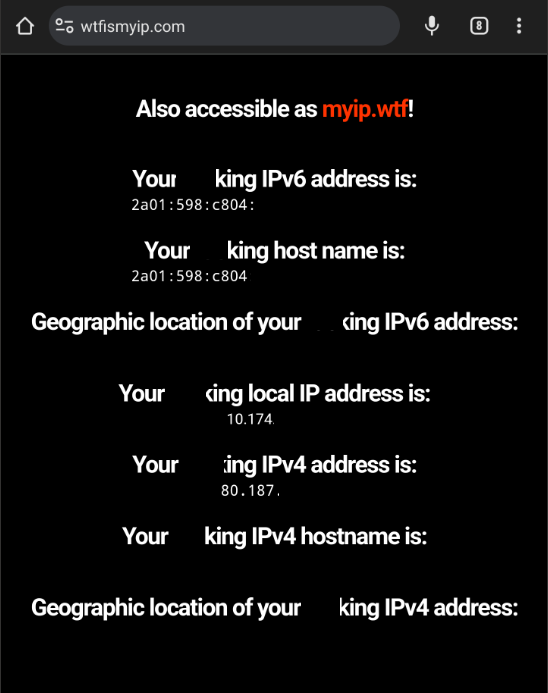
After a bit of troubleshooting I asked my brother to check wtfismyip and send me a screenshot and I think not enabling IPv6 finally came to bite me.

This one is taken from my mobile (App doesn’t work):
image

and this from my brother (App works):
image

For some reason my hybrid IPv4/6 connection doesn’t work while my brother’s with only IPv4 it does.
And it only affects the Android app, everything else works remotely. (PlexAmp, Windows App, Web Player, iOS App)

I’m even more lost than before, do you have a clue if this is an Android App thing, a server thing, home network thing, or just ISPs handling things in a way that breaks the App?

Should I open a new post in the Android App section since it’s way off topic by now?

Anyway, thanks again for all the time taken and hope you get better soon

Questions:

  1. Is your LAN IPv4 or IPv6 (the host IP)
  2. In Settings - Server - Network - Show Advanced
    Do you have IPV6 enabled or disabled?
  3. Signing into your modem/router, do you see IPv4 / IPv6 / or both addresses on your WAN port ? LAN port ?

Remember, Mobile devices usually get IPv6-only addresses by the cellular providers.
Those addresses are also NAT addresses in some cases but that should not break things (else everyone would complain)

I disabled everything IPv6 at home
Router has IPv6 disabled.
Plex Server has IPv6 disabled.
Plex and nginX VMs also have it disable if I recall correctly

I barely learnt IPv4 and v6 seemed dauting, so stuck with what I knew works. (also for security reasons, can’t protect what I don’t understand)

Guessing that is coming back to bite me now…

clarify for me please ?

Is PMS in a VM or Native on the host ?

The PMS is a VM in a TrueNAS scale Host with GPU passtrough.
Networking in bridge mode so it has it’s own MAC/IP in the home network.

@Matutanos

Are you using plex.tv / app.plex.tv for the access -or- are you attempting to use your FQDN address ?