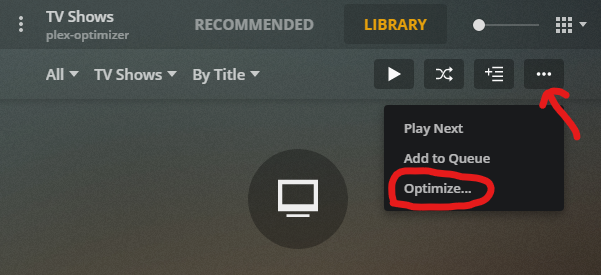
I’ve been optimizing content for a while and had setup to optimize my whole library and set the location to the library folder. I had to delete all the versions recently because one the conversions failed and now when I try to optimize the whole library it doesn’t let me set the location anymore. Did something change that doesn’t allow whole library optimization anymore? I am able to optimize individual tv shows and set the location, but not the entire library. It was nice before because I could run a library scan and it would automatically start optimizing the library with the optimize jobs I had previously configured.
Plex for Windows client
Version 1.31.1.2262-74fdc6b7
Thanks for the reply @Volts. That workaround is indeed what I have been doing. I use this server strictly for optimizing content, so things are in and out frequently. It is annoying that I would need to do that each time I want to optimize content. Hopefully this option can come back in the future.
Oh I also forgot to mention that I tried adding another location to the library to try and point the optimize location to that one. The official Plex support article states that this should be possible, but even that has the same results. I do believe this is a bug.
Same issue for me, I want all automatically optimized content to save to an alternative location but I only get the option to save in the original folder. I`m running Plex on a Synology NAS and have the latest version installed 1.23.4.4805-6000. If optimizing manually I get the option to save to an alternative location.
@nostraplex It’s good to know that this functionality is not broken on v1.22. Could you point to where you found the installer for v1.22 and how you downgraded? I couldn’t find previous versions on the plex website.
I just googled older plex downloads specific to my OS. I don’t think plex maintains an archive which is a bummer. always be careful going via 3rd parties.