@ChuckPa
Sorry, I’ve followed the instructions several times now. I’ve completely uninstalled the new DSM7 plex, but something remains, as now I have 4 failed installations when I open Plex.
The installer doesnt fail, it installs correctly in a couple of seconds and seems to make no attempt at migration. no log is created, and nothing appears to copy over from the “Plex” folder.
I’m happy to retry, but even doing a total uninstall and erase seems to leave something behind, as the uncontactable servers remain.
I’ve removed all the servers from inside PMS via a web login, and have deleted all traces of the PLexMediaServer folder, but still, whenever I try to reinstall (following all the steps, with all permissions), the install makes no effort to grab files from the “Plex” folder, installs in seconds and wants me to add new folders once I log in.
I can do so, but it’s a totally fresh installation. Nothing is brought over from DSM6.
all files remain in my old “plex” folder
Hi again,
First, mMy migration went well after some efforts (DSM installed, new Plex for DSM7, proper permissions, former Plex folder deleted, Plex user removed).
I thought my issue with Plex vs dsm 7 was solved, but I observe today that it is not the case.
I just added a video to the database, with same Director as other videos already there in the database.
But this director is not recognized as the same as already flagged in my database.
When filtering by director, I get a list that display two times the same name, one corresponding to the previously installed videos, the new list (with just one item right now) containing the new video.
In other words, everything behaves as if the unique identifiers associated to attributes of the database are actually no longer unique !
Please help, because Plex is no longer usable in these conditions.
Yes, I remember a new agent system (faster, better and so on) was proposed, and I agreed
My memory is not at best, so I cannot tell you which transform it did.
Thanks for your support.
There is one solution I am aware of but not sure you will like it.
If my solution is not acceptable, I will ask if there are others
My method is
Delete the library section
Recreate it with the desired agents settings
Don’t change then after you’ve set it
The problem is because the id numbers changed. Media matched with one agent isn’t seen by another agent. (not sure I agree with that logic – but it is what it is)
I recreate libraries so often that I don’t care about watched status.
I know what I have watched.
After creation, I go in, Select the entire block of what I’ve watched, and mark it all in one action.
Honestly, I am not a fan to delete the library.
Although most of it is automatic, building this library still entailed a large amount of work for several years:
thousands of entries,
meta data not necessarily easy to get in some instances,
database built with English titles, but posters chosen with original titles,
different versions of same stuff,
personal notations (stars),
I used to lock the metadata once I checked the entries, etc…
Rebuilding a library will throw away all that.
I am a bit puzzled that identifiers depend on the Agents,
and I though one interest of Plex was the ability to gather metadata with different Agents.
@Pierre_Cervenka Are you running 1.25.0.5220 beta? We recently found an issue where duplicate tags could get created. There is a 1.25.0.5246 beta update that just came out with a fix for this.
I gave up.
There was a issue w/the sub folders not having correct permissions, but I started over. Uninstalled it, including restarting the NAS, etc. Finally made it through installation w/no errors or complaints from the install program. It seemed to work but after about a hour it went back to manually stopped again.
I unmatch the last video, and then re-match.
Now, it works, i.e., clicking to the director name yields the proper list
with all the videos of this Director (previously there + new video).
I will try with others videos, and let you know if it is really fixed.
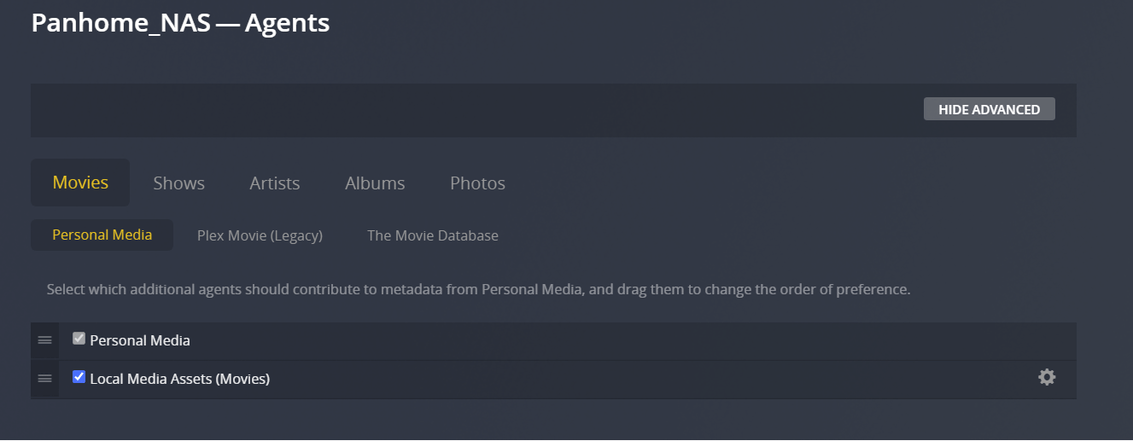
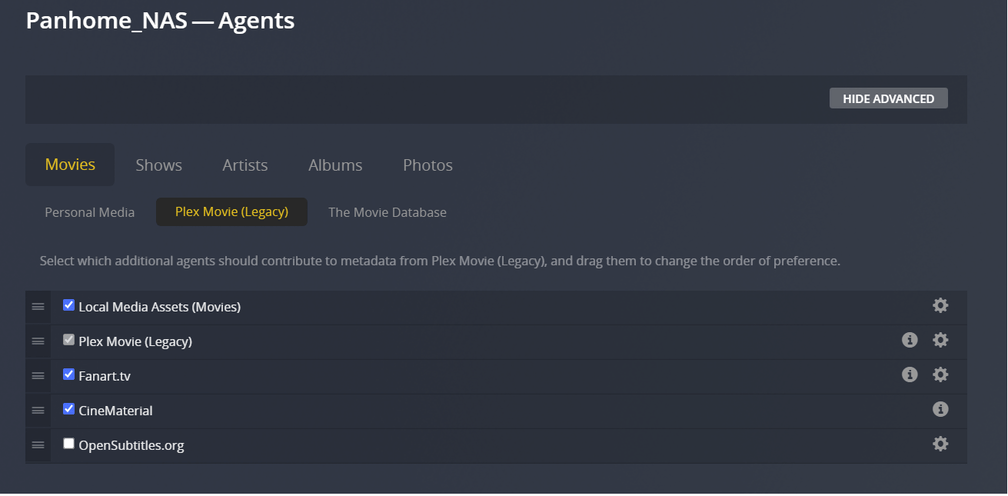
Actually, I have some difficulties to understand the structure for defining the Agents:
why under ‘Movies’ is there ‘Personal media’, ‘Plex Movie (Legacy)’ and ‘The Movie Database’,
and find again these items plus others under each of them.
I am not sure, but in my kind of fuzzy tests,
I think I removed ‘Plex Movie’, and replaced by the former ‘Plex Movie (Legacy)’.
I have a strong suspicion that it is what fixed my problem.
Anyhow, I would be very grateful to receive your comments.
Thanks
Done. Exact same result. The new SPK installs in a couple of seconds and then wants to set up a new clean installation, with nothing being grabbed from the old plex folder
#!/bin/bash


echo  Plex is located at \"/volume*/[Pp][Ll][Ee][Xx]*\"

echo DSM 6 installation found at \"/volume*/[Pp][Ll][Ee][Xx]/Library/Application\ Support/*\"
Please create a Scheduled Task, User-script, with the above as the “Task settings” (script contents).
After almost a week of going back and forth with Synology Support, they have basically given up and told me it’s a Plex issue and they can’t fix it. They did suggest the possibility of installing in Docker to avoid these issues. I’m not totally against this as I had considered doing this some time back anyway but I wasn’t sure whether there were any negatives to going that route. I’m also not really familiar with Docker and wasn’t sure how difficult it would be to set this up. Any thoughts?