Using server version 1.18.8.2527.
I took advantage of a TIDAL promo to signup and have it linked to Plex. After enabling music under Online Media Sources and linking my TIDAL account with Plex, I restarted PMS and also my clients as suggested in one of the support articles (https://support.plex.tv/articles/adding-tidal-subscriptions-to-plex/). TIDAL would now show up as a library source, but the My TIDAL page wouldn’t work and songs would only play for 30 seconds.
After pulling my hair out, I found people having a similar issue here on the forums and after trying their suggestions, I can confirm that for each device I want to work with TIDAL, I have to sign out, remove it from my list of authorized devices and then sign back into Plex on the device.
If I add a TIDAL album to my music, it shows in my library just fine, however, all of the songs show preview next to them. If I try and play the song from the web client, I will initially see the length of the song as 30 seconds, but then it will change to the actual length of the song and will play the full song. When playing on the Roku, I get this:
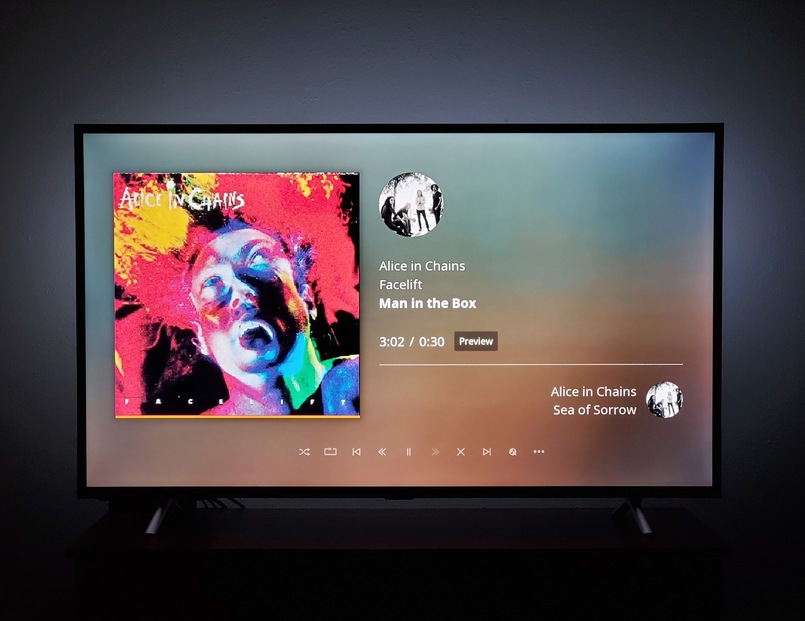
You can see it plays the entire song as well, but it also shows it is a 30 second preview.
It’s been awhile since TIDAL integration was announce, and I know there have been some major changes to music as a whole, but I thought browsing local music would bring in TIDAL supplementation. For instance, if I only have 1 Adele album, when browsing her artist page, her other albums would be shown as TIDAL albums. Is there a change I need to make for this to happen? (https://support.plex.tv/articles/enhance-a-plex-music-library-with-tidal/)
Also, why is music the only Online Media Source that doesn’t have an option to disable for managed users. I have Movies and TV enabled for all, but podcasts enabled only for my user.

Other than that, I can see myself keeping the TIDAL subscription. I was hoping I’d be able to edit metadata when artists or albums were added from TIDAL to my music library and I can!