Server Version#: 1.15.6.1079
So both my tv shows and movies only show random images from the show/movie and not the movie poster. I have been looking around this forum and have tried a lot:
- Moved my files out of the folder -> Optimized, Clean Bundles, Empty Trash
- I have gone one step further and uninstalled Plex, cleaned all cache/temp files, restarted PC, created a new login, installed into a new directory, moved video files to a different hard drive.
- took ownership of my video files and folder within Windows 10.
- Countless other “uncheck this, save, go back and check again” fixed…
I’m using Windows 10 with a hard drive inside the pc… no external media server or anything. I’m really pulling my hair out on this one and cannot figure it out.
Thanks in advance.
How do you have your agents set?
you didn’t install it in program files? Did the PMS folder get created in appdata?
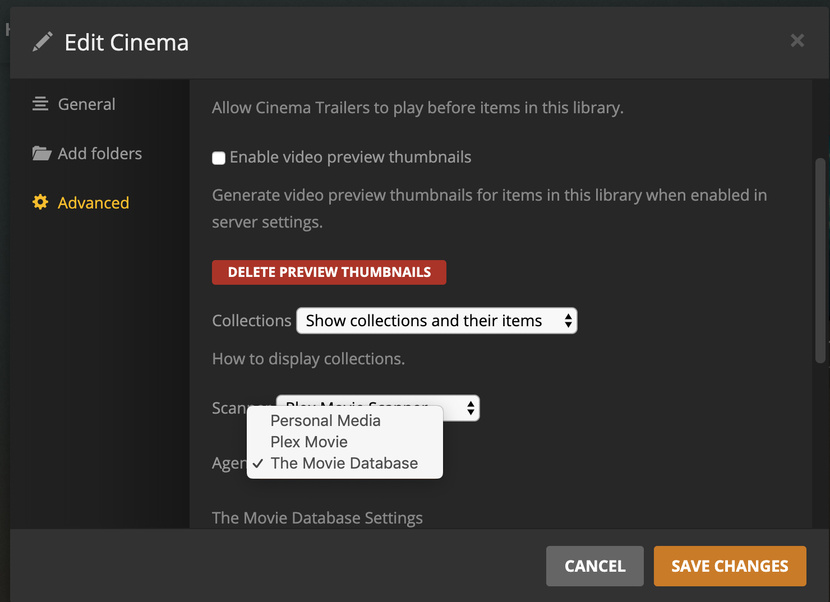
What version number of server are you using? The Plex Movie agent appears to be missing. It should be between Personal Media and The Movie DB
if you edit the library in the window under advanced what is selected as the agent?
If you edit your movie library, go to advanced
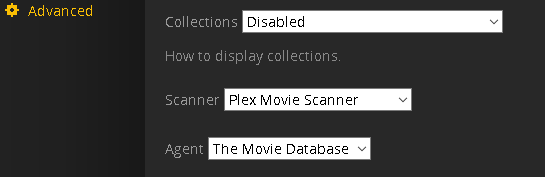
is the scanner and agent set like above
I installed plex into the program files folder… just called it something different (didn’t know if some weird cache was being linked to the old installation path… again, I’ve tried everything and trying anything).
Server Version#: 1.15.6.1079
So I’m missing the Plex Movie Agent…?
@nydave69 -> That is how I have it setup.
only other thing would be the file naming structure…
movies being the main movies library folder
/Movies
   /Avatar (2009)
      Avatar (2009).mkv
   /Batman Begins (2005)
      Batman Begins (2005).mp4
      Batman Begins (2005).eng.srt
      poster.jpg
My files are all the same as the previous working version of my Plex (I reinstalled Windows 10 a little bit ago and then this started).
And I have gone back to make sure my files are named correctly (and they are).
I just noticed the same issue but only for new added Movies. It is not loading the Metadata and matching is not working not manual or auto. Not sure if it is an issue with the latest beta release.
1 Like
The Plex Movie agent is not required to use but is the default and should be there on a fresh install. Which leads me to think there could be other issues with install.
I’m not sure what this means. Called what something different, the folder?
after you hit refresh metadata and nothing happens. grab the logs and look at the pms.log and imdb.log and themoviedb log for errors.
I installed plex to C:\Program Files (x86)\Plex2 just so it didn’t have the same install directory as the old Plex (even though I uninstalled and rebooted). I wanted to make sure any leftover registry entries weren’t causing a problem.
Here’s some errors I found in the logs. No errors in the Plex Media Scanner.1.log.
But found these in the com.plexapp.agents.imdb.log
2019-05-31 14:07:50,160 (c60) :  ERROR (networking:219) - Error opening URL 'http://127.0.0.1:32400/system/messaging/clear_events/com.plexapp.agents.imdb'
2019-05-31 14:07:50,160 (2a40) :  ERROR (networking:219) - Error opening URL 'http://127.0.0.1:32400/:/plugins/com.plexapp.system/resourceHashes'
2019-05-31 14:07:50,160 (c60) :  ERROR (messaging:49) - Unable to reach the system bundle.
and
http://127.0.0.1:32400/:/plugins/com.plexapp.system/messaging/function/X0J1bmRsZVNlcnZpY2U6QWxsU2VydmljZXM_/Y2VyZWFsMQoxCmxpc3QKMApyMAo_/Y2VyZWFsMQoxCmRpY3QKMApyMAo_'
2019-05-31 14:12:43,122 (224) :  ERROR (networking:219) - Error opening URL 'http://127.0.0.1:32400/:/plugins/com.plexapp.system/messaging/function/X0J1bmRsZVNlcnZpY2U6QWxsU2VydmljZXM_/Y2VyZWFsMQoxCmxpc3QKMApyMAo_/Y2VyZWFsMQoxCmRpY3QKMApyMAo_'
2019-05-31 14:12:43,122 (224) :  ERROR (services:272) - Unable to load services from system. Loading from the current bundle only.
from the com.plexapp.agents.themoviedb.log
2019-05-31 15:58:02,075 (58c) :  ERROR (model:205) - Cannot read model from C:\plexTemp\Plex Media Server\Metadata\Movies\2\a4e6ad531332fdab799e10dcbf9da4e41df80c8.bundle\Contents\com.plexapp.agents.themoviedb
2019-05-31 15:58:02,076 (58c) :  DEBUG (networking:166) - Requesting 'http://127.0.0.1:32400/library/metadata/32/tree'
2019-05-31 15:58:02,085 (58c) :  ERROR (networking:219) - Error opening URL 'http://127.0.0.1:32400/library/metadata/32/tree'
2019-05-31 15:58:02,085 (58c) :  CRITICAL (core:574) - Exception when constructing media object for dbid 32 (most recent call last):
Then clean out those registry records and uninstall Plex server again:
https://support.plex.tv/articles/201941078-uninstall-plex-media-server/
Reboot Windows
Download a fresh copy of the installation .exe using a different web browser
Install it, into the default location
I’ve done that twice now. Uninstalled, used CCleaner and deleted all Plex folders everywhere, rebooted and reinstalled. Still no luck.
Same problem on synology …1200 movies , agents ok…with last update the first image its empty…metadataproblems ?
Oh, this was not good. The “Registry cleaner” of CCleaner does more damage than good.
Which type of Anti Virus are you using?
Have you inspected the event log of this AntiVirus, if it “cleaned” or blocked something from Plex server?
Did you download a fresh copy of the installer before doing the reinstallation?
Have you verified the digital signature of the .exe, to see if it isn’t damaged?
I’ve never had any problems with CCleaner.
Using Malwarebytes for anti-virus and it hasn’t blocked/quarantined anything from Plex. Also using their firewall app and it’s not blocking anything from Plex.
And yes, every time I reinstalled I’ve download a new .exe from the Plex site.
Try disableing Internet Protocol IPv6 in your network adaptor.
1 Like
I have the same problem . I know the change of permissions in Synology . It was the previous version , after corrected the permissions all was working . It’s with the next update that I have the same issue of this windows user…it’s strange not ???
The first image of the poster and the wall are always selected but empty …the rest are ok …
I have to go inside the data and select the next image .
This did it! I unchecked and then Refreshed All Metadata and now I got movie posters showing up very quickly (I almost started crying 

So when I re-enable IPv6 in Windows, should I use the above to make it work in Plex?
Also, THANK YOU!
1 Like