So, all seems well now, but I have added about 5 titles this morning and none of them work unless I do the Plex Dance. How do I get things back on track? Adding it after the Dance, it loads instantly like before.
Any ideas? I restarted the server already.
Edit: I spoke too soon. I am not successful I guess after the Dance. One was, but the others are still showing “Episode 19” or “Episode 4” or whatever instead of the name on tvdb.com. I could have sworn they changed…I guess not. Navigating in Chrome to thetvdb.com and searching is quick and regular.
Yeah this has gotten pretty bad the past few days. I’ve been trying to get the new episode of Legion to automatically match for the past few hours now and in the process of doing so I got all of the episodes unmatched and now some of the episodes are matched and somehow others’ episode title is the air date. Pardon my French but uhh this ■■■■ is getting to be all kinds of fucked up.
I’m really pissed now. Navigating to thetvdb.com works just fine. There is no reason it should have a stupid problem through Plex, though it must be a screwed up API.
I am so upset because there is no fix. I would gladly pay a subscription to have this crap work. A lot of money was spent on Plex Pass for my entire family ($1000) so this is simply unacceptable to me.
Why does pressing Refresh do nothing though? That bothers me. Why am I not getting an error or something to clue me in to what is going on? I guess being left in the dark on this junk, with no recourse of any kind, and no word from either party is the root cause of my frustration.
please note, the naming scheme is not the issue, as I follow all the standards. Further still, naming is exactly the same as previously matched items “the.show.name.S02E04.this.one.works” and then a show added today, that is on thetvdb.com with metadata, is “the.show.name.S02E05.this.one.doesnt.work” and it will not be found. Just says Episode 5 for example. Sometimes the Plex Dance worked in the past, but right now, I have a 0% success rate.
I am a paid subscriber and I believe this is a issue developers should resolve ASAP. Basically we are paying to have this matching thing -working. So please … get on to it …
I’m having the same problem, sometimes TVDB is finding some episodes but not others. As a workaround I’m manually fixing match with The Movie Database, click on “Fix Match” and go into Search Option and change the agent. it’s not 100%, but got me through tough times
So, this issue crept again for me today. TheTVDB.com seems to be up, but no matching. Naming format is not the problem…just a rehash of this problem. I would presume it will correct itself as it has before, but man oh man is this FRUSTRATING.
Not sure where the problem is, but need a notification system or something so we know. I get so irritated with this stuff and I think it’s because we have no way of knowing if it’s Plex, us, or something else.
this is really pissing me off, it finds the meta data then the next time i look in server half my shows are missing its metadata … This has gone on since February it’s getting irritatingly idiotic now.
yes I understand how Hard drives work thank you, I’m a technician… last i check my cable was never yanked…
the issue I had was with the movies not staying in their collections which your suggestion worked thank you. I do not have this problem on plex with movies but more with TV shows if I use TVMD it maybe finds a small portion of shows but not all but after awhile it will eventually find them, The movie database, if I set up my TV shows on that, doesn’t have issues finding my shows. I noticed TVDB having this issue last year back in November, and there is no resolution to it when I noticed it was i uploaded a show or an episode and it never collected the data for it so I entered it manually but before the issue occurred it never had this problem before. you can try and candy coat it al you want but I still think it’s an issue on TVDB or Plex’s end otherwise this issue wouldn’t have just jumped out of no where infront of me and thousands of otehr users…
I am consistently having problems with matches to TVDB. Despite carefully naming my files following the Plex guidelines I have several shows that get no match. When using fix match the suggestions are way off even though the search term EXACTLY matches the show name in TVDB. I am ready to give up on using Plex for anything other than my photo collection. I cannot understand how something as simple as matching a show title in Plex to a show title on TVDB can be so difficult. It seems to me that the fix match/match dialog is just not fit for purpose.
Matching to the TVDB is an art, not a science. My matches got a LOT better when I follow the Plex Naming guidelines pretty religiously. Adding the Year after the Show name like with Movie files helps. I just added Ash vs. Evil Dead Season 2, Here’s how that looks:
Thank goodness for FileBot! And adding the leading zero to the Season folder number somehow seems to be important. Haven’t definitively proven that but seems to help.
Oh, and also look up @OttoKerner’s suggestion’s on Agent Order. Moving the Local Agent to the bottom of the order seems to help if you have m4v files with embedded metadata.
Oh, and you’ll need to learn about the “Plex Dance”. Ridiculous but it works.
Maybe you can provide some examples of what you’re having problems matching for more help.
Okay, here is an example for the recently aired BBC Series “Travels in Trumpland With Ed Balls”
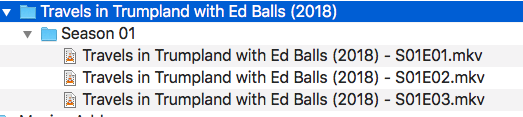
My Folder Structure is:
Television
Travels in Trumpland With Ed Balls
Season 01
Travels in Trumpland with Ed Balls - S01E01 - Proud.mp4
Travels in Trumpland with Ed Balls - S01E02 - Making America Safe Again.mp4
Travels in Trumpland with Ed Balls - S01E03 - Making America Wealthy Again.mp4
Plex failed to match even though a series with that title exists in TVDB. Furthermore, fix match does not offer the correct match even though the title in the search tab “Travels in Trumpland With Ed Balls” is an exact match to the entry on TVDB. If the search title is modified to just Trumpland the returned results still do not offer the correct series. On the other hand, if you go to TVDB and search for Trumpland you get just one result returned - the correct TV series.
I have tried editing and completely removing metadata from my files and doing the Plex dance numerous times.
This failure to match doesn’t happen to all of my TV shows but it does happen a lot and the behaviour of the search in fix match seems broken to me. Surely the first item returned in the search should be TVDBs exact match to the title?
You are using mp4 files. If these have incorrectly filled metadata, they can throw off Plex’s matching severely.
Try this:
Go to
Settings - Server - Agents - Shows - TheTVDB
In there, grab the line ‘Local Media Assets’ with your mouse and drag it downwards, so it ends up being at the bottom of the stack of active agents.
Repeat the same under
Settings - Server - Agents - Shows - TheMovieDatabase
Settings - Server - Agents - Movies - Plex Movie
Settings - Server - Agents - Movies - TheMovieDatabase
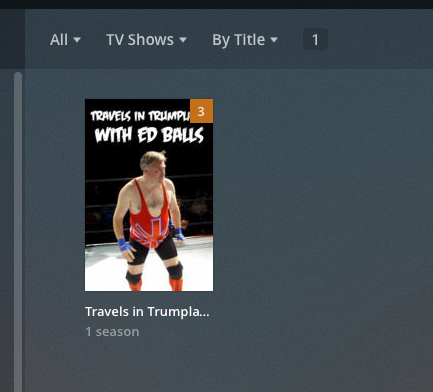
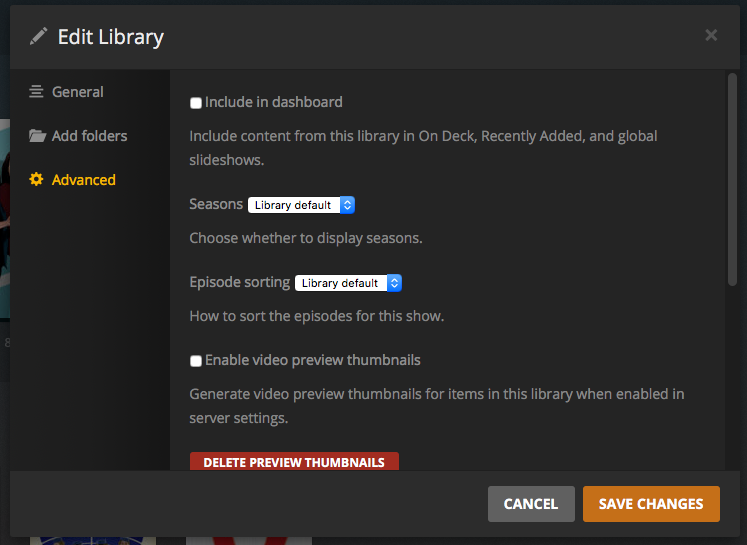
Long ago, I created a test Movie library and a test TV library to help troubleshoot problems and not ding up my main libraries. I put all files through these libraries now before they go into my main libraries just for matching tests. So I used the TV Test library for this test. I moved the files into the test library and Plex matched them without assistance. Here’s what I got:
So it looks like Plex matched it up correctly. The Video/Audio details might not match yours as I just used a test file I had lying around to dummy these episodes up.
Other than FileBot removing the year from the filenames of the files everything went as it usually does. And the only difference in file/folder structure I can see is that you don’t have the year on the Show’s main folder. Not knowing what your library/agent setup is I wonder if that is what is throwing a wrench in it for you. I’ve seen Otto’s post above fix a lot of that.
Sorry for the long post but I remember how infuriating it can be when they don’t match automatically. Check out more of OttoKerner’s posts throughout Plex. His posts have proven very useful for me to get these problems sorted out!
Thanks for the detailed posts. I moved the folder to a different location, did the Plex dance and restarted my NAS for good measure. No luck, matched to some random Children’s programme - the only similarity being “ball” in the title. Moved the folder back to its original location and got on with doing some other stuff 'cos I was way too frustrated by this time. Then, when updating files in the library for other stuff I had added the Travels in Trumpland show just suddenly matched. I do think OttoKerner is right about the metatdata screwing things - I had stripped all the tags from the MP4s before I started moving things around. The weird thing is though that Plex seemed to be holding on to random info and using it in searches even after the Plex dance. It does seem strange to me that when performing a “Fix Match” that the search term entered into the title isn’t used or if it is used it isn’t prioritised in the results. Logically you would expect that when fixing a match the users input into the title field would be the most important thing for Plex to search for rather than Plex recycling stuff that has already led to a failed match. Anyway, thanks for all your help guys, I have come to realise how important it is to prepare files before adding them to the library as making changes afterwards is a nightmare. Despite all the problems I do love my growing Plex library so I will persist.


 last i check my cable was never yanked…