Server Version#: 1.24.3.5033
Player Version#: 4.72.0
For some reason Dexter new blood wont show up in my plex library. I have tried manually triggering the library scan, but it is set to automatic. The show is put in z:/series where all my other shows are located, and found without problems.
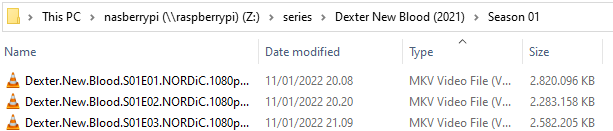
I have read the troubleshoot guide: Why is some of my content not found? | Plex Support but I can’t find any point on the list that could explain why its not being found. The naming convention is pretty standard if you ask me:
I assume Plex has probably mismatched the files and associated them to another show; e.g. the original Dexter series in case you have that in your library.
The reason is probably the tv show folder naming and structure…
Simply name it Dexter New Blood, optionally Dexter New Blood (2021). In the long run you might also want to consider including a session-level folder (here: Season 01) to improve the automatic scanning performance.
Thanks for the advice. I have tried renaming to that convention:
I can see in the webplayer that it immediately starts scanning the library as I renamed the folders, but it still does not find the show.
I do have the original Dexter show as well yes, and that still displays with the 8 original seasons.
And there are no other (mismatched) new shows under “recently added shows”
You could edit the original Dexter show‘s 1st episode () to see on the Info tab if the 1st episode of your new show is mismatched to that (same works using the Get Info action from the context menu).
Given Plex had already matched the files, it’ll insist to keep that (wrong) match. There’s two scenarios to approach this:
Follow the Plex Dance procedure to make Plex forget that previous match/association
Click Split Apart from the show-level context menu, then fix-match the Dexter: New Blood files
Hi, thanks for assisting. When reading that step guide in the link, it sounds like it will completely wipe all my metadata for all my shows. I would not want that to happen as I have spend hours, manually matching shows, and would not want to repeat that process.
That said, I can see in the “get info” dialog, that indeed it think it has 2 episode files for each episode in the original Dexter season 1, and true enough half of the episodes are the ones in from the new show.
Are there any way to only forget meta data from the original dexter show? I tried “unmatch” but it immediately re-added the show with some new cover images etc, and still had the new show under the original show - so that didn’t fix the problem.
Also, I can’t find the option split apart anywhere, but I also don’t understand whether that is only relevant after scrapping all metadata, or if this should be a stand alone solution?
Absolutely not. You’ll only make Plex forget about the “Dexter: New Blood” files by focusing on their files.
Everything else remains in place (unless you move the entire library out of the library folder… which isn’t necessary at all).

 ) to see on the