That likely means that reverting our changes to the timeouts “fixes” it for you (and probably every other user bumping up against them). If you see it again, definitely let me know. Like I said, we’re going to revisit those timeouts again in 1.15 and see if we can figure out why everything went sideways when it shouldn’t have. That’s especially true for HDHomeRun users, who should get much much faster tuning.
@timwoj, thanks. Can you elaborate on what the ‘timeout’ fixes are? Also how are you guys planning on improving tuning times? I am not looking for any commitments here, just in general what are some of the things you are considering? Tuning for me is between 5-10 seconds, 99% of the time…
I’d just like to mention that the Nvidia SHIELD version of PMS stopped working with the Happauge Win-TV Dual-HD.
If this could also be fixed that would be awesome, the several threads on the issue have gotten radio silence from mods or employees.
Thanks in advance!
The three topics have now been consolidated into one here Hauppauge wintv-dualhd not being detected after 7.2 shield update
See initial response here Hauppauge wintv-dualhd not being detected after 7.2 shield update - #31 by timwoj
Nope, still happens better than 50% of the time… It is NOT fixed.
The changes were to resolve issues where an obvious signal failure took far too long to be detected, and were a bit heavy-handed and affected tune startups that were just taking too long to resolve.
There’s a number of things we’re working on to improve tune times, mostly around the startup of the transcoder and how we start sending the early segments to clients. I can’t give a timeline on when those are due to land in release, but they’re definitely being worked on.
1 Like
If you could provide debug logs from the server for your current tuning problems, will have a look and see what the issue is. Please indicate what was being tuned and the time.
Thank you
See the following support articles for ensuring debug logging is enabled on the server and for downloading the logs zip.
https://support.plex.tv/articles/201643703-reporting-issues-with-plex-media-server/
https://support.plex.tv/articles/200250417-plex-media-server-log-files/
Have you attempted to reproduce this on your own? My setup is W10 64 bit up to date on an i7-4770, 8Gb memory, SSD main drive, 2TB Seagate green drives for storage, 2 Hauppauge quad PCI cards, PLEX directories moved from “C drive” to one of the 2TB “Plex drives”. I have the most recent server installed (just checked again, Beta enabled) and I try the release and the Beta app on a ROKU 4660 and the release app on an ATV4K (2017). Gb switched ethernet between clients and server.
I really don’t have cycles for this right now. I’m spending my cycles trying to keep my family happy in the face of all these problems and bugs PLEX introduced the weeks leading up to Christmas. This is a paid for premium feature and you should be attempting to replicate it. Everything had been working fairy well.
Let’s suffice it to say that past efforts at providing logs and my time have been less than productive. Happy to report problems but I think y’all need to attempt to reproduce this so you can keep it in your regression tests. If you read all the posts you’ll see that there are MANY reports of tuner issues over recent weeks.
Let me know after you try to reproduce this.
@elan - I get why you want users to help you debug but perhaps you need to show some good faith as to why we should feel compelled to do so. I see in the other thread you acknowledge there is a trust gap and that is spot on. Perhaps sharing the list of issues being worked and the priorities would help. Then a thread for each issue could be opened so people could keep up with the progress. Just thinking out loud.
Because without the help, many times we stand zero chance of solving the issue.
It’s not quite that easy, unfortunately. We have dozens of repos with thousands of total issues, and we haven’t found a good way of sharing some useful form of that…
1 Like
I get that but with all the reports of these issues and as often as it occurs you should try to replicate it on your own. Trace log files aren’t the best way to fix problems.
It’s also been suggested that you add a “report a bug” button that sends the information you need rather than asking people to take 15-30 minutes of their time. Make it easy for people to help you!
Right now I’m up to my eyeballs just trying to get a show tuned in for someone to watch.
OK, here are some logs. It really is pretty simple to share the list of issues IMO
Can’t tune to 5.1 and 11.1. I know the signal is good as I have it split into a TV at the server location and the signal strength is currently in the 90’s on both stations. I installed that TV because an attempt was made in the past to pass this off as a problem with my setup. That wasn’t the only time and is a big reason I don’t trust providing logs. There are a bunch of the errors in Capture.jpg showing up in the console.
Plex Media (2.3 MB)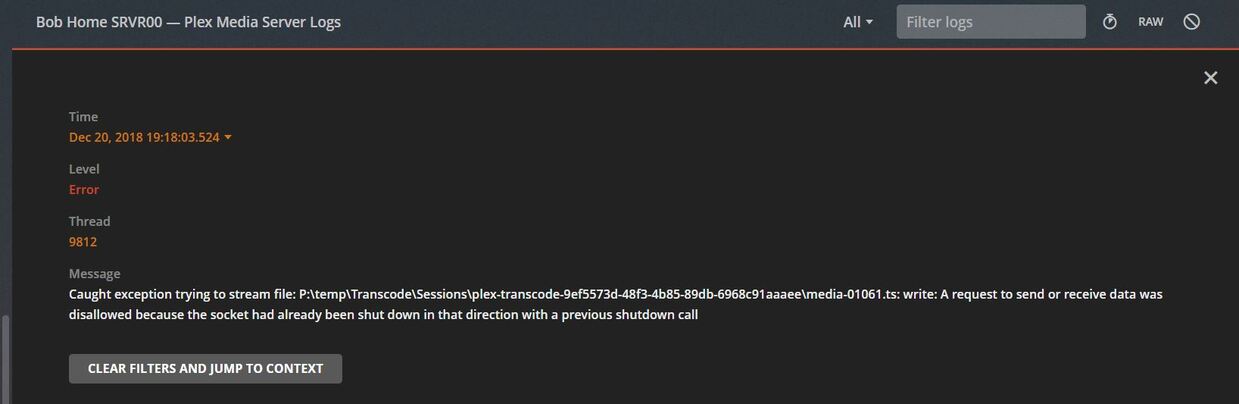
And now without touching a thing except switching to the Beta app I can tune to 5.1
Now before you go celebrating, it happens in the reverse as well, problems tuning on the Beta, wait awhile, try the non-Beta and it tunes. Sometimes it’ll even work with the same app if I exit and watch YouTubeTV for awhile and then return.
I doubt that your log files will find this problem but I do know it is in the last 2-3 releases of the server where it became extremely prevalent. BUT I’ve reported this all before to no avail…
What do the logs tell you?
10PM updte - And now I can’t tune to anything on the Beta and switched to the “release” and I can tune to channels that failed on the Beta.
I provided logs but can’t seem to get any feedback from @sa2000
Thanks…
@timwoj is the guy you want; he’ll have a peek at your latest logs and let’s see what he finds. Thanks for your patience!
2 Likes
surely people do have some sleep?
I will have a look after i wake up proper and have breakfast
Had a quick look before breakfast.
You forgot about enabling debug logging which i emphasized here
See the following support articles for ensuring debug logging is enabled on the server and for downloading the logs zip.
Please enable debug logging and restart the server and try again. Getting logging to cover server launch is often helpful.
There are exceptions logged about a socket being closed - it is possible it is the client app that closed the connection - so may also need the client app logs but initially could just check out the server logs and if it is the client disconnection then would need to get both sets of logs - for client app logs see appropriate article here
Have a question on the P: Drive and i apologize if i asked you before in other forum topics and forgot. Is it the SSD or network drive?
Just want to show you a user post
it appears that version 1.14.1+ is working much better than anticipated. I’ll continue to monitor and send over relative logs when they are due.
Channels are tuning properly, and the DVR functionality it working as expected. Scanning is still quirky - ended up modifying the db, cloning the greater number of scanned channels to the second tuner (WinTV-QuadHQ comes up as 2x 2 tuner cards).
Have you had a chance to look at this? Other things begin to happen as well like loss of time shift capabilities. See this post - Roku Update
@elan says you’re the right person for the job here… I sure hope so. We’re all busy and I don’t have time for people telling to go read other people’s posts or … There’s a problem here and I’ll help you find it so long as I’m not thrust into a part time job doing it.
Leading up to this set of logs I lost all ability to time shift. SKIP to beginning/end were grayed out. Selecting left/right on the remote brought up no progress bar. Failed tuning to each of 3 stations (4.1, 5.1, and 21.2) under both the Beta app and the release app. All 3 stations come in loud and clear on TV using same antenna feed (90+ on strength meter).
Plex Media Server Logs_2018-12-21_04-21-10.zip (3.6 MB)
Here are some more fail to tune an hour or so later after a restart. You really should be able to replicate this.
Plex Media Server Logs_2018-12-21_05-46-52.zip (5.3 MB)
I took the time to provide my configuration here - Unable to tune to channel (again, more research now)
It’s frustrating when I get asked to go do things when the information has already been provided.
THANKS @timwoj
thanks for that. I would like to offer something here. I remember posting this in a different thread maybe a year ago but can’t find it now. Anyway, here is a way to improve tune times. Of course, I think the best you can do here, I think is match the HDHR Viewer performance (I don’t think you will be able to tune any faster than that) which is maybe 2 seconds (still light years improvements from where we are today). The difference being that HDHR Viewer connects directly to the HDHR Prime, not via another server side component (in your case PMS).
So my thought is to steal an idea that many cloud file sync clients are doing. For example, if you have your 100GB of data synced to your desktop, and you fire up your iOS client (let’s say in OneDrive), those two clients are able to detect they are in the same LAN, so the iOS client will pull data from the desktop client instead of again redownloading 100GB over web.
Similarly, PMS and Plex Client could negotiate to figure out whether they are in the same LAN and PMS can instruct the Plex Client to connect to HDHR directly via its IP (PMS know the IP of HDHR). Of course, while this is happening, PMS also starts capturing from the same tuner and channel and eventually ask the Plex Client to pivot back to getting the stream from PMS instead of HDHR directly. This way you achieve fast tune, and can also offer seek capability etc.
Timwoj, are you looking at this? What are your normal hours of access so I know when to look for things?
@Smokindog ~ please be patient, people are in and out with holiday stuff at this time of year. We have the logs now, and will get back to you when we have more information.
1 Like
