There,
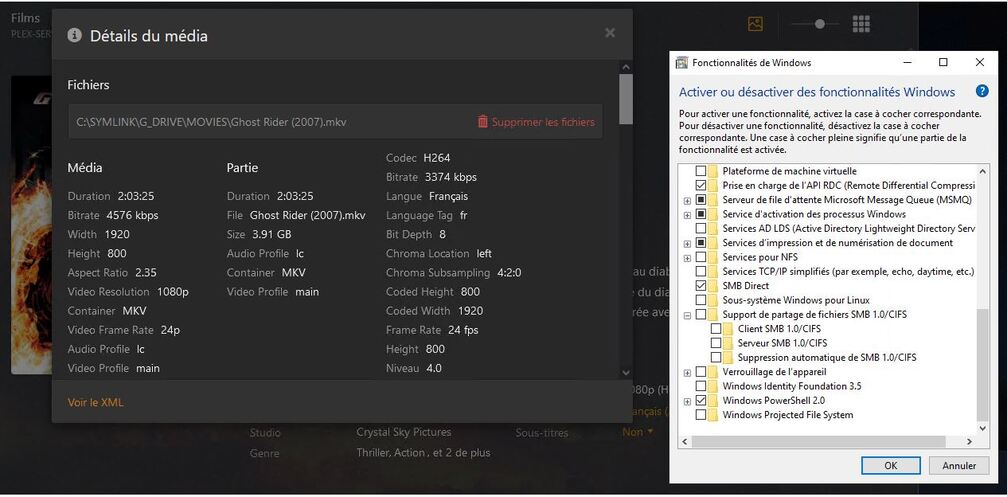
is not a SMB or UNC issue, all my content are on C: on a direct symlink which are connected on LOCAL drive. (C:\SYMLINK\MOVIES, C:\SYMLINK\SERIES, etc etc) and i have exactly the same issue with 1.32.0.6918 (x86 or x64 is the same)
1 Like
And those symlinks themselves are pointing where?
I have the same problem as “iTrooper” my file share is connect via a router, IE: SMB1
On local drive (softmounted by virtual box), it is not physically connected but it simulate 2 drive connected.
And normally we can use symlinks precisely to avoid the worries of incompatibilities of certain software not managing badly or not managing UNC. For the software, he believes to use a local location on a local drive
Can those of you affected by this check to see if SMB 1 is enabled for Windows? If so, turn it off and restart your computer. This will force Windows to use SMB 2 or 3 to connect to your network drives if supported. If Windows can not connect after doing this, that means your network drive only supports SMB 1. Check if you can change this. We are looking to see if there is a fix we can apply on our end, but for now not using SMB 1 would be the better option.
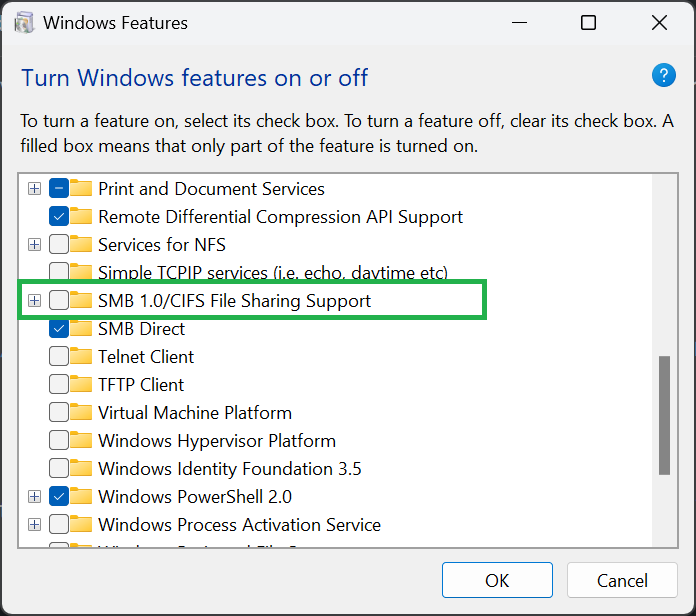
I’m not a computer guy, so maybe I just don’t understand…
But, a change made by the Plex team in their most recent version created this issue. Why should we need to change how our systems connect to drives, potentially (as I read) have our network drives no longer being able to connect to our systems (only SMB1 support) while you see if there is a fix.
The fix is to reverse whatever you changed in the most recent release. IT WORKED in the previous release, now it doesn’t. Change, whatever, back.
1 Like
These changes are intended for diagnosis. Not as an ultimate solution.
At this time, Plex engineers cannot reproduce the issue on their systems. So it must be diagnosed on the systems of the affected end users, if we want to get to the bottom of this in a timely manner.
1 Like
You may already know this from looking at the data I provided, but unfortunately in my case, my old DNS-320 NAS enclosures needs SMB1 to connect. When i disabled the first two subcheckboxes on SMB1 I lost access to my network drives after a restart and got an error along the lines of:
you can’t connect to the file share because it’s not secure and that it requires the obsolete SMB1 protocol.
It seems I’m stuck waiting for a fix for now.
Same here. My HDD connected to my router, and it’s only supports SMB1 protocol.
I have tested as described above. My NAS box needs SMB1 support for it to be seen by my PC.
Actually, that should be the other way around, because Windows PCs do support the higher SMB versions, while not all NAS boxes do.
This is not limited to UNC paths. I am using DrivePool on my Windows Server with PMS running after I log in to the machine. Files are being accessed in the pool via drive letter. When I update to 1.32, I am unable to see any sub folders on that drive.
Sorry, for how it was stated. I need to have SMB1 file sharing support turned on per the Windows Feature on or off box for my PC to see my NAS box.
My D-Link DNS-345 supports only SMB1 protocol. I will try to go back to older PMS version for now.
Hi,
Thanks but i have already say that i think that is not a problem with UNC or NETWORK SHARE, i use symlink with 2 local drives and i have also the issue.
And SMB 1.0 is already OFF, your “workaround” will not work.
1 Like
Can you provide your server logs after trying to scan that library?
To be clear, you created a symlink fro myour local G drive to your C drive? Why not just point your Plex library to the G drive?
you say:
To be clear, you created a symlink fro myour local G drive to your C drive? Why not just point your Plex library to the G drive?
because my installation is virtual and it allows me to add/replace disks dynamically in the host transparently for the plexserver instance. It’s a matter of scalability.
simlink is precisely used to avoid using UNCs or network shares that can cause problems with certain software that does not support it.
FYI, the problem is the same on the X86 and X64 version
note: i have sended logs in a private message.
regards,
Just wanted to add to the SMBv1 dogpile here; my plex server is able to play content, however is unable to scan new content. I have a Drobo NAS, it worked before the update etc.
Specific error: Filesystem error (boost: filesystem::directory iterator.:construct: The system call level is not correct
1 Like
Changing the minimum SMB setting on Synology NAS from 1 to 2 fixed it for me. Server runs on Windows 10 PC (Version 1.32.0.6918) but all media is on the NAS box and I use UNC paths for my media library.
I am having the same issue with update 1.32.0.6918, and I know that my old media server only supports SMB 1, but Plex shouldn’t stop working because of this update. Obviously PMS still can talk with SMB, since streaming works fine, it’s just the update library that is completely broken in this case.
1 Like
