Server Version#: 1.30.2.6563-7000
Player Version#:Version 1.62.2.3451-fb8ac0ae (windows)
Hi all,
just trying to work out what’s happened with my Plex install. Was running fine in DSM 6.2 but decided to move to DSM 7 as 6.2 is going EOL this summer. I attempted to follow the guide for updating and i uninstalled plex prior to updating DSM. Once DSM was updated to the 7.1.1 i attempted to reinstall plex.
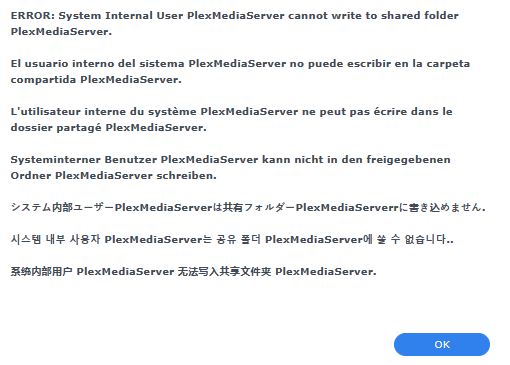
I added the perms to my Plex library folder and my appropriate media folders for ‘InternalUser’ PlexMediaServer within the folder perms on the synology and started up Plex.
My ‘Plex’ Library metadata is about 17gb.
After a while i could still not see my Plex Server from the Plex client (no connection) however the server dropdown now revealed a duplicate plex server with the same name which WAS accessible and i could see all its version information. However it was seeing this as a NEW server which would mean adding back all my shares and rebuilding my metadata from scratch (something I would dearly like to avoid). I’ve obviously done something wrong but so far i’ve not been able to work out how to get this duplicate to go away and for plex to use my old instance.
I’ve attempted to de-install and re-install the plex package (as the internal PlexMediaServer user was now created) however I seem to be in the same position. It just seems to be ignoring my old /volume2/Plex folder (containing the old metadata) completely. Also I note the dialogue for setting the folder permissions only allows me to tick Read/Write rather than select ‘Custom’ which does not appear to be available… assuming this is normal?
< NB - think I’ve worked out why the folder has limited perms - it’s not using the Windows ACL permissions settings - it was created many moons ago along with the other shares and so is using Unix perms structure. I’ll convert it windows ACL and attempt the migration again (assuming I can then set the correct perms on the folder from the UI).
If this does not work I’m wondering if some command line intervention may be required. Would rather try and recover my old library as it’s organised after many years of experimenting and I’d rather not have to re-index the entire lot..
For reference, the NEW plex folders appear to be under
/volume2/PlexMediaServer/AppData/Plex\ Media\ Server/
and the original folders (under DSM 6.2) are located in
/volume2/Plex/Library/Application Support/Plex Media Server
although the perms are still for the ‘plex’ user - in fact the old ‘Plex’ folder appears to not have any perms on it all - maybe the migration did do something. Will set the directory back to read/write/execute for user group and other.
If it’s just a case of copying the contents of the Metadata and Media folders from the old place to the new and setting the ownership to the PlexMediaServer user I’m happy to do that myself but I don’t want to do anything without some guideance first. I’ll probably zip up the old ‘Plex’ folder for safety in case it gets whacked anyhow.
hopefully an easy fix.
Any advice appreciated on next steps.
thanks.
 IS TRUE