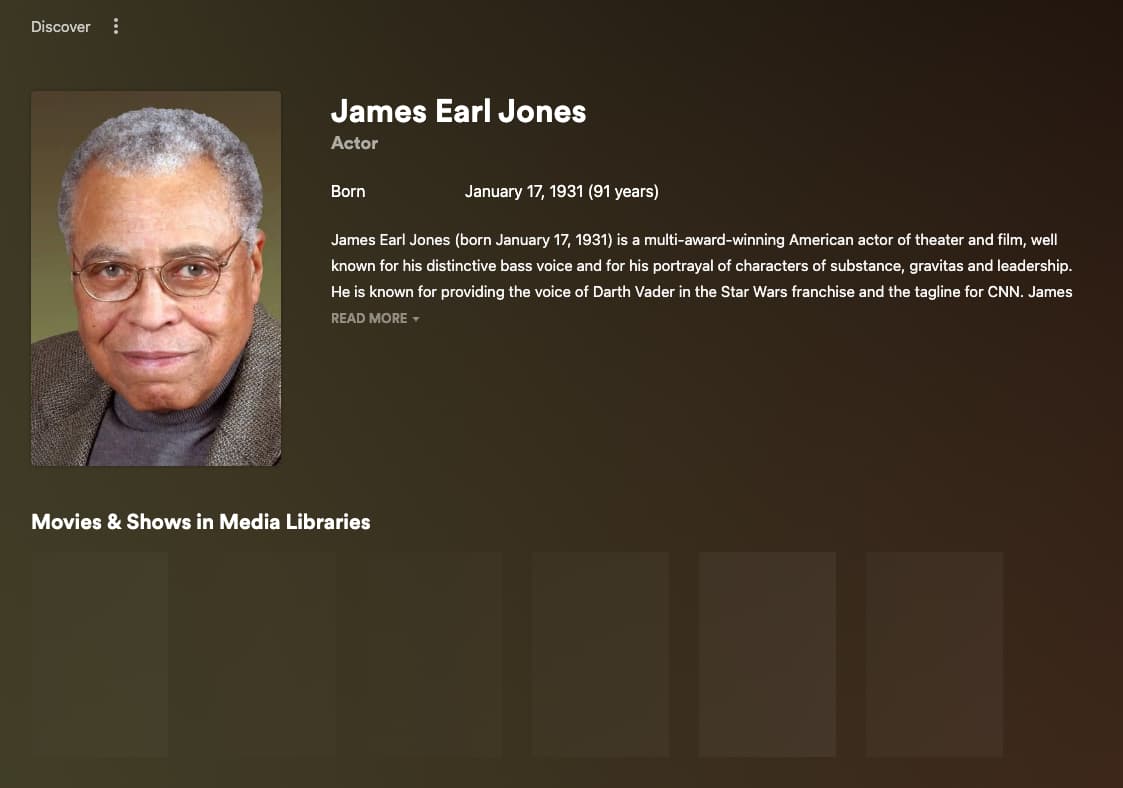
I have a couple of relatively obscure shows in my TV Shows library I have noticed (there may be more) where, when I click on one of the cast members, it takes me to the new credits page for that person but that show doesn’t appear under “Movies & Shows in Media Libraries” on that page.
Those particular shows don’t appear in the Filmography section on the page, would that be the reason for them not showing under “Movies & Shows in Media Libraries”?
If so, is there any way to report incomplete data like this?
ive also noticed on my end the actress Anna Paquin (main actress in true blood) will show the tv/movies she is casted on my server. but it excludes True Blood on my server, instead it suggests where to watch that same series on other services ignoring it being on my server. is this on purpose or a bug or both?
I’ve moved your post here as it wasn’t all that much related to the feature suggestion where you originally posted it.
Have you checked for the caveats / prerequisites in your own setup from the support article linked above? If your library is e.g. set to include adult content this can result in its items not showing up on the actor page.
Totally agree, took me an age to find out where this was. Great result, great bio page, shame its not integrated from clicking on any of the Actors Portraits.
If that is the case then you’ll need to reference the FAQ and see if your Movie library or titles falls into one of the several caveats that would cause this behavior.
It is working for me on web as well. Include Adult Content was enabled. However, please note that on my android app I could still click on actors and it would have led me to their page , even with adult content enabled. Maybe it’s a bug or an override since this is unwanted behaviour.
It maybe a case where you’ll need to sign out and sign back in to observe this change. The FAQ references the need to sign-out/in when dealing with the Adult Content setting. Please let us know.
The Credits work fine for me if it is a boxset. However if I select an actor within the movie section then nothing has changed. I get the usual list of films on my server that they feature in.
Am I missing something? Perhaps a setting that needs to be changed.
The data appears to be complete on TheMovieDB for these shows. For example, one of them is Asylum (1996), which TheMovieDB shows correctly shows as having starred Simon Pegg on both the show and actor page:
@Atomatth I was mistaken. Changing the setting you suggested did NOT fix the problem. The
“Known for” row still shows up on the actor info page even though I disabled the setting you suggested. It is showing on Plex for Windows, Roku, and Apple TV. BTW, it also takes longer to load this page.
Since it is seemingly impossible to disable the “Known for” row, can you at least bury this row under a filmography page via the filmography button (as suggested above) for those of us who only want to see actor information for movies/shows in our own libraries. Those who want to see an IMDB style “known for” and “complete filmography” would still have access to that info within one click of a button. Everyone’s happy.
I stand by my previous comment of not wanting the Twitter/Instagram handle stuff AT ALL. Really, it’s hard for me to imagine that ANYONE would want that information.
I’m struggling with the “use case”, what are we gonna do, find their Twitter handle while in Plex and message them on the spot? “Hey, Tom Hanks, I’m about to watch a movie you’re in…”, or maybe I’m about to watch a movie and I think “Hey, I wonder what Tom Hanks is opining about right now.”
Having said that, I’ve noticed that on Plex for Windows it is now showing ONLY the social app icons (not their actual handle), and they are in just one row. That is, admittedly, a big improvement if they are here to stay. Carry that change across all versions of the player and I’d be less annoyed by their presentation
Overall, it seems to me that Plex is going in the right direction with these new features, I’m just quibbling about the execution in some cases, trying to make an argument for a cleaner “less is more” interface, and pointing out the current inconsistencies between their presentation across different players. Most of all, PLEASE continue to err on the side of giving options to people who still care primarily about their own media.
The “Known for” hub pulls from Discover not Plex’s Movies & Shows.
You asked about the “Movies & Shows on Plex” hub in the Credits page not the “Known for” hub. Right now the only way to not show the “Known for” hub is through a Managed User as Discover is completely disabled there.
We are taking in all feedback around on improving the Credits page so please keep the feedback coming!
I feel like this is similar to the issue I raised forever ago about the Plex Movies & TV & Live TV not respecting Rating Restrictions.
They eventually changed the Plex Movies & TV so that it now seems to show only things in the Account’s Allowed Ratings, but for some reason doesn’t respect the restriction for things that have no rating, even though all the kids’ accounts have it set to not allow none as well as Not RatedUnrated & NR. It was a big hassle getting that to work because setting it to Exclude those stopped working years ago & now the only way is to Allow Only the ratings you want for the accounts. Then they added the Plex TV & Movies to managed Users & you had to go & change stuff again for Kids accounts, then the Live TV was changed to include Plex Channels & those Plex channels don’t respect the Rating Restrictions at all. & still is a problem. Like the account that’s limited to only see PG & lower can still see & watch the Hannibal channel on the Plex Channels even though the show is rated TV-MA.
It’s clear Plex doesn’t care about those issues unless they start causing major problems. I mean ideally they should be able to restrict channels, if nothing else give us the ability to manually give a channel a rating so it doesn’t have to rely on what’s currently playing, but at the very least give us the ability to turn off the Plex Channels for a managed account… But I hope you have better luck with the Remove "Known For & Filmography" but just be prepared to have it ignored
Taking a cynical look at this, one might say they done this intentionally as to prioritise their known for section as its our own media which times out and not their cloud based list. sigh!