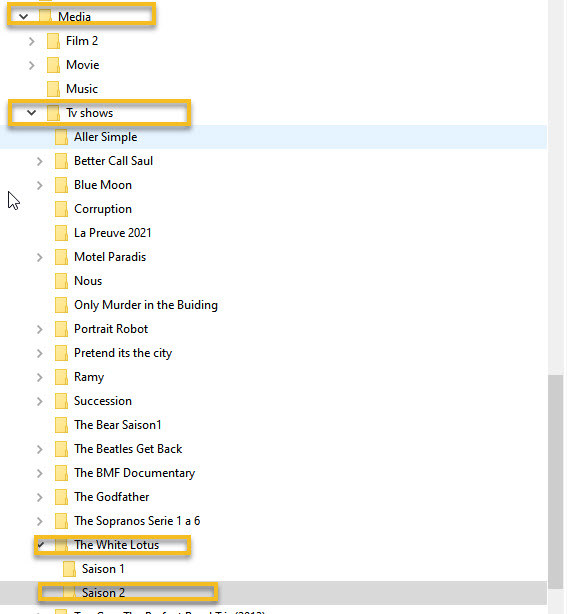
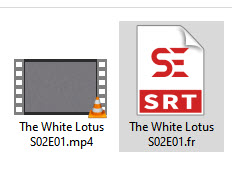
Thank for your answer, but it not solved the problem, First I made a few correction as you said changind fre for fr extension changing for the right episode.
I don’t speak French and we may have a bad translation but I think that “Non” just means “off”. That is colored with the little arrow, because it is a drop down so you can select the subtitle manually
If you want French subtitles to be enabled automatically when the audio language is not French then you should set your account audio and subtitle settings like this
Enable the display of file name extensions in Windows file explorer.
It looks like your video file has actually a double file name extension.
So if you want the subtitles to fit, you need to either remove the double extension from the video file,
or give the subtitle file the extension .mp4.fre.srt
Besides the Audio & Subtitle settings shown by BigWheel, your naming needs a bit of attention along the lines of what Otto posted.
Plex works best when your show is named like this
The White Lotus
├── Season 01
│   └── The White Lotus - S01E01.mp4
└── Season 02
    ├── The White Lotus - S02E01.fr.srt
    └── The White Lotus - S02E01.mp4
Please use the word Season due to a Plex restriction on folders used for that purpose.
After you’ve made major changes to filenames or folder names, and if you don’t mind losing watched state on that series, then it’s best to Plex Dance the series.
move The White Lotus folder somewhere Plex can’t see it.
scan library files, empty trash, clean bundles, optimize the database
move The White Lotus back into Plex and scan.
Should work. If not, let us know.
Caveats:
an episode could have an audio track where someone failed to specify the language in the audio track metadata. If the audio track has Language=unknown then automatic subtitle choosing doesn’t work afaik.
SRT subtitle files are text files, and text files get encoded with the character set most common in your region. Because we’re a global population, the standard encoding is UTF-8. If your SRT file does not UTF-8 listed as the encoding when you look at it in a good text editor, then that will cause problems. It should be converted to UTF-8 for best results.