So I have seen over the last month, that lots and lots, and more by the day keep having this same issue.
Alot of people have had it happen on the same day.
The Plex staff tell its users, “change your DNS” it fixes it for all of a few minutes " as most users have posted".
As somebody who bought a lifetime pass, And has not used the cost of the lifetime pass. OR EVEN CLOSE to the cost. I am wondering essentially is this it? are we essentially screwed, cut our losses this is how it is now?
Is Plex employees working on a fix? or are we dishing out the same garbage about us needing to make changes?
Clearly this happened to multiple users at the same time, I have made 0 changes to my server, this didnt happen on my end.
I cant make all the custom ghetto hot fixes that people post that work for 30 seconds, as my network is a little different then others. I have tried the changing DNS garbage. It doesnt work.
I want to know If im just getting screwed and your keeping my money and saying “hey, change your dns”.
I think this is a question people havent asked yet. THERE IS 0 CLARIFICATION ON THIS from the plex staff. The only things you are clear about is the ■■■■ hotfixes that are not working and I am freaking tired of spending hours trying to fix something I know isnt on my end.
There are multiple issues folks may have with remote access that have similar symptoms but completely different causes. If changing the DNS did not help an issue then it is not likely the same cause as the folks for whom it did help.
Just because you did not change things does not mean your ISP didn’t. Some ISPs have recently been discovered to block some plex urls (Shaw, Verizon) in their safe browsing features. Browser blocking third party domains. DNS rebinding. routers with not great UPnP mapping system. And of course there can be bugs we have not routed out.
If you are experiencing an issue with remote access it is best to post your own information in your own topic. Describe your specific networking set up. Provide your own logs.
This is what the user who discovered the issue with Shaw did. I don’t know if there is a way to just allow plex URLs or if you have to turn it off completely like this user did.
okay so i went and enabled it on my server. to test the waters. and it made my server completely unreachable.
And then disabling it, I am still at the same stand still. no users can connect to me without indirect connections, or it says its unavailable all together
So i have it disabled by default.
I tested waters, enabling it. it made my whole server closed off everyhere.
I have my port manually forwarded both Private: 32400 Public 19221 Internet
I wait about 20 seconds and it goes to Not available outside your network.
If i hit manually port forward public port, through plex it works for about 20 seconds again then goes off.
to clarify on my router, I have the ports set manually to my plex server.
and I have UPnP on as well. If theres anything specific you would like from me please do let me know!
if you manually forwarded then the manual specify port field has to be enabled and the 19221 entered there else the server will try to use UPnP instead.
Question. if you search google for “what is my IP” does it show the same external/public IP address that it shows in the remote access settings of server
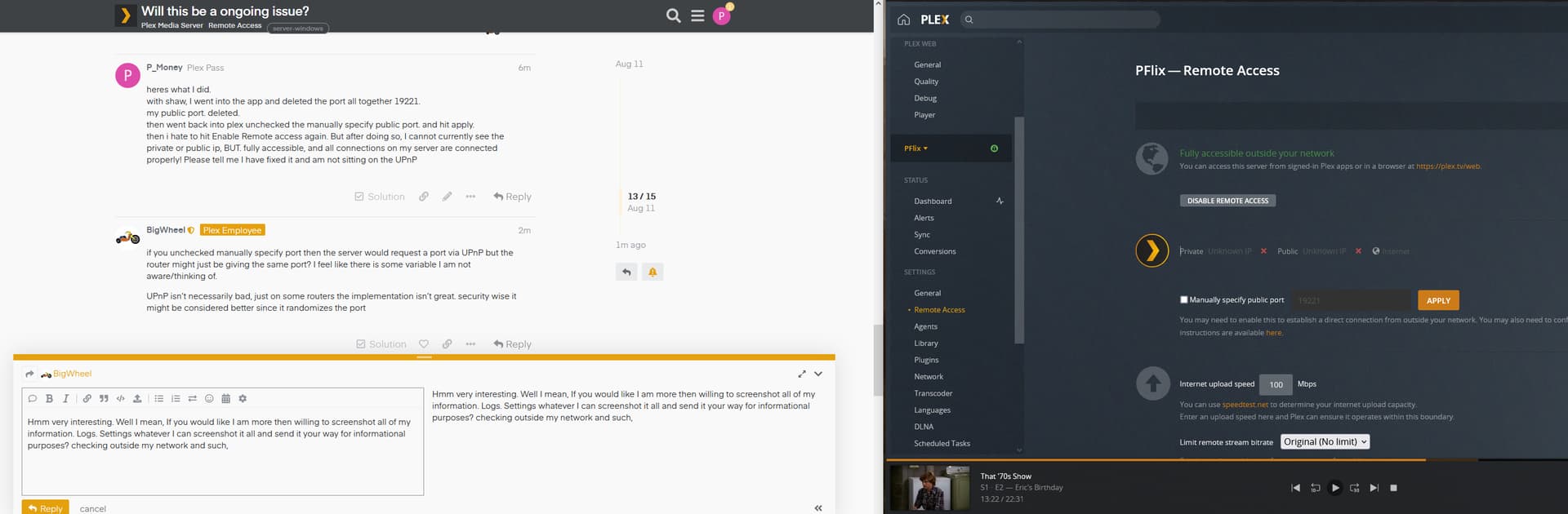
heres what I did.
with shaw, I went into the app and deleted the port all together 19221.
my public port. deleted.
then went back into plex unchecked the manually specify public port. and hit apply.
then i hate to hit Enable Remote access again. But after doing so, I cannot currently see the private or public ip, BUT. fully accessible, and all connections on my server are connected properly! Please tell me I have fixed it and am not sitting on the UPnP
if you unchecked manually specify port then the server would request a port via UPnP but the router might just be giving the same port? I feel like there is some variable I am not aware/thinking of.
UPnP isn’t necessarily bad, just on some routers the implementation isn’t great. security wise it might be considered better since it randomizes the port
Hmm very interesting. Well I mean, If you would like I am more then willing to screenshot all of my information. Logs. Settings whatever I can screenshot it all and send it your way for informational purposes? checking outside my network and such, its working. I can get it going. I just dont know if this is going to be a problem in terms of now, its saying Unknown IP with X’s in both Private and Public. But its working lol
okay so, I am testing around, i tested a few devices, I think the issue I seem to have now “If im being picky” everything takes awhile to load now. like everything… go to the website. app.plex.tv. or my ip. it takes forever to load. and then, it loads and select a user. okay i select myself. takes forever to get to the enter your code. i enter my code. it takes forever to transition to the home screen and load everything. my server usually is a half a second load. now its a noticeable 2-5 seconds for each transition.
if you don’t mind can you send me a screenshot of your port forwarding rule in your router. You can message it to me by clicking on my avatar/username to see message button
sure can! i also actually added another response for you to read, I also wanted to say I apologize deeply for my rude comments. I was mistaken and I do apologize. I thank you guys for the service and I was wrong it is on my end. I just wanted to make sure you guys know.