Mine isn’t a flac or mp3 thing or a music stopping issue. It will play either format (and continue playing) through one echo, but no sound at all hooked up as a stereo pair with Echo Sub.
Still not working. Alexa says “Playing Library Radio.” Stream never starts or shows up on PLEX dashboard now playing on the two Gen 2 Echo devices running stereo with Echo Sub. Plays fine and shows up as now playing on one Gen 2 Echo Dot (both .mp3’s and flac files play fine). Wish someone would look into this.
I have similar problem playing FLAC files on my 3rd generation Echo Dots in stereo mode. Sometimes I’ll be able to play one song and then it will stop. Other times it won’t play any songs. This is occurring using PMS v 1.25.0.5246.
Is there any additional information I can provide that can help resolve this issue? It’s been happening for months and months now.
1 Like
I have the same problems since months. No reply and nobody from Amazon or Plex seems to have any interest to solve this ….
Wanted to enjoy my Plex library on stereo echo devices and echo sub for Thanksgiving. That sure would give me something to be thankful for. But, alas… as before… no joy.
Still not working. Alexa says “Playing Library Radio.” Stream never starts or shows up on PLEX dashboard as now playing on the two Gen 2 Echo devices running stereo with Echo Sub. Plays fine and shows up as now playing on one Gen 2 Echo Dot (both .mp3’s and flac files play fine). Wish someone would look into this SOMEDAY SOON.
1 Like
Still nothing.
Hi again @anon18523487 I had this thread running a while back. Same issue as folks are getting here. I gave up trying to fix it on my remote QNAP server, so loaded Plex onto a local PC. Been working for me since. But not so for many others, by the look of this thread. Can you pick it up again, please.
It hasnt been working for me for a whole and I tried again today,
It worked BUT…
When I asked Alexa to play (artist name) it did nothing … for over a minute. and then all of a sudden it started playing.
Looking at the Dashboard I see it was converting my FLAC file to an MP3.
Before it used to play DIRECT no conversion from my WD MyCloudEX2 NAS Server,
Not sure why it changed but it DOES Work
But the first time you ask to play something it takes forever!!! so be patient.
WHen it worked correctly a whiles back it would play within a few seconds.
I know my NAS Server can play directly FLAC
99% of my files are high quality flac and I have no desire to convert thousands of albums to mp3s when they play fine using the PlexAmp app and on my Roku or NVIDIA Shield.
See screen caps below,
Pix #1 Graphs showing CPU and RAM spike when server is loading a new song to play;

Pix #2 - FLAC file is being converted to an MP3 for play on my Alexa device.
Before it played directly no conversion needed

Please advise how we get back to have to DIRECT play a FLAC using the Alexa Skill instead of converting it to lower quality MP3.
thanks
1 Like
My Plex/Alexa environment is permitting direct FLAC playback. Could this be a configuration issue?

everytime it doesnt work go to your Alexa app and look at activity and report for each voice request if it worked or not. Once they see a BUNCH of voice commands that didnt result in the desired outcome then they will escalate it.
i did that early on in the past and it worked. used to NEVER work then ti Worked fine with all my FLAC files not just mp3s
but now its broken again to an extent but works … see my post below with my update on 11/2921 describing what I found out was happening
See screen caps below
Pix #1
Alexa App on phone
Go to “MORE” then “ACTIVITY” in the bottom of the app and you can see all your voice commands you sent to any of your Alexa devices and give feedback if it worked or not so they can fix it if it didnt

Pix #2 after you pick one of the recent voice activities that shows up on the list you can provide feedback YES/NO it worked or didnt

Hope this is helpful
1 Like
Had to give a SHOUT out for a fell RUSH FAN like me 
They started it all for my musical journey. Alex was my original guitar hero
RIP Neal  #gonetoosoon
Can you show me a screen cap of your settings to allow Direct Playback of FLAC to make sure mine is set correctly. Too many menus to know where to find all the settings
Thanks
I too am a huge fan of Rush. I was lucky enough to see every Rush tour from Hemispheres forward (with notable exception of Test For Echo). So much tragedy in Neil’s life. 
1 Like
Awesome. Yeah Ive seen them alot. Very very sad.
I missed the very last tour / show at the Forum in Los Angeles
PM me and Ill send you a bunch of stuff Im into now, if your into prog rock/metal
as I am
Yes way way too much tragedy for Neil and his family
God Bless them
Hmmm well I just played another album that was from my itunes libray and those are AAC files and it played DIRECTLY no transcoding so whats up? See screencap below
How come Alexa doesnt allow FLAC direct play anymore like it used to??

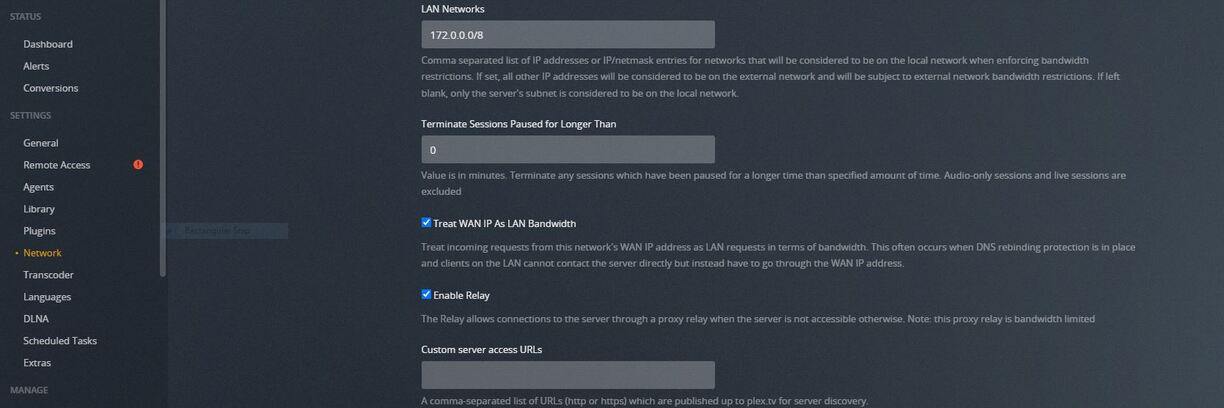
With respect to configuration settings… I am at a loss in how to set the transcoding settings on the MUSIC side of the equation as the transcoding configuration settings appear to address video only. One thing that might be key here is that I have my Plex server treat all network attached devices as local to the L:AN so there no “need” to try to limit bandwidth. Hope that helps.
ok…and how did you do that?
Im using a Western Digital MyCloud EX2 Ultra NAS for my Plex Music Server
I checked all the settings on the Plex web UI config side and found nothing that I could see to “switch” this so I could play FLAC directly.
Since this is not the PlexAmp app where you can choose how the player plays the music and what quality to use (direct or lower quality (whic would mean transcode it) then how do you set the Alexa app to play FLAC without xcoding?
I know it worked before, at least I thought it wasnt xcoding, unless it always was and I was unaware of it.
Maybe at the time I wasnt watching the Plex Web UI Console graphs at the same time.
Are you sure you can Play full FLAC quality thru your Alexa device when using voice commands with it?
Like I said its working and playing but not FLAC just MP3
Not sure if they (Plex or Amazon) changed anything on their side so that it WOULD play more often if they changed it to only play mp3 versions and if it was a FLAC it would force a xcode to speed things up as folks hate to wait. But still doesnt makes sense
hmmmm
My music library is comprised of 9366 FLAC files, 310 mp3, 22 wav files. I never witness a cpu spike as the system plays back music regardless of random selection, by album or by artist. Maybe this will help:
1 Like

yeah I already had that setting checked for Treat WAN IP as LAN
I also have my Upload limit set to NOT LIMIT so…not sure
My internet is a Fiber Optic setup by Frontier. 500 MB Up and 500 MB down
I went into the NAS UI admin area but there was not any settings that had anything about this and when I hit “Configure” in the Plex app on the NAS it just opens the UI Settings area on the Plex site, as normal so…

