You too. Many thanks for your patience 
Well server say it is OK but my Android app still cant connect. Should I try it after some time or there is still some issue?
Mine has magically started to work again according to my system
Why does the status page show issues yesterday with RA but none with the DNS servers?
It was a DNS error within the RA service. The status page show the services.
It is all working now lol back to green tick lol!
@chuckpa thank you for helping us to get this resolved.
The issue that was causing this was on the Plex end but it has since been resolved
If you are having trouble with remote access it’s likely to be something specific about your network
It’s not a bad idea to mask your public ip btw
Have you gone through these steps?
https://support.plex.tv/articles/200931138-troubleshooting-remote-access/
If you have, or need further help you should probably start your own thread
List your OS, server version, and as much specific info about your network and settings as you can
I’m here… if it’s safe to return 
I think this issue is resolved but for Android app to work I had to delete all app data so I had to configure (and login) it all over again. Not great but it is working now.
I still have the same issue, I’ve restarted all devices, done everything I can do on my end. There has to be something else on Plex Inc’s side…
If it was fixed it’s now broken again 
I need DEBUG server logs ZIP again
@ChuckPa Plex Media Server Logs_2023-04-01_10-30-16.zip (4.5 MB)
I have attached my logs. I have noticed that over the past few days that remote access keeps going down. I do have Tautulli which has also reported that it keeps on going down. My ports are open though and during the day users are able to connect but it will go down for no reason. Can i get some assistance please?
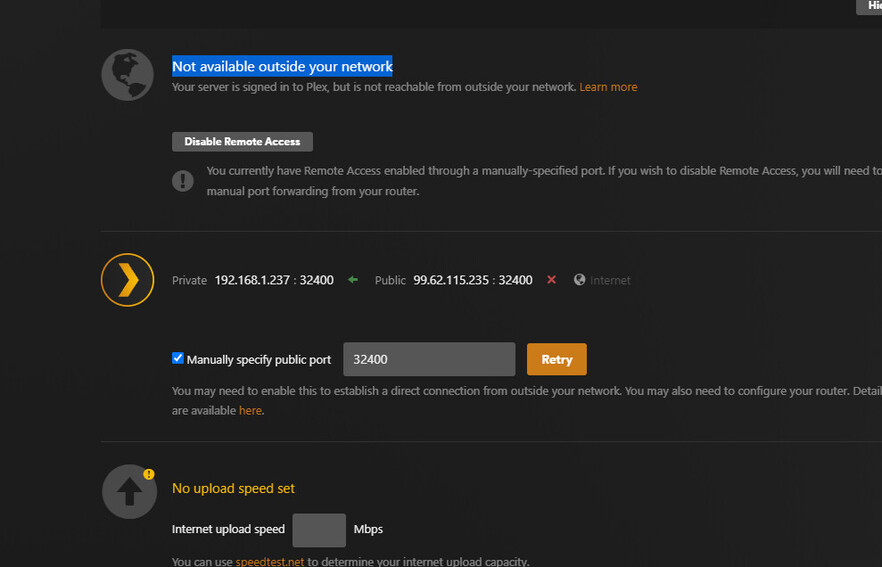
Remote accèss “Fully reachable outside your network” but the app.plex.tv and any remote user can not connect. Started sometime after noon eastern today.
on app.plex.tv.: Unable to connect to “” securely.
My server works for a bit then goes down too. But Plex states that remote access is working too. I’d say upload logs too and wait for assistance 
I have the same issue
Even though it is accessible and port forwarding and everything as per remote access guideline is fine it inherently switches to “Not available …” and refresh or re-apply manual port brings it back for few seconds.
Kindly advise
@ChuckPa
If it were 100% per guidelines, it would work 
Plex.tv and PMS are strict about what they report:
How it works with UPNP
-
You enable Remote Access
-
PMS opens a UPNP port forwarding assignment
-
It notifies Plex.tv to test
-
Simultaneously, it reports “Green” accessible status
-
When Plex.tv responds to the request with a test message. PMS sees it (there is a handshake token used) within the allotted period, PMS confirms to Plex.tv that it got the handshake and PMS is now “reachable” on that port.
-
Plex.tv “publishes” the server as available to those you share with and will now show up in all Plex apps.
-
Should PMS not receive the test message from Plex.tv within the allotted time, it will turn the access indicator RED again (not accessible).
What can cause an “accessible” server to become ‘not accessible’ ?
-
Firewall on the host.
-
Modem/router UPNP able overflow and ‘tossing out’ the established PMS port forwarding
-
DHCP server address reassignment
Seeing the DEBUG logs which capture the Enable action (optimistic GREEN) through it turning back to RED, will let me see what really happened.
Knowing if FQDNs or VPNs are involved is critical.
From there, we trace the path
This isn’t too difficult to resolve once you understand what it expects
How do you add those pubsub entries? Are they on your router or in plex somewhere?
