Hi All,
Have been searching forum but am not sure am searching issue correctly.
I have a 100 track album, the tracks are identified correctly, BUT I want
to change the poster that was selected. I understand that there can only
be one poster per album. That’s fine. I just want a different poster.
Don’t see a way to do this other than track by track 100 times
No need to do that on a track level (or more than once).
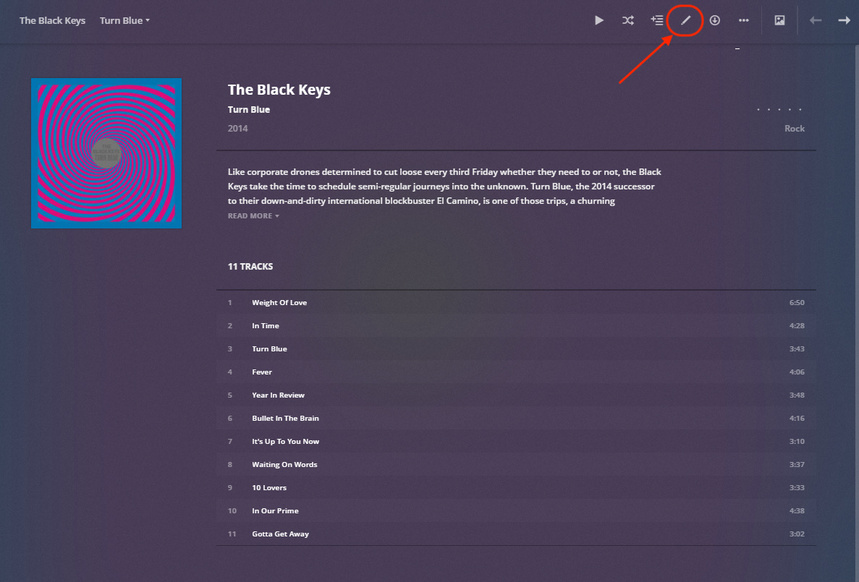
When you see the album item/poster (e.g. on the interpret home page), hover over the poster and click the Edit button (pencil). If you’re inside the album, click the pencil or ... > Edit from the menu at the top of that page.
Thanks tom80H, but don’t think that’s what I’m after
(but I don’t understand what the “interpret home page” is)
Following your example, I can change the poster for an album
with the SAME artist.
I have a 100 track album with 100 different artists.
The artist tracks are identified correctly, and each entry has
the same “white” icon. I want to give those 100 tracks the
same “black” icon.
When you access your music library, there’s a number of different views available. You can display your music By Artist (referring to the album artist, not a separate individual artist contributing e.g. a single Song/track to an album), By Album (as your albums would show on your shelf) or By Track (plain list with all your songs from all your albums).
Check out the music libraries section in the support article on how to use the library view: https://support.plex.tv/articles/200392126-using-the-library-view/
Editing the Album
I suppose your 100 tracks album is actually showing as a single album in Plex with e.g. Various Artists as the album artist and many individual artists/contributors. If so… just enter the album‘s pre-play screen (the page that shows the album cover and all its tracks) and click the Edit button in the action bar (top navigation/menu). This will open the form/Modal Shared above where you can set the properties for the entire album (name, artist, tags, poster…). https://support.plex.tv/articles/201272763-edit-details/
If you have your album showing as dozens of albums because of how it’s currently organized by individual artists, your first step should be to actually make it into 1 single album.
Thanks tom80H, that is exactly my issue.
The album is listed “dozens” (actually 100,
one per track) times.
There are 100 different artist names with the SAME
album name and the SAME (incorrect) icon.
To your point, if the Artist Name was listed as Various
I could change the icon as you suggest.
You are correct “it is showing as dozens of albums because of how it’s currently organized by individual artists, your first step should be to actually make it into 1 single album.”
How can I make it a single album? (Even though all 100 tracks have the same
album name and icon in Plex?)
Should I remove it from it from Plex Library and then remove each of the
artist names from the file? Currently each track is Artist Name - Song Title
in a folder titled Album Name
As an aside, I have over 2000 albums in Plex and if I have to manually
edit the 5 that I have this issue with, it’s not a big deal. Plex is amazing!
You must add another meta tag to your files.
Add the ‘Album Artist’ meta tag and make its content identical in all tracks that belong into a certain album.
In your case, I recommend using Various Artists.
(‘Album Artist’ is a different, separate meta tag from ‘Artist’. For better differentiation, we are often using the term ‘Track Artist’ instead of just ‘Artist’.)
To keep an album “together”, you should also have identical content in the ‘Album Title’ tag.
I recommend to fill the meta tags for
year
track number
disc number (if the album has several discs)
as well.
After you have done this, perform the Plex Dance with the album.
What I mean: don’t do this in Plex. Plex only changes things in its own database, but doesn’t write back those changes into the files.
If for some reason you lose the Plex database, you lose all your edits.
Do it right, change the stuff in the files and then re-import them into Plex.
There are lots of different metadata editors available for every major OS platform.
And they all support editing several files at once.