Any updates on this? Xbox One still buffering like crazy
Seems that I am getting a lot more buffering issues recently. My client is an xbox one, which is on a wired connection to my server.
When watching movies pulled from DVD or BlueRay, and converted to MP4 in handbrake, I’m seeing buffering every 30 seconds or so. Watching the dashboard, it is directplay video and audio. It looks like CPU use is low, but bandwidth is cycling between 100+ Mbps and 20. When it goes to 20 is when it seems to buffer:

So could this just be a network issue then? I was wondering if my movies were encoded at too high of quality, but the DVDs do the same thing as BlueRays so I doubt that is the issue. Or a client setting?
When I watch the same exact movie via the web client on a PC, I get no buffering and this bandwidth use:
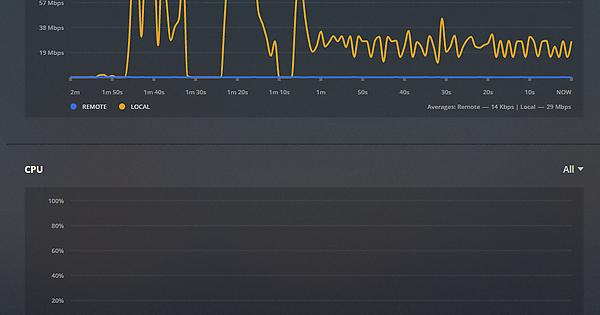
The PC seems to have a more constant, lower level use, and the Xbox has big spikes.
Edit: Definitely not a network problem. Tested an apple 4k TV on the same switch. It worked fine without buffering. It’s network profile looked more like the web client.
Playing around with the Xbox One client, I tried a few different settings, changing the H.264 profile, etc - nothing seemed to get rid of the buffering issue with the big swings in network utilization.
Just adding a +1 here. I’ve experienced buffering when playing 1080p movies after a certain amount of time has passed, usually a little over an hour or so. Usually stopping the video and starting from where I left off allows me to finish the movie. This doesn’t happen on my chromecast ultra.
I had issues with streaming to my Xbox One for a while now. The server were a MacBook Pro and they resides on the same wireless network.
After been at this for a while, I though I would plug a cable between my Xbox One and switch. Immediately, the issue were solved… A trick for some would be to use cables as much as possible.
I was constantly experiencing these issues on Wired Gigabit network.
Yep-absolutely ridiculous. I never had any of these issues streaming any files over the generic Xbox Media player.
1 Like
double check you Xbox Plex settings as 9 times out of 10 the app will connect via Remote and not Local (Wish I knew why) Personally I have changed the Quality to Max for everything in house and it seems to work for the most part.
Btw, the forum software is terrible.
Ever since I’ve upgraded from 1.14 to 1.16, i’ve been having those problems.
Now I can’t watch a movie without buffering. This is on wired gigabit. Plex server shows very little activity when buffering is happening.
28 July 2019 - issue still as bad as it was (maybe worse) than when it was first reported 2 years ago. Impossible to get through a 1080p video without buffering all over the place. Still no word from Plex.
We need to keep bumping this thread … i love Plex but this is bad
1 Like
My 1080P has been fine for awhile but 4k is a real struggle, Atmos TrueHD Audio is a complete no go, I get stutters all the time in the audio. Now DTS-MA will start to buffer after about 5 mins of perfect playback. DTS-MA used to play fine on 4k HDR
Seems audio codecs are still throwing up issues with the Xbox One version of the app.
DTS-MA and TrueHD will transcode to AAC, DTS-MA will now buffer after a few mins and TrueHD will just have audio skip and dropouts and then go to buffering.
With 4k HDR I’m still gambling that I can get through a movie without a buffer loop that never ends.
Really frustrating.
This is still annoying me almost every time I watch a movie.
Hi,
My Plex app on my Xbox one keeps buffering. Just started a yesterday. Closed down and reset app and Xbox. Connection is 580mbps and everything else streams well. Not sure what to do next. Any advice?
Thank you!
It’s broke, my 4k hdr files play great on my samsung tablet which supports 4k HDR, playback is smooth with no buffering. The same file playing on my Xbox One X and it’s a mess of buffering and dropped frames.
11th August 2019 - this issue still prevalent and bad as it’s always been. No help or word from support or devs.
Still busted, please help
I’m really concerned the Plex devs are completely ignoring this issue.
In the past @moussa would usually respond to PM’s or chime in on the forums.
I’m not seeing ANY Plex employee responding to any user issues anywhere here.
It seems they have left us to fend for ourselves even though this issue is a platform issue and not something we can fix ourselves.
1 Like
At this point with consoles selling less and less each month, I wouldn’t be surprised if Plex discontinued support for the XBox One app altogether.
Xbox still has around 45 million units sold, probably in the top 3-4 of Plex clients around and in theory the Xbox Ine X SHOULD be the best Plex client their is due to it’s power and media capability.
It should not take much effort to fix these bugs that are being reported.
1 Like
I wasn’t having this problem until about 2 days ago. Nothing has changed on my network, nothing has changed on my server, it just randomly starts to buffer forever. Stopping and resuming fixes it for a while then it just buffers again. It’s not a me issue because I don’t have this problem streaming via chromecast. I’d prefer to use the Xbox because the remote is so handy and quick to respond rather than have to grab my phone to pause or rewind but the buffering is forcing me back to the chromecast. I wish a resolution could be found to this problem.
1 Like
