Sorry - I will check ITV Meridian ! I did not check that specific regional channel !!
I have checked ITV Meridian and it is looking ok to me. May be the EPG overnight refresh completed before the new data was fully in place - the update completed at about 04:30am - may be EPG refresh ran before that time.
Could you do a manual EPG refresh now and let me know if channel 3 ITV Meridian schedule gets corrected
Could you also check the actual grid. I can see an issue with the 12th April 13:10 airing which looks wrong. But the 11th April 20:00 look ok.
@Jakosaur - this reported issue is actually still in progress with our provider. We have not had notification that they completed the work on it - so we are checking status whilst it is still an active issue with them !!
Thanks and sure enough checked upcoming recordings and look normal now.
Just some feedback.
Plex for Android (TV) - when selecting a TV channel on the guide for live viewing if there’s a HD channel available, can Plex tune to that channel instead? E.G. click an airing on 001, but 101 is available as HD so tune to that. I think Plex Web/Plex for Windows does this. Any idea if this could be done server side so you can click an SD channel on any device/platform, and the server just sends the HD video from the server but the experience is as if you’ve pressed the SD channel on that device/platform? 
Are we able to select where live TV viewing files are temporarily stored? Where does live TV viewing files go temporarily now? I’d personally like to have an option on the server to change it, I’d have it set to store in my server’s ram during viewing.
On Plex for Android (TV), I love you can now continue watching when you back out to the guide. Any chance when you click on one of the home’s recent channel icons, then back out it goes to that channel & airing block on the guide instead, so you get the guide continued viewing experience?
Done. 1 scheduled recording now.
Can see exactly that.
This has now disappeared but a recording from 7th April has moved to today. The time shown in the schedule links to channel 047 tonight, where S3E5 is being aired. Only a Plex Web issue it seems.

We have a mixup in posts - I was referring to “Britain’s Got Talent” and the grid entry for Saturday 20:00 and Sunday 13:10 - I have not yet responded to your recent post about “The Great Celebrity Bake Off ……” - which is also still an open issue with our provider
I believe it would be within transcoder temp directory area
I was not aware we have differences in behavior.
For live tv, we should tune the specific channel the user selects. The Prefer HD option is for recordings.
What you are asking for is perhaps a similar preference option for Live TV
I don’t think there’s a mixup. Order of my post was quote then my reply to the quote. “Can see exactly that” was to Britain’s Got Talent on 12th April & 11th April on my EPG grid. 
Bake Off seemed to be an EPG issue until this afternoon’s manual refresh, but now is a Plex Web issue.
I have just tried BBC1 SD channel on channel 1 from the grid on Plex Web and also on Plex for Windows app and they both tuned to channel 1 and not channel 101 - which is the behaviour I was expecting
It’s weird, Plex for Windows earlier was viewing a HD channel when I clicked an SD channel airing. Even confirmed on the HDHomeRun web interface. 
Regardless though, yeah a toggle for Live TV would be awesome. As a user, I’d expect it to be on by default to prioritise HD channels. So basically a user on any platform/device can select a SD channel airing for Live Viewing, and the server will tune to HD variant if available for that channel and send that video instead. The experience on each device/platform and recently viewed channels list would show as if you’ve pressed the SD channel. Basically the server doing the hard work, and each platform device just acts as normal.
Press SD Channel Airing (Platform) → Check if HD variant available (Server) → If yes, tune HD. If no, tune SD. (Server) → Acts as if channel was SD (Platform)
Press HD Channel Airing (Platform) → Tune HD channel as normal.
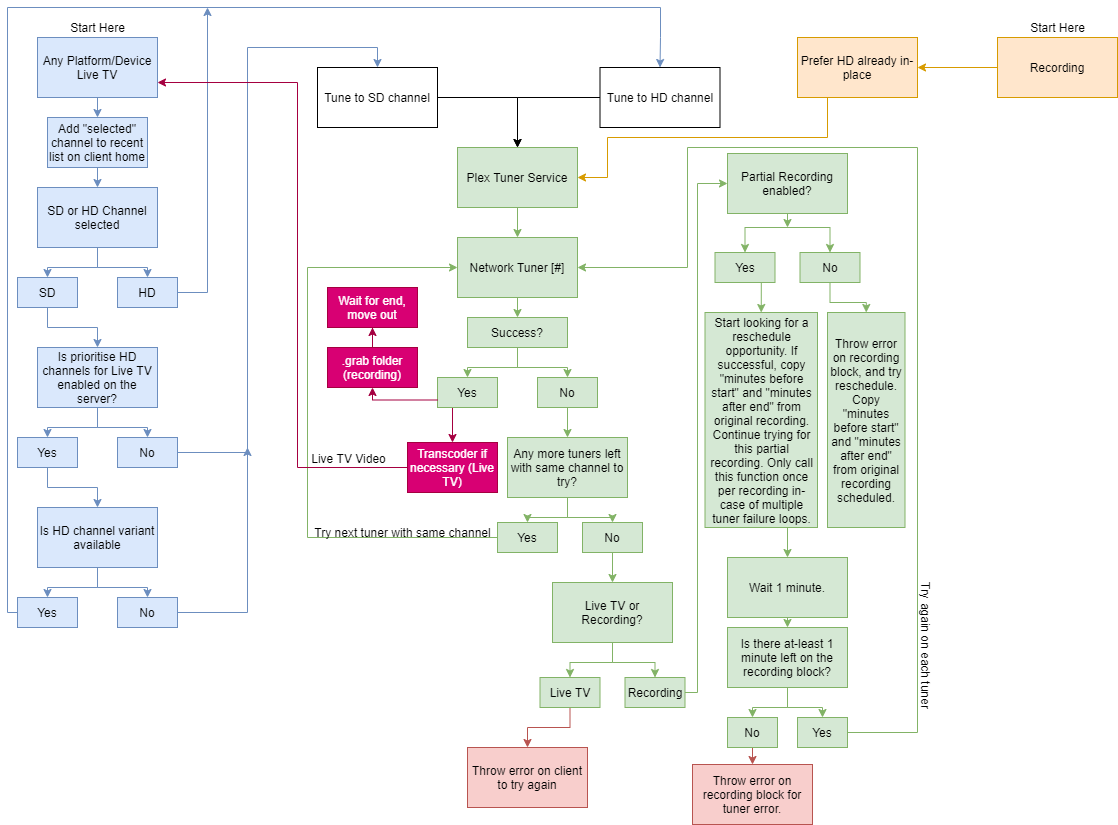
Error checking like below would be handy too for Live TV & DVR! Not sure whether the correct way in error checking would be to go through each tuner on a device, before moving onto another device. Never really looked into programming something to use network tuners so have no experience there. 
I might create a flow diagram for my ideas as I think it’ll be easier to understand than me typing all that.  Do hope the dev team do find this feedback useful though!
so on the Grid for 11th April 20:00 on channel 3 ITV Meridian you can see S14 E1 and not the 2nd screenshot that you posted here
Correct. Both 003 & 103 now show as S14E1 - Auditions 1
Why don’t you disable the SD channels for those that have HD ? A number of users have done that.
We believe watch now from the grid should always tune that channel.
For the What’s On / Recommendations hubs, having a preference for HD option could be useful for live tv.
Mainly as people I know don’t know the HD channel numbers, so it’d be nice to give people better image quality via the channel numbers they know and have memorised over the years. Also regardless of where in the Plex app they tune a channel. Taking away channels at the top of the guide, would probably confuse a lot of them.
From my testing this evening, I’m seeing that. Not entirely sure what happened but the logs show 101 being tuned. I’m pretty sure I was at the top of the guide as I just loaded it up. Regardless though, if that’s the way it’s meant to work; it’s how it works now.
Most of my users just use the grid guide as it’s similar to what they used when using Freeview via Aerial on their TVs previously. Obviously, this is just our use-case scenarios but just giving my input.
They’re really liking the new Android Live TV improvements! There’s a few things that I’ve noticed on Android TV that I think could be improved & will state them below.
Having the solution all server side would allow a prefer HD option everywhere, rather than just for the What’s On & other hubs. Where-ever (any device, hub, section on the app) you try to tune a channel, the preference will exist and take place. The experience on any device remains the same. Press 001, device adds channel 001 to recently viewed list, device shows you as watching 001 but the server is sending channel 101’s (HD) video.

This keeps happening on Plex Web. When something you’ve previously recorded / in library is airing today, it sometimes moves the recording block from a previous day to “today” in this case
For what I was suggesting with Prefer HD for Live TV, I’ve created this. May not be correct for some of the processes, but with an outsider view this is all I can show. Hopefully useful to demonstrate what I mean. This also shows the tuner error detection loops I discussed too.
A bonus, but not necessary if tuner error detection was improved, would be the mobile push notifications for DVR too.
Regarding notifications, any reason they don’t seem to have any sound or vibration on iOS even when enabled in iOS settings? Does Apple give guidelines on notifications or totally developer choice? Sorry I don’t know much about that topic, but would rather them have a sound & vibration by default and allow the user to turn them off in iOS settings if they want sound/vibration disabled.
^ above + they seem to disappear on server reboot too!
Plex for Android (TV):
- When you hold down an airing to record on the grid, then schedule it; it sometimes doesn’t update the airing block to show it’ll record. Also when you click an airing and record in the episode view, sometimes the “Record” button doesn’t change after scheduling. Pressing “Record” again after just previously scheduling adds it again to the recording priority. Should change the button to manage the recording.
- In Live View - Press Record, maybe change the button look to show it’s recording? Also after scheduling with that button, maybe a cancel button/confirmation if pressed again?
These are all just suggestions and what I think could be changed overtime. Just coming into this thinking of some of the people using my server, who might sadly get confused if I disable the SD versions of channels. They’re just used to lets say BBC One being right at the top of the guide, rather than @ 101.
Hope this all makes sense. Thanks
@sa2000 Another episode of The Great Celebrity Bake Off for Stand Up to Cancer marked as NEW but is a previous season (Season 2). 21st April, 8PM Channel 4. It may sort itself out by then, but thought I’d give a heads up.
@sa2000 Above still showing as NEW on my schedule.
Mon 20th April, Channel 5 guide data seems different to elsewhere. Comparing the Freeview guide to the Plex guide, most of the day isn’t the same on Plex for Channel 5. @ 9PM there’s meant to be Traffic Cops: Manhunt which is what I was looking for.
Hoping I’ll be able to schedule this sometime over the weekend  . Just not sure if the airings on Channel 5 are going to update.
