Same here-
iOS Plex app play fine
Windows 11 app pink and green
LG G4 TV Plex app pink and green (JellyFin perfect)
Samsung TV Plex app pink and green
Same here-
iOS Plex app play fine
Windows 11 app pink and green
LG G4 TV Plex app pink and green (JellyFin perfect)
Samsung TV Plex app pink and green
Apologies y’all but want to check on the initial report:
For the iOS Plex App and for tvOS Plex Preview (if you are in that beta), is Dolby Vision Profile 5 Direct Streaming properly for everyone?
Not working on tvOS. Profile 5 & 8 do not trigger the DV logo on the TV. Neither does HDR10+.
All files play perfectly with the correct HDR version (HDR10, HDR10+, DV) on Infuse.
And, why can’t I just press Play on the remote to play the content, rather than select (middle button), then middle button again?
The profile 5 is playing but not trigger DV on your TV?
Profile 8 will fallback to HDR right now. This is something we’re looking into.
Another user also reported HDR10+ not properly triggering as well.
For me personally profile 5 plays on iOS/iPadOS but on tvOS it does not open at all and says “Error Occurred cannot open” and has for all releases of the Preview Experience.
Thank you for the reply, Craig.
Profile 8 and HDR10+ not triggering DV and HDR10+. Profile does seem to fallback to HDR.
I don’t think I have any Profile 5 files to retest, but will check.
Just checked a Profile 5 file. Doesn’t trigger DV on the TV. All files work as they should on Infuse - tiggering the relevant format on the TV.
Also, another issue.
Why can’t I just press ‘Play’ to play/watch content like I used to be able to? I now have to press Select, then Select, and then Select again through 2-3 different screens just to watch. The current public release is just ‘Play’.
Understood, this is something I have on my list to fix. I’ll provide an update when the tvOS beta has some changes around this.
Just checking, is match framerate and match range enabled on the device? Only trying to narrow down the issue.
I’ll provide this feedback to the proper team. I’m just focusing on playback but I can send this to the right people.
Yes, match framerate and dynamic range matching are both on. All files play back fine in Infuse with the TV switching as needed.
I am surprised that the ‘Play’ button issue is an issue. It’s like a ‘Duh’ type feature that should have been there from the very first release.
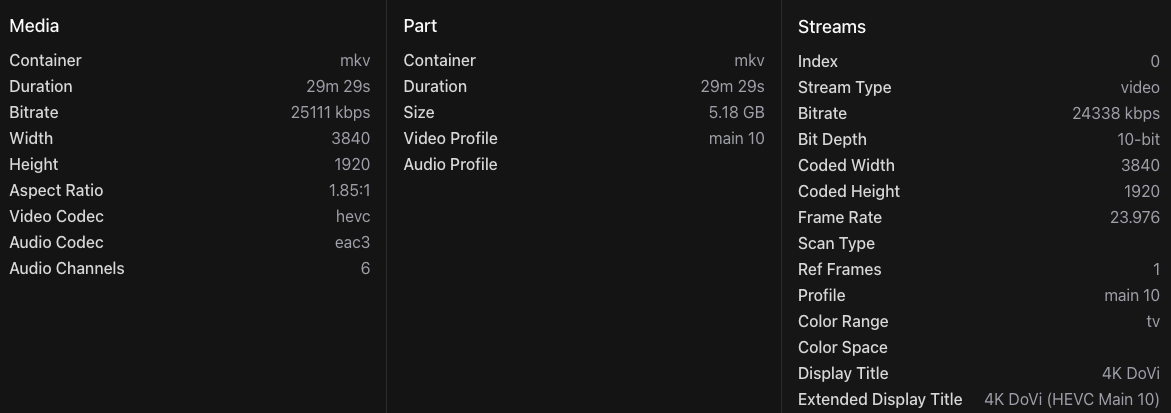
Could you share the media info for the DV Profile 5 asset that is having issues?
The tvOS app is still in beta.
Yes, I am aware the app is still in beta. But like I said the app is meant to Play video therefore using the ‘Play’ button is a basic requirement to Play video. And not to throw my weight around, but I am a software engineer by profession, I know what Beta software means. This app feels more like an Alpha release.
Anyway, I have attached the media info for the profile 5 video.
Thanks again for your help.
I also have this issue but on both the web app and the TCL S5 android (2021) and also on qm7 google TV..
@Craig, are there any news on the transcoding issue on apple platforms? Plex plays DoVi Profile 5 in direct stream, but renders the same error message when transcoding on iPadOS, IOS and ATV, all latest versions. “File is Unplayable. DoVi (Profile 5) color space is not supported.” The file is H.265 mkv. Plex server version is 1.41.8.9834.
In detail:
I get the same reported as @IllMethods in his post above ([FIXED] File is Unplayable. DoVi (Profile 5) color space is not supported - #75 by IllMethods). Xbox Series X is connected to LG OLED55C2AUA (webOS24 9.2.2-58) via Pioneer VSX-LX103 receiver. My Xbox Series X is at 10.0.26100.4857, with the Plex app at 5.92.0. If I use my Surface Pro 9 Windows 11 (which supports Dolby Video) and the Windows Plex App (1.109.0.329-ea562b95), the video starts playing but the colors are all wrong (Green and Pink as others have indicated). If I play the same MP4 video natively on my SP9 and Media Player, it plays just fine (Dolby Vision logo appears in the Microsoft Media Player app). Here’s the output from Mediainfo:
General
Complete name                            : Video.mp4
Format                                   : MPEG-4
Format profile                           : Base Media
Codec ID                                 : iso4 (iso4)
File size                                : 9.02 GiB
Duration                                 : 51 min 22 s
Overall bit rate                         : 25.1 Mb/s
Frame rate                               : 23.976 FPS
Encoded date                             : 2025-07-22 02:48:42 UTC
Tagged date                              : 2025-07-22 02:48:42 UTC
Writing application                      : GPAC-2.2-rev0-gab012bbf-master

Video
ID                                       : 1
Format                                   : HEVC
Format/Info                              : High Efficiency Video Coding
Format profile                           : Main 10@L5@High
HDR format                               : Dolby Vision, Version 1.0, Profile 5, dvhe.05.06, BL+RPU, no metadata compression
Codec ID                                 : dvh1
Duration                                 : 51 min 22 s
Bit rate                                 : 24.4 Mb/s
Maximum bit rate                         : 58.7 Mb/s
Width                                    : 3 840 pixels
Height                                   : 1 600 pixels
Display aspect ratio                     : 2.40:1
Frame rate mode                          : Constant
Frame rate                               : 23.976 (23976/1000) FPS
Original frame rate                      : 23.976 (24000/1001) FPS
Color space                              : YUV
Chroma subsampling                       : 4:2:0
Bit depth                                : 10 bits
Compression mode                         : Lossy
Bits/(Pixel*Frame)                       : 0.165
Stream size                              : 8.74 GiB (97%)
Title                                    : n/a
Language                                 : English
Encoded date                             : 2025-07-22 02:48:42 UTC
Tagged date                              : 2025-07-22 02:52:19 UTC
mdhd_Duration                            : 3082416
Codec configuration box                  : hvcC+dvcC

Audio
ID                                       : 2
Format                                   : E-AC-3 JOC
Format/Info                              : Enhanced AC-3 with Joint Object Coding
Commercial name                          : Dolby Digital Plus with Dolby Atmos
Codec ID                                 : ec-3
Duration                                 : 51 min 22 s
Bit rate mode                            : Constant
Bit rate                                 : 768 kb/s
Maximum bit rate                         : 811 kb/s
Channel(s)                               : 6 channels
Channel layout                           : L R C LFE Ls Rs
Sampling rate                            : 48.0 kHz
Frame rate                               : 31.250 FPS (1536 SPF)
Compression mode                         : Lossy
Stream size                              : 282 MiB (3%)
Language                                 : English
Service kind                             : Complete Main
Default                                  : Yes
Alternate group                          : 1
Encoded date                             : 2025-07-22 02:52:09 UTC
Tagged date                              : 2025-07-22 02:52:19 UTC
Complexity index                         : 16
Number of dynamic objects                : 15
Bed channel count                        : 1 channel
Bed channel configuration                : LFE
Dialog Normalization                     : -25 dB
compr                                    : -0.28 dB
dialnorm_Average                         : -25 dB
dialnorm_Minimum                         : -25 dB
dialnorm_Maximum                         : -25 dB
Let me ask what may be a very stupid question here.
What is ultimately responsible for playing back a file; the software, or the hardware? Or is it some odd interdependency between the two?
I ask as this file has zero issue being played with the Plex app on my shield. But my iPad, or phone will not have it.
So if the notion is that it’s a software problem because of licensing issues, then it should be a software problem regardless of the platform on which the software lives should it not?
Not all Plex clients are the same. Some are like a wrapper around the playback abilities of the underlying device and its OS, while others are closer to actual video player applications like VLC and come with their own codecs and ability to read different formats.
When will this be fixed? It’s still an issue on Apple TV. It’s starting to get really extremely annoying.
Well, that is the interesting thing then. On an iPad Pro M4, it explicitly supports profile 5. on the new beta just released a couple of days ago, I now have an explicit message about the inability to play a profile file or as previously it was a bit more generic. However, it still seems to not make a lot of sense given the hardware I’m using. I will now argue it’s (still) a software problem.
Yes, in this case (an iPad) the issue would be a software one. I was answering your question regarding what is ultimately responsible for the playback on Plex, the answer is it depends on what the client device is because they don’t all function the same despite being the “same” app and looking similar.
Also, keep in mind that in the case of patented formats like DolbyVision/Atmos even if the hardware is capable the software not playing them back can be a deliberate choice due to licensing needed to include the function, not a bug. I’m not saying that is the problem HERE, with an iPad, but it can be an issue with certain formats/devices.