“There are no changes coming for the Hauppauge tuner. Live channels doesn’t support all models, your model isn’t supported if no channels are showing up. Plex does correctly support it and any problem we’ve found so far with not picking up enough channels are related to signal strength so check your connections. We’ve been working with Hauppauge to check to make sure our 7.2.2 support has the correct SW and the have confirmed it.”
I also have absolutely no issues tuning channels when I use the tuner with my PC & the signal strength is excellent.
I also had absolutely no problems tuning or recording channels before the 7.2 update - it worked flawlessly - so I agree that it is certainly the Nvidia update that has caused this mess.
As the only reason I pay for a Plex Pass is for the Plex DVR facility on my Nvidia Shield then I can’t see that I have any choice but to end my subscription
I’m glad I opted for the pay monthly option now & I feel bad that I have to do this as I honestly don’t believe it is Plex’s fault but I can’t see the point in paying for something that doesn’t function as advertised.
Yep, if only there were a way to contact Plex for some technical support they might help, or it might help them addressing the issues,
I guess they would be interested in fixing their product, but so far I haven’t found any way to do it
.
The contact form says that “Support questions submitted through the contact form will go unanswered.” and it sends you back to the support page where there is only FAQs and link to the forums. As for the forum forum, people here are quite helpful, but so far I’ve seen no answer from Plex people, at least on this issue.
Sorry took a while for me to analyze the logs you provided. They do show some successful tuning.
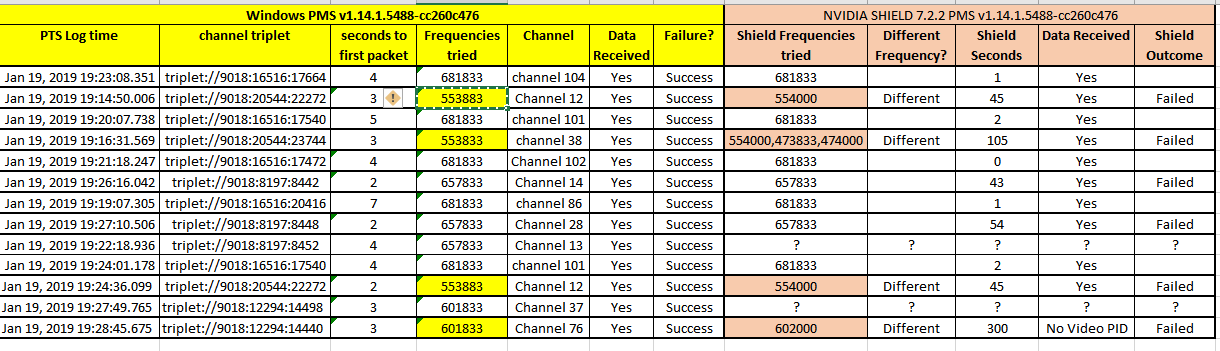
Logs show successful tuning for these channels
An earlier attempt to tune channel 2 failed at 19:00:01 as it took almost a minute to get the stream to start
The failures were the following with some tunes taking too long and getting timed out
Do all these tune ok on the PC ? And are they still failing on the shield ? If they are ok on PC using WinTV but fail on the shield with Plex, can you tell me from the wintv config information what frequencies they get tuned on?
further to my earlier response, it is possible that some of the issues - with the length of time it takes to tune and resulting timeouts, that there are still problems within the NVIDIA SHIELD update - which I understand is now on 7.2.2. If you have access to their support forums, please feed back through there. I will be mentioning it to our contacts as well
Thanks for your support - it is much appreciated by myself & I’m sure everyone else who is having these issues.
I will connect the tuner back to my PC as soon as I get a minute (different rooms, multiple cables etc!).
In the meantime I have been posting on the Nvidia forum regarding these issues along with a number of others and at first it seemed that they were looking into a fix for the tuner problem:
Sniper said:
As a follow up, if this testing goes well this will become 7.2.2 which we want to deploy to all of our customers.
We’re working on test images for 7.2.3 and I’d like to use this group to help us continue to test those after we deploy 7.2.2. For 7.2.3, we plan to address:
SD card issues not fixed in 7.2.2
USB issues not fixed in 7.2.2
CEC issues found in 7.2.x
Haupauuge tuner not picking up all channels issues.
Webcam Zoom issue
Please don’t ask about or report other bugs from 7.2.x in this thread, keep those discussions in those release posts. Please also don’t ask when it’s coming. It’ll come when it’s ready.
But then yesterday they announced the changes for 7.2.3 & the Hauppage tuner problem was not part of their fixes. A forum user questioned this and Nvidia came back with the below:
We believed #4 was resolved after the post above was made. It is working fine for most users, but there are still some folks who are having problems with it so we’re working with Hauppauge to understand it.
Hauppauge is contact/going to be in contact with one of the users who reported this.
When they say “fine for most users” I don’t think they are reading the sheer amount of posts in their own forums or elsewhere online about this problem.
Thank you. Could i ask you to do an extra test - just to try and establish if the issues are specific to the NVIDIA SHIELD and potentially the 7.2.x update
Could you after you do the wintv tests on the PC, setup a test Plex Media Server on the PC and go through the DVR setup using Plex and then test out the specific channels i referenced here and showed giving tuning timeouts. Please go through testing each channel and noting down time and outcome for each, That would be channels 2, 86, 101, 102, 104 and channels 1, 12, 14, 28, 38 and 76
Please get logs so i can compare with the earlier logs - assuming of course that the timeouts i highlighted remain. (The failure with channel 76 may be just that the channel does not work.)
Full test now completed using Plex DVR on my PC with logs attached.
On the channel scan Plex on the PC found over 400 channels compared to 100 using Plex on the Shield. Every single channel tested on Plex PC tuned in - channels 12 & 76 took longer than most but nevertheless still did.
Noticed differences in frequencies used between the two sets of logs - So i have now full windows log of the DVR setup showing the channel scans and also the tunes
I understand it is the same usb tuner tested on the Shield and windows
Attaching also list of channels detected and identified on windows - i saw 141 channels Detected Channels on Windows.zip (9.4 KB)
I am aware that running tests is not easy but i would like now to compare a new setup using the same USB tuner on the Shield with 7.2.2 (I am assuming 7.2.3 is not out yet) - to compare the logs for channel scanning and also repeating again the tests carried out on windows as showing in the screenshot. Please do one test at a time and overlapping tuning to make it easier to see the outcomes
Again logs and outcomes as you have done for windows for a new launch of Plex Media Server and after deleting the dvr and recreating it after the relaunch and then doing the tests
Here’s an update from Sniper on the GeForce forums
[Quote]
On the hauppauge isseue with scans not working well in europe on model 1590: The 1590 DVB model has 2 variants, and old one and a new one. The old one is programmed in what they call Isoc mode and the new one is bulk mode.
The reason for the varied reports is folks using the new units (Bulk mode) in Europe are working fine, but the old units (Isoc mode and from 2016 and earlier) are not working. We’re working on figuring out why.
Model 204109 are the older units in Isoc mode
Model 204209 are the newer units in Bulk mode
The model is on the label on the back of your tuner. It would be helpful to have the folks having issues with Hauppauge DVB tuners report if they are all on the older model in Isoc mode.
BTW, Live channels only actually supports the Bulk mode models. Only Plex is intended to support both models.[/quote]
You would need to fill this survey to enter the 7.2.3 testing images
If anyone has the 204209 model of the 1590 WinTV device, would like to have a look at logs to compare with what i have seen from @andyp250 for the 204209
@andyp250 will you be able to get me setup logs from the shield and after setup test tune the channels tested before ?
I’m having a similar issue where the channels are scanned fine (as in the program guide is all up to date and I can see what’s playing) but whenever I try to tune to any channel it fails with an error message like “Recording Failed: LIve TV Session” even though I’m just trying to watch the channel. I’m using Hauppauge 1657 WinTV-dualHD.
This is seems to be a Plex-specific issue because if I use the Live Channels Android app I can tune in to the TV channels with no problem. I started experiencing this issue when I updated my Shield TV to 7.2.2. I already tried stopping/starting the PMS and clearing cache but it didn’t help
I’m a Plex Lifetime subscriber and this is a major feature I like to use. Anyone have any suggestions? Thanks!
Hi,
I’ve managed to do some more tests with Plex and DualHD (204109 ) and here are the result:
Thanks to Hauppauge SW I could reprogram the DualHD to Bulk mode
In Bulk mode I could tune a bit more channels using Plex but reached at most 180 out of >400 that can be tuned by my TV set connected to the same antenna
Strangely, Live Channels app now doesn’t recognize the DualHD, while before the reprogramming it did even though couldn’t tune anything. The app also doesn’t start most of the time, but that’s another issue I guess.
I also managed to do some more testing with the antenna connections. First will describe the current status
I live in a condo with centralized DVB-T antenna
From the antenna plug on the wall I have connected a signal amplifier and from it have two cables one very long reaching the other side of the flat in the sleeping room and one going to the TV next to the plug
In the sleeping room there are some splitters that send signal to a WinTV-HVR stick in a PC, TV set and DVD-R device
In the living room the cable goes to a 3 way splitter that goes to TV, Sky Q Box and the DualHD
Now what I have tested
With the default antenna connectivity (via splitter+amplifier) in the living room I can scan at most 180 channels, some of the main ones missing
With the antenna directly connnected from wall to the DualHD the situation is the same, at most 180 channels
With the DualHD connected directly to the amplifier, without splitter, I can scan some 300 channels but at times they do not get tuned at times they do, randomic
The same DualHD connected to the PC in the sleeping room (antenna behind the amplifier but with 2 splitters and some 20 mt cable) I can scan and perfectly tune >430 channels
Considering the tests it seems that the DualHD is exagerately sensitive to the signal level but ONLY when controlled by Plex+Shield, in fact in a definitely weaker signal (the sleeping room) it perfectly works with a PC.
I cannot imagine if this is due to the drivers or to the way that Plex is controlling it, that’s why I wanted to do the testing with Live Channels app but as I said that ain’t working.
Will post more info if I can do that test too.
I gave back to amazon the Dual-HD 1592, hoping to get a more compatible one (1590 204209) to solve the problem
So I bought it directly on Hauppauge store, but I got a “old” Dual-HD 1590 204109 Isoc
@Ratavaz: I’m interested in “trasforming” the device in bulk mode, how can I do?
Anyway the results (with respect to 1502 model) didn’t change much, randomic effect apart:
in my case Live Channels finds 0 channels, whyle Plex scan finds
Plex DVB-T/T2 Italy
try 1: found 5 “full power” signal channels during the scan. 3 tunable channels out of the 5 ( despite some delay in the tuning)
try 2: found NO channels at all
try 3: found nearly 40 channels (completely different than the 5 before)
Plex DVB-T/T2 Europe (Full frequency range)
gave nearly 30 channels (still another set)
Plex DVB-T/T2 Europe
found 0 channels
Then I tryed to do the same on my windows PC: installed the server and fired the dvb tuning on exactly the same antenna, and got 473 channels at the first attempt!
A difference to notice, is that in this case the app doesn’t ask for the frequenzy range (DVB-T/T2 Europe | DVB-T/T2 Europe (Full frequency range) | DVB-T/T2 Italy ) I wonder why…
All channels seemed tunable
Ciao,
I have chatted first online with the Hauppauge support from the US or UK web site, don’t remembered which one but it has a “live chat” option in the support pagi explained the problem and they told me to send a mail to support@hauppauge.com, if I remember well, to ask for the conversion to Bulk mode.
I got a mail back with a link to Dropbox with a small program that basically changes a flag and a product ID in the firmware. It is very fast and requires to install the DualHD drives on the PC, of course.
Don’t know if it was a private or public link.