djtweed, After you deleted & added the DVR did you have to re-enter all of your DVR recording schedule? Your reply implies that your previous DVR recording schedule still worked after you deleted & added the DVR with the new EPG.
Just switched back to this guide. But in Melbourne, Australia channels 1 and 15 (HD) show up as nine network instead of ten. The program information seems to be ok but shows a WIN HD logo as the channel.
Is there any way to fix this?
When I deleted the DVR and setup the new ones with my HD Homerun Tuners, I was surprised to see my scheduled recordings were still there. However, sadly none of the scheduled recordings auto matched up to the new EPG. So I had to manually copy and paste in the search for the show with the new guide. It didn’t help having to type in the search bar twice to find the shows. You literally have to redo every single show one by one. It took hours!
Hi Matt,
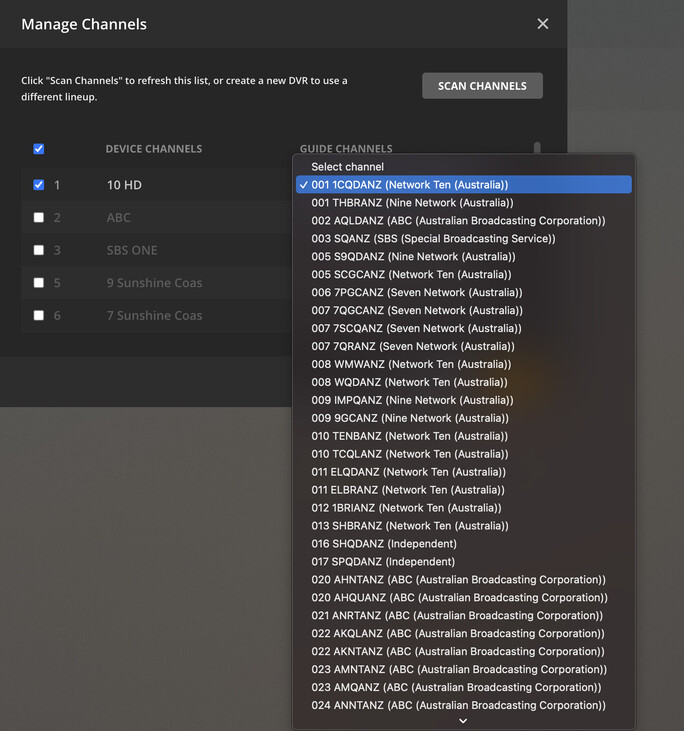
I’m in Queensland and have mine working ok. Next to HD Symbol you will find drop down menu.
Example:
Merry Christmas
Hi
This isn’t what appears under the Melbourne guides. The drop down shows channel 1 and 15 are linked to Channel 9.
I’ve tried all the different guides available except for Foxtel because the channel numbers are all over the place. The Freeview, fetch and local listings all have this issue.
Matt
Maybe it’s just me, but the EPG update knocked out the commercial skip feature altogether. No settings of the thing worked, and reinstalling the server didn’t fix it. Not sure if it’s a bug or just me, but that’s what happened after the last update with EPG change.

With the Gracenote EPG the DVR will show the number of channels in parentheses. With the TiVo EPG the number of channels was not shown.
Just Curios, do the episodes have “NEW” in the listing?
After all it is the
Thank you. Glad I didn’t delete then even though I got the email.
What happened to the Browse option to look at what’s upcoming? How does losing that extremely valuable option make this “Better” ?
1 Like
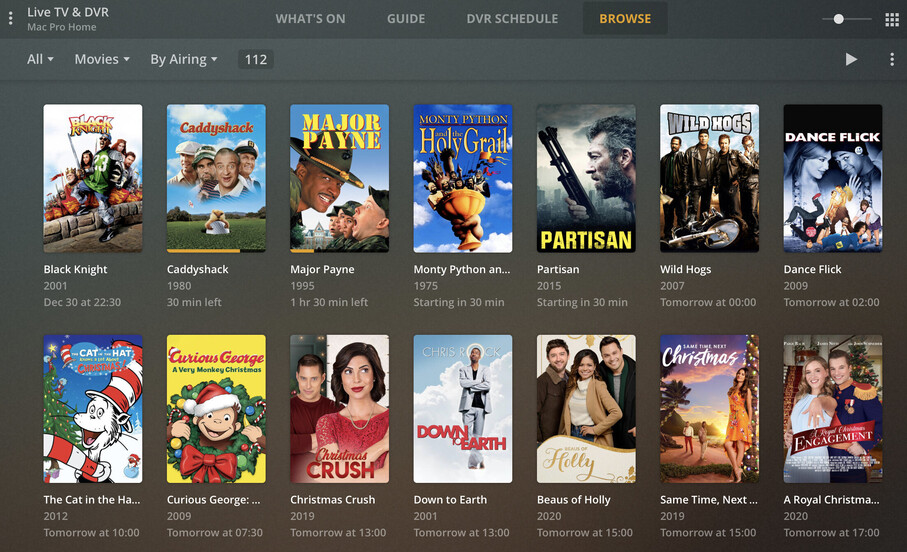
Curious, It wasn’t available earlier today
Yes, the listing’s show new 
Dos this stop me from using my existing EPG provider - IceTV in Australia ?
@Jase This has already been reported and acknowledged earlier in the thread.
Thanks @Bazrat, I now see your post #122. Missed that earlier. It’s been an issue for quite some time.
@cire12, great to hear that Search will be improved.
This is what I’m confused and worried about. It’s Christmas, nobody has time to do this and because of the fact that you CAN’T re-schedule anything that doesn’t show up in first set of guide data, means this is potentially a 3-4 month long process to catch back up on all of your series recordings. This is not acceptable, I bought into Plex because I thought things would be better…
@cire12 If I bite the bullet and do this over the weekend, is there an easy method to roll back? I run Plex on a linux virtual machine in ESXi, would a snapshot prior to deleting the DVR be a reasonable rollback plan?
I have blown out the old DVR and installed the new, re-setup recordings, etc. I didn’t have as many as some, so although a pain, it was manageable.
What I have noticed, though, is I am no longer seeing ‘Upcoming Sports’ or ‘Upcoming Movies’ in the What’s On tab. Is this something that we’ll see return what’s the spit and polish is complete? Or is there something I need to setup somewhere? (Certainly didn’t find anything) I really used those quite a bit.
…pretty sure it’s Christmas everywhere… 
It’s really not that bad. I’ve literally just done it with ~50 recordings that had to be reset. True, there are some TV series that I cannot rerecord as they are not airing right now, but you only need to check those weekly or fortnightly, so easy to do - just keep a list.
…honestly, it’s worth doing on Sat or Sun when the COVID-Christmas madness has died down.
I cannot answer the roll-back - sorry.
cheers.
[edited for typos]. …if you are worried about the new EPG, wait until New Year’s Eve i.e. keep the EPG you have for as long as possible.
Should other regions be seeing updated icons or was it just the handful that Paul mentioned?
Here are the Freeview UK channels from my line-up that I think are problematic:
Note: As this post is kept up to date - only those items marked in bold are still an issue.
001  - BBC1: The icon should be similar to the BBC1 HD icon.
002  - BBC2: Pretty unreadable - the text should be white like BBC2 HD icon.
003  - ITV: This is the old pre-2019 logo.
004  - Channel 4: Blue text on Dark Grey background is almost unreadable.
011  - Sky Arts: This is the Sky Arts HD icon but Sky Arts on Freeview is not HD.
013  - E4: Whilst the E is readable the 4 is very dark.
015  - Channel 4 +1: Dark Blue text on Dark Grey background is unreadable.
016  - QVC: Dark grey Q is unreadable.
020  - Drama: Should be a purple D with DRAMA written underneath.
023  - BBC Three: This is the old logo before the channel relaunch.
026  - Yesterday: Should be a green Y.
029  - E4 +1: Looks like a more readable E4 as the +1 is difficult to identify.
036  - QVC Beauty: Incorrect style as the text should be below icon.
037  - QVC Style: Old style as should now be a Q icon with STYLE text underneath.
040  - CBS Justice: Dark Blue text is unreadable and Freeview has text on two lines.
050  - TJC: This is the logo for TJC Choice on Sky and Freesat and not TJC.
056  - Smithsonian: Dark Grey text on a Dark Grey background is unreadable.
067  - CBS Drama: Pretty unreadable. Freeview has CBS above drama.
068  - Horror Channel: Pretty unreadable. Freeview has text on two lines
071  - Jewellery Maker: Black text on Dark Grey background is unreadable.
073  - Drama +1: Should be a purple D with DRAMA +1 written underneath.
074  - Yesterday +1: Should be a green Y with a +1 to the right.
077  - TCC: Currently shows a variant of the Together TV logo.
082  - Together TV: Black text on grey background is fairly unreadable.
084  - PBS America: This is the American PBS logo not the UK PBS America logo
085  - Hochanda: Black text on Dark Grey background is unreadable.
103  - ITV HD: This is the old pre-2019 logo.
104  - Channel 4 HD: Dark Blue text on Dark Grey background is unreadable.
231  - BBC News: Text should be white.
232  - BBC Parliament: Text should be white.
236  - GB News: Generic logo following no logo on reclassification from HD to SD
252  - Kiss Chat and Date: Incorrect channel name and no icon, just default text
253  - Proud Dating: No icon, just default text
701  - BBC Radio 1 Xtra: Generic logo
712  - Kiss Fresh: Dark text is unreadable
714  - Kisstory: Dark text is unreadable
Postcode: CV23.
Update 18/03/21
Some icons have been updated recently and the following are now readable:
- 002 - BBC2
- 004 - Channel 4
- 104 - Channel 4 HD
With the following now using correct icons:
- 001 - BBC1
- 011 - SkyArts
- 231 - BBC News
- 232 - BBC Parliament
Update 01/04/21
- Channel 085: Hochanda has rebranded to become Craft Store TV. However, rather than simply being renamed, channel 085 has now been removed from the channel line up - as reported here.
Update 24/04/21
The following icons have recently been updated and are now readable:
- 013 - E4
- 029 - E4 +1
- 056 - Smithsonian Channel
Update 25/05/21
- All Sony general entertainment channels have been rebranded to GREAT! and whilst the guide appears to have been updated all the old logos are still present.
Update 04/06/21
- GREAT! Movies and GREAT! Movies Action logos added.
- Updated QVC, QVC Beauty and Together TV logos. Unfortunately as can be seen above these are more unreadable than their predecessors - as reported here.
Update 16/06/21
- Jewellery Maker logo is now readable.
- Horror Channel logo is more readable - on two lines like that of the Freeview guide would be better though.
- The new QVC, QVC Beauty and Together TV logos from the 4th June have been updated to be readable. However, the QVC Beauty logo is incorrect as it should be the same style as QVC with the Q in a box and BEAUTY underneath.
Update 27/07/21
- Some of the channels that were reported to Gracenote last week for having missing logos now have generic Plex logos.
Update 11/08/21
- The generic Plex logos for GB News and BBC Radio 1 Xtra have now been updated with the correct channel logos.
Update 19/01/22
- Paramount Network has rebranded to 5 Action but the logo hasn’t been updated yet.
Update 29/01/22
- BBC Three re-launches on the 2nd of February with both standard definition and high definition channels. Whilst the HD channel (Channel 109) logo is correct the SD channel (Channel 23) logo is the old BBC Three logo.
Update 20/02/22
- The 5 Action logo has now replaced the Paramount Network logo following the channel being renamed.
Update 30/03/22
- Channel 085 which was rebranded from Hochanda to Craft Store TV back in March/April 2021, and subsequently removed from the available list of channels in the guide, is once again showing up the rebranding to Craft & Create last month - it’s only taken just shy of a year for it to re-appear!
1 Like
