Metadata on Synology

Hi,

I am new to PLEX and i have some questions on Metadata. I am pointing Movies to the movies folder that contains both english and chinese movies.

However, it seems that metadata is showing only on the english movies and not the chinese ones. To add on, chinese movies are all named with chinese characters.

Any help will be appreciated. Thanks!

It’s probably better to separate the movies into different shared folders and different library sections; one for English and one for Chinese.

When you do this, you can set the language for the Chinese movies to Chinese as you define it. Chinese will then be the default.

Oh okay. Will try to seperate the movies into different folder.

Another question, what do i do if the movie do not have metadata found?

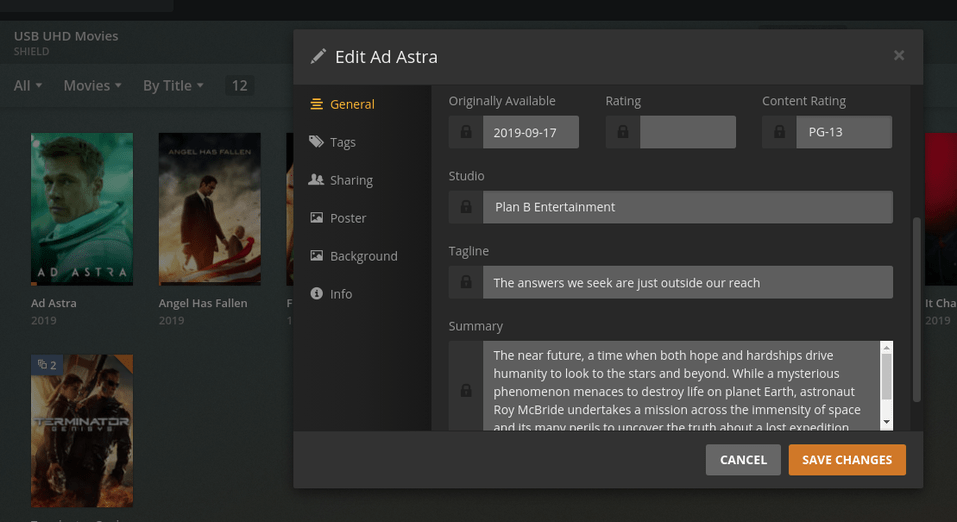
Can i manually add in metadata?

Thanks.

Yes.

You can edit its entry and type in what you want. (The pencil is in the lower left corner when your mouse is hovering over the poster)

Thank you so much for your reply.

Understand that there are limited metadata agent in default. Where do I get custom metadata agent and also how to install it?

I do not know where to get custom metadata agents.

Plex is discontinuing the use of custom agents.
The entire Python layer has been deprecated and is now being converted to internal C++ code.

If you are able to find some (google search?), the agent would be placed in the “Plug-ins” folder within the Plex share.

Alright.

Just to check if you are a synology user?

Do I use Synology equipment?

Yes, I do. I own a DS1815+.
I’m also the engineer who writes the scripts to install and control Plex on Synology

I owned a 415play previously and I was a Video Station user all along till it has playback problem on 4K content, i thought it was my NAS’s problem, so went to upgrade to 918+, sadly I’m still having the same problem and this is the reason i switched to PLEX.

Personally, I still think that VS is has better metadata function vs PLEX. However, I might be wrong as I just started playing around with PLEX.

Any idea if I need to purchase PLEX pass to watch movies on other devices like tablet or mobile phones?

Thanks.

If you’re switching from Video Station to Plex, there’s a few things to be aware of.

  1. Don’t use the default shares which Synology created for Video Station (video share). It has always caused problems with Plex because they maintain full control of it in ways which has always caused problems.

  2. If you wish to move around your media, I have some ‘power tools’ which will help with that in my Synology FAQ.

  3. The DS918+ will do 2160p (4K) very well. The one thing it will not do well is subtitle burning. This is because the CPU must burn the subtitles into the image. At the bitrates normally used in 4K, it is a simple matter of the CPU not being able to keep up. To avoid this, Text Based subtitles and making sure the players are set to burn “Only Image Formats” (each player has a setting for it).

  4. To take advantage of the Hardware Transcoding in the CPU, you will need a PlexPass to enable it. Synology has a proprietary method built into the NAS motherboard itself. Only they have access to it.

Are you able to share your FAQs?

Can you also advise how to edit “Cast” info? I can’t seems to find the option to edit cast.

Appreciate it

To find the FAQ, the search (magnifier glass in the upper right corner) will show you.

Syno FAQ

the link, which I have handy, is:

Plex/web only allows certain things to be edited right now. I know they’re making changes but don’t know any details.

Thanks!

This topic was automatically closed 90 days after the last reply. New replies are no longer allowed.