It’s just to use a different EPG for different tuners instead of just one EPG for all tuners as before. Unless you previously used the tab workaround, it’s the same.
It’s still ways off and shouldn’t have been launched yet. It’s completely broken when using an OTA tuner and an xmltv service. I had to revert back to a previous version of PMS.
On my Iphone, it shows the channel numbers for an instant, and then it switches to the network logos. Is there a way for the guide to display channel numbers for when I need to see the channel number?
Well after a few tries I did manage to get the data from two sources (HDhomerun prime and locals from usb hauppage stick tuners ) into one guide. Show the channels listed show as 2, 2.1, 2.3, 4, 4.1 etc… on my W10 server. Waited a long time for this one. Bravo Plex.
Please add the ability to specify the channel number or guide line-up that is coming from the tuner. This is creating havoc in my Comcast area where we have several duplicate channels of HD (in the 200’s, 800’s, and 1,000’s). My original plex setup allowed me to keep my channel numbers in the 1000s, but now with the update (which I appreciate allowing guide data from both my OTA and CC tuners), it randomly assigns them and now I have channels showing on Plex EPG in the 100’s, 200’s, 400’s, 600’s, 800’s, 900’s, and 1 1000 something, completely out of any order.
Even though in my HD Homerun tuner, I disabled all but the 1000’s.
This explains the problem I ran into recently, and never had a chance to troubleshoot. It’s really annoying. I basically have all channels over 1000, except the few that Comcast hasn’t transitioned there for some reason. But they stopped working properly after this update.
I think I found a glitch and was able to fix the guide. Using Plex Media Player (older, unsupported version),I was able to use the old interface and go to cable card tuner and manually change each…and…every…channel. Took forever, but, now they are in the order I need. However, it doesn’t show the channel numbers but at least it is still in the order I want it to be.
If a Source 1 and Source 2 have a channel number that’s the same but they’re a different program how does that work? Example, on channel 750 with one cable provider is Discovery and the other cable provider is Food Network how do I let the guide distinguish between the two or do I have to lose a channel? I tried mixing it together and it shows guide data for Discovery and shows the Food Network logo LOL.
Unfortunately, I have late good news for you: I deleted my DVR and recreated both guides (for OTA and cable) and now it’s all numbered properly. I don’t know if the recent update was related to that. Anyway, just something for anyone else reading this.
On my guide, they show up as different channels. Which for me is good: My OTA channels have higher quality than the equivalent Comcast channels. But your mileage may vary on that.
I don’t know how recordings work. I’d guess they’re tied to the system where the original recording is set up.
How do you get them to show up as different channels. I have 3 tuners from different geographic areas (local tv stations). All have a channel 5.1 but two are NBC and one is Fox. For me, only my first tuner shows when there is a duplicate channel (ie. no way to access the Fox Channel).
Are they all ATSC? It’s possible Plex can separate between sources (ATSC vs. Cable) but can’t separate multiple ATSC lineups. Maybe Plex assumes that since you can’t be in two geographical regions, you wouldn’t have two different ATSC lineups, so all 5.1’s are combined.
I’m just tossing out a guess, though. Mine is ATSC and Cable, and the two lineups are kept separate.
Mine are all OTA related however, the purpose of adding multiple tuners is to allow for different geographical locations. That was the big change with the recent update is to pull guides from different zip codes. I’ll patiently await a response from a plex team member or a fix I guess at this point.
I am so frustrated ffs. Comcast line-up that I manually had match the channel numbers on my CableCard completely borked upon server update. I normally have them in the 1,000’s. Took me 30-40 minutes to manually match them up since Comcast here has several duplicate channels.
Now, went through again to try and fix and it is not sticking. It is just randomly throwing my HD channels all over (some in the 100’s, 200’s, 800’s). All DVR stuff is messed up now.
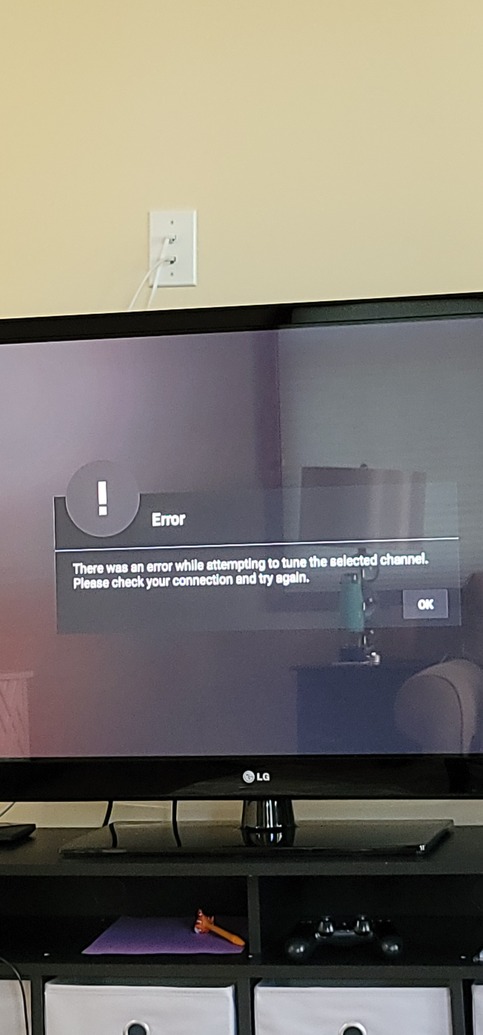
My Cablecard lineup changed as well. No channels that are affected can be tuned. Can’t select a duplicate channel to enable viewing/recording.
Happened with version 1.23.3.4707
No workaround that I could figure out.
Plex is fundamentally broken with this issue for my household.
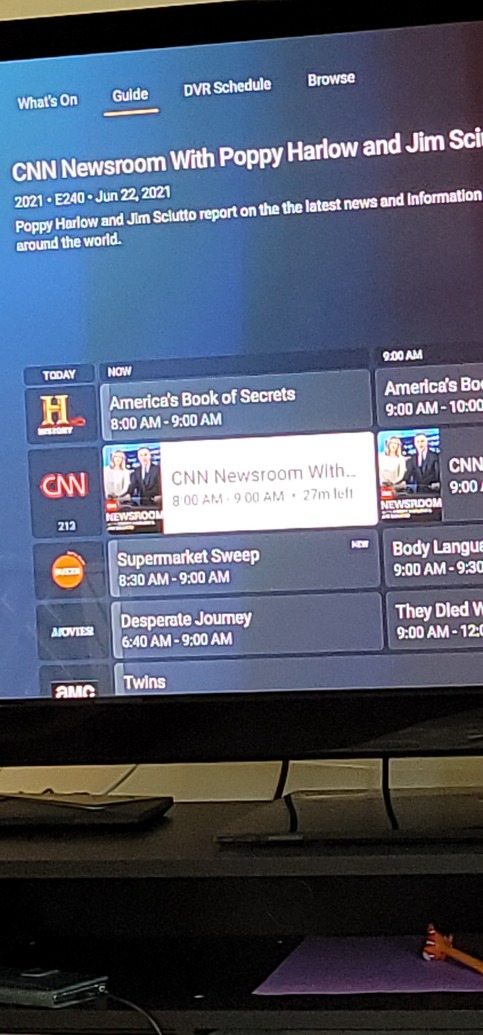
Same! Thought the order was just messed up but noticed I can’t tune any channels on CableCard tuner now, too! If I assign CNN to 1111, KEEP it at 1111 please! Since update, it now it assigned it to 213 and will not tune!
Spent another hour this morning reverting back to older plex version, so far no luck. Going to try and remove and re-add tuners and try to manually (for 3rd time) change channels to the numbers that lineup with my HD Homerun lineup.