It’s the only reason I’m still forced to use and pay for Infuse
I’m confused. If you are using AirPlay, you are not using the enhanced player.
Edit - I believe we do support AirPlay2.
AirPlay2 for audio not video casting.
My understanding is that recent versions of MPV actually have better support for airplay2 and that’s why Infuse works and the current enhanced player on tvOS does not.
Correct, AirPlay audio from the Apple TV to AirPlay speakers.
Whichever version of MPV Plex is using only has AirPlay 1 which has bugs that make it nearly unusable. I didn’t know Infuse also used MPV - is that accurate? Infuse has had AirPlay 2 support for quite some time.
Either way after I posted this I figured out that Plex AVPlayer seems to support 4K HDR HEVC now so I’m fine with that - just please don’t remove support for AVPlayer! Features are missing from MPV.
That’s probably a bad assumption on my part. But I think it’s true for Emby…
Yeah I can’t imagine that’s right - Infuse is a closed source proprietary player as far as I know. Haven’t tried Emby, might give it a shot later just to see if it works.
I’m still confused on your request. When you use AirPlay, you are only sending audio. The video player (mpv or avplayer) is not involved. You can send music to AirPlay 2 compatible speakers.
The video player is most definitely involved - you need to maintain sync between the video and the audio using AVSampleBufferAudioRenderer and AVSampleBufferRenderSynchronizer to be AirPlay 2 compatible. MPV needs to be updated to support AirPlay 2 audio buffering.
If it’s not clear, this is about watching videos on the Apple TV while playing the audio from that video to AirPlay 2 speaker(s).
I really wouldn’t know what AirPlay support Plex’s music player has as I don’t use it for music. I would imagine it’s just using AVPlayer which has AirPlay 2 support (obviously)
1 Like
Ok. AFAIK, when using Airplay for videos, the app reverts back to AVPlayer which uses AirPlay 2.
Can you describe why you think AirPlay 2 is not being used, or what specifically isn’t working for you?
No the app does not revert to AVPlayer when AirPlaying…
I guess I will explain in better detail and include screenshots later when I get a minute.
1 Like
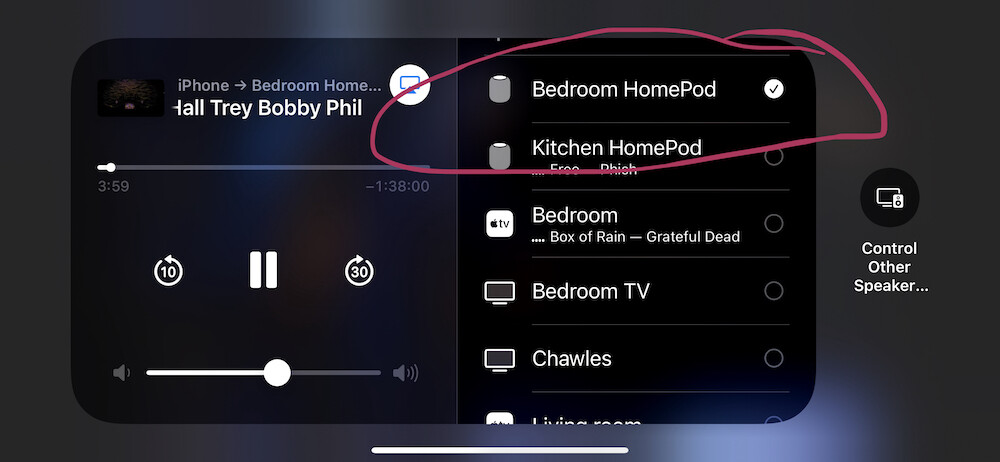
You cannot play audio to BOTH the AppleTV output device (my stereo) AND the HomePods or whatever AirPlay 2 speakers I have in the other room in my house simultaneously. This is what people are complaining about. I just ran into this and saw that people have been saying this for years. Works for me with all the other apps I have tried on my Apple TV (well, with Music, Pandora, and a few others). While it SHOWS both speakers as round buttons with checkmarks, and it will DISPLAY both speakers chosen, if you send audio to an AirPlay 2 speaker in addition to the Apple TV, the Apple TV will go silent.

While both buttons (TV Speakers, Bedroom HomePod) have checkmarks, ONLY the Bedroom HomePod has audio. I uncovered this while at a friend’s house setting up, assumed something was wrong with their setup, tested at home found the same issue. Again, DOES NOT happen with other apps…
P.S. Issue happens whether I play audio only, or whether I play a movie (in this case concert videos because that is when I want it in multiple rooms). Trying the same with infuse from the Plex library play fine on both devices (TV Speakers and Bedroom HomePod simultaneously).
1 Like
And just to add when casting the audio (while playing a video) to an airplay speaker on iOS and iPadOS the playback stops and just keeps spinning.
As described here
I do not see that. Playing video on iPhone XSMax running iOS 14.6, video on iPhone, audio on HomePod. I do NOT see this issues on iOS/iPad OS. ONLY on tvOS.

Your issue may be more related to the Sonos than to Plex from iOS. I have not had that issue.
Not AirPlaying the VIDEO, just AirPlaying the AUDIO. This is when trying to watch a concert for example and sending the AUDIO to another speaker in addition, or JUST playing Audio and trying to send to other speakers. My guess is you don’t default to the standard AVPlayer in those scenarios (only AUDIO being AirPlayed) but default when VIDEO AND AUDIO are being sent. Might this be the problem? I mean, seems weird that you would not detect the difference, but that is all I can come up with?
Maybe you are using the iPhone/iPad code (where when you send audio to a different device you are not trying to send video, and you want to ONLY hear via other device?).
iOS and iPadOS work differently in that you CANNOT choose both the device (your iPhone for example) AND other AirPlay speakers. This is a direct difference from the Apple TV when you might want to listen ON DEVICE (TV Speakers) AND on AirPlay device.
Note; Tested ALSO in Beta Apple TV player 7.19 (1585). No change.
1 Like
Why has no one on the Plex team yet to comment on this missing feature that every other Apple TV app seems to have figured out?
2 Likes
I’m really not happy with the lack of ANY response from the Plex team.
1 Like
AirPlay2 support still hasn’t been added to the player. It’s currently not a priority and based on the vote count for this feature, there’s nothing to push it up.
AH okay at least I now know the case. Thank you. Just FYI lots of the music I see since the pandemic is live streamed, so I watch a LOT of concerts in Plex. That is music. I am sure mer people than me want to be able to play it everywhere…
Also when you say “The Player” do you only mean the video part of the player? Because it sucks I can’t play my music to other speakers, and that I can’t even do it in the PlexAmp app, This is a sorely missing feature.
FYI, things we DON’T need that should NOT be priority? Game emulators. Web shows. Tidal pushed in our face. Weather. Things we DO need? Ways to play the music we have in Plex on multiple devices in our home in sync, ergo AirPlay 2.
There are plenty of threads here on the forum of people complaining about airplay. I guess AirPlay 2 support would be a fix for all.
1 Like
