I did query it as the channels appeared with a new source. I will pass your feedback but this is the response that I received
Rabbit Ears https://www.rabbitears.info/ is used for US OTA lineups - whilst may not be 100% accurate - it is seen as a reliable source
Rabbit ears displays W28DB on VCN 28 and W15EJ on VCN 31. Different sources are used to account for different (simultaneous) transmitters, so that customers in the area can have access to their respective transmitter within the area.
I will pass your feedback about it being for a different marking
Did you have a link to where the announcement of the change from 28.x to 31.x was ?
Thanks for looking into this. Unfortunately, the only only announcement that was given for the change was an on-screen message in the days leading up to it. I’ve searched online for information about the change but have not found anything which states it expressly.
It’s only really a cosmetic issue at this point. As long as accurate guide data remains available for 28.x in the EPG it doesn’t really matter. I’m sure at some point information about the change will propagate out to the various providers. I just checked tvguide.com and they still have 28.x as well.
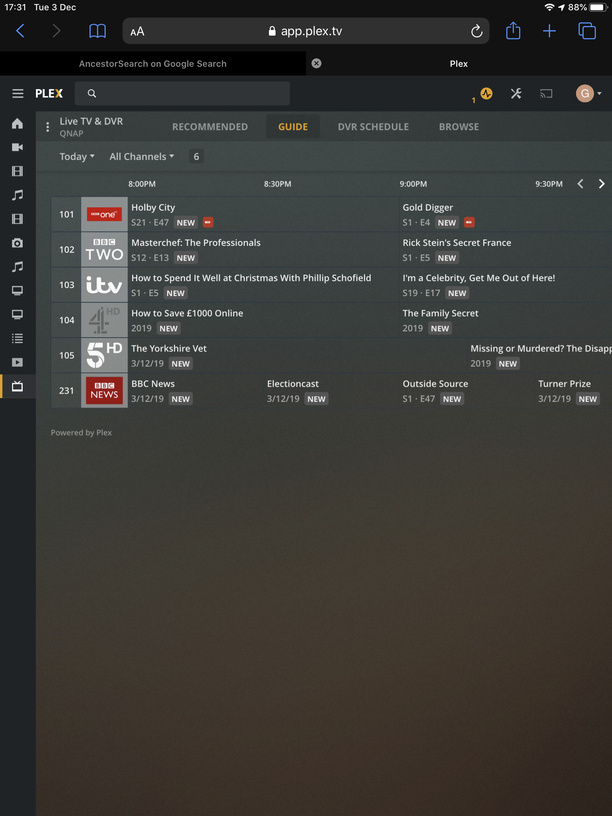
Once again the DVR is refusing to record a program on BBC in the UK - this time Holby City at 8.00pm.
From the screen shots you can see that the guide is marked as scheduled to record the program. However in the DVR schedule it is not. It will therefore not record and I am unable to force it to record. I have tried a manual reload of EPG and setting the recording to all episodes not just new. It simply refuses to set it to record.
I just had the very same problem, after investigating I found it was related to the episode number… A previously recorded episode had the wrong episode number and therefore Plex thought is already existed and would not record. Once I cleaned up the numbering it recorded without a problem. Sometimes I think the EPG has incorrect info which can really mess with your recording.
Thanks for the reply @chewmull. Could you give me more information about how you clean up the numbering? The DVR recorded an old repeated episode in the early hours of this morning for some reason. I deleted it. However, from what you appear to say this perhaps messed with the episode numbering. So how do I clean it up? Thanks
My issue was it recorded “episode 9”, yet E9 hadn’t aired yet. I went to IMDB to verify, then went to the directory and verified each episode and turns out I had episode 8 twice (once as 9), so simply deleting E9 was all it took. I then rescanned the library and all was well, DVR schedule was now set to record. Why did this happen? I couldn’t find a root cause but I suspect it was EPG, I was having a lot of issues with it updating and finally resolved it by dropping back a version (2029). Hope that helped…
History Channel - Vikings S/E data fubar. There is no such thing as season 7, tonight premiers season 6. I have no faith any other associated data with that show is correct.
Another error introduced. Cartoon Network Dec 17, 03:00 “Informercials” should be “Adult Swim Informercials”. I have zero desire to end up recording all sorts of unrelated late night BS that just happens to also be called “infomercials”. With that said, it is nice these are finally labeled so they’re collected in one spot instead of almost 40 one offs. Now if only “Adult Swim Smalls” and maybe “Adult Swim Pilots” would be properly labeled as well.
In addition I have no idea where the S/E data comes from because it does not match (the admittedly bogus ‘one’ season) tvdb information. While it’s perhaps nice to have them actually broken into seasons, no other data sources I’m looking at have them labeled like this.
I have been having this issue over the past week with one channel. The stupid thing is that I am in the same television market as the Plex offices, so if ANYWHERE in the world would be working correctly…you would think it would be here.
My DVR is recording the series and episode number incorrectly, but the title of the episode is showing correctly. For example, last night it recorded and named an episode of the The Flash as:
The Flash (2014) - S06E09 - The Last Temptation of Barry Allen Pt. 2
Episode 9 is next week and this weeks episode is episode 8.
Last week, it recorded Arrow, season 8, episode 6 as Batwoman, Season 1, episode 8.
Both of these shows are on the same channel (The CW, Channel 44) , I have had to correct both of these and luckily for me, I didn’t actually miss one of these shows because of these errors.
Same thing happened to me on these episodes, but on CW channel 62 (different city).
I think Plex is getting the CW channel data from an unreliable source, because for over two months now I’ve had some back and forth with Plex support for a different syndicated show on Saturdays, same channel, where they have been labeling the show with episodes from the previous season.
The whole time Gracenote powered EPGs have the listing right. Plex still hasn’t been able to fix the problem.
I manage to get a week (+/-) out of EPG before it decides to no longer update. This has been an ongoing problem for me and I end up deleting and recreating my DVR every week or so to fix it. I have attached logs after a recent EPG refresh with hopes someone can offer some help/advice.
Dec 07, 2019 08:13:10.116 [10224] DEBUG - Activity: updated activity 3177fdab-ed2d-4e78-881c-fa10a79d6fb1 - completed 100.0% - Refreshing guide data

Dec 07, 2019 08:13:15.648 [10224] ERROR - Couldn't rename file "D:\Plex Data\Plex Media Server\Plug-in Support\Databases\tv.plex.providers.epg.cloud-5bb439ba-764a-42d7-87f4-d7e3b42cf1a2-loading.db" to "D:\Plex Data\Plex Media Server\Plug-in Support\Databases\tv.plex.providers.epg.cloud-5bb439ba-764a-42d7-87f4-d7e3b42cf1a2.db": Access is denied
I suspect a lock on the EPG db file and at the end of refresh the attempt to move the new EPG db file to overwrite the existing one is failing with Access Denied. Unlikely to be permissions issue since the process was able to create the temporary db file tv.plex.providers.epg.cloud-5bb439ba-764a-42d7-87f4-d7e3b42cf1a2-loading.db
Could you get me screenshot of the file properties for each of the db files including any “shm” and “wal” file extensions and also the temp loading one
So go to this directory in windows explorer D:\Plex Data\Plex Media Server\Plug-in Support\Databases\
and select each file with a filename starting with tv.plex.providers.epg.cloud
and right click and select file Properties and take a screenshot
And please when supplying logs, provide the whole set of logs - the zip that you get through the Plex Web Help / Download Logs interface
I think I have have found the problem. I had DFS Replication on and while I never received an error it finally refreshed after I turned if off. Your finding of “access denied” prompted me to look into it. However, if you find anything else that may be a problem I would appreciate the feedback.
I think it was that. The screenshots show the wal and shm files were created at 08:13:15 - the time of the end of the refresh - but the failure was on the main db file - which must have been locked out
Yes, internal drive and it was replicating over to another server. It is odd that it would update fine for several days and then stop. Now that replication is off I’m hopeful that was indeed the problem, time will tell. I very much appreciate your help, I’ve been fighting this for several months now and it’s been incredibly frustrating.
So we now have 31.1 available on your lineup. Have you changed the channel mapping in DVR Setting to switch to this - or has that happened automatically?
I have attached the schedule for this channel that you would be getting. Let me if it is the right channel content
Thanks, there is now guide data for these channels. As far as I can tell it is correct (it matches what the 28.x channels were showing). Thanks for running this down.
Thank you for the confirmation. With the channel getting a new source identifier, if you have any pre-existing scheduled recordings for the channel, these need to be deleted and created afresh