Geoff, I get this all the time. It’s really annoying. What always works for me is when setting the recording, choose “New and Repeat Airings” instead of just “New Airings”. I know we shouldn’t have to do this but it always works for me. If only I could find a way of stopping Plex DVR forcing me to record certain TV shows into a Movie folder 
Thanks @johninho. I was advised and found that it is a series/episode numbering issue. If I manually correct the numbering of the files then the recording does happen. So at least now I have a manual fix. I have only recently come across the issue you have raised as episodes being categorised as movies. I’m not sure why that occurred - presumably the EPG categorises them that way. Of course a manual renaming of the resultant file and coping it to the appropriate folder would correct the problem. It’s just a pity that these manual edits are necessary.
I can see that the Episode number is out by 2. Tuesday 3rd December shows as S21 E47 when it should be S21 E49 - I am not sure what episode number it ends up with after recording and matching with thetvdb. You can check the media info in Plex Web
If the episode number gets corrected after recording then the next episode which would have an episode number than is 2 less than what It should be, will not record if there is one such episode number in the library
This is theory. One would need logs during time when to record / file details of previous recordings / metadata details of what is in the library
Further to my earlier reply, I have just gone through a dummy recording of tomorrow’s episode by forwarding the date on the test machine. The episode is identified as S21 E48 instead of S21 E50.
At the end of the recording whilst the filename will still have the episode title Kintsugi. we will match it to the 26th November episode E48 “Blurring the lines”. I cannot say at this stage, if this would impact next week’s recording
What I need to see initially is the media info and media info xml for previous recordings (ones that you have not manually changed)
and logs for when recording is to start tomorrow on Tuesday and logs again at the end of the airing - 5 minutes after
https://support.plex.tv/articles/201998867-investigate-media-information-and-formats/
https://support.plex.tv/articles/201643703-reporting-issues-with-plex-media-server/
https://support.plex.tv/articles/200250417-plex-media-server-log-files/
Hi - I’m having issues with the EPG for live TV. There is no season number for any show on the channel, but there is only a generic description. Also the show listed on the guide does not match what is on the stations website. For example one program is listed to air at 3pm but what actually airs is something totally different. However what is aired, does match the station’s website. The station in question is 30.1 WSDI. My dvr is set to DVR—Broadcast TV Indianapolis-Louisvl OTA Broadcast.
Is there anyway to contact EPG provider to have them look into this?
From another thread; The Simpsons schedule is fubar and has been for 5 episodes now. Missing and mislabeled S/E information.
On Grande ClearSource Dallas Digital. “Red Bull Signature Series” has incorrect “new” marking. It seems like every single airing is marked new. The two channels I see the show on are 836 and 934. I’m recording every airing, even when I have the episode with the same air date already.

Thank you. This has now been referred to our provider
There are a couple of issues here.
For channel 836 (Fox Sports Southwest HDTV (Dallas DMA) 24/7), I do see two airings marked as “New” which I do not believe they are. This has been referred to our provider

For channel 934 - the issue is due to the airings being marked as “Taped broadcasts”. We currently mark these as New and this needs a refinement at our end to check other data items. This has been raised for our team to look into

With regards to
I’m recording every airing, even when I have the episode with the same air date already.
This should not be the case as the episode should be found in the library and not recorded. I would like to see a Plex Media Server log with debug logging enabled if it is not doing that and you are using the current version of Plex Media Server
I do see you have one old server on 1.16.5.1552-8e8d0c785 - is it being used for DVR ?
Of the above list of airings, these airings are the same episode and should only result in one getting recorded

and similarly these
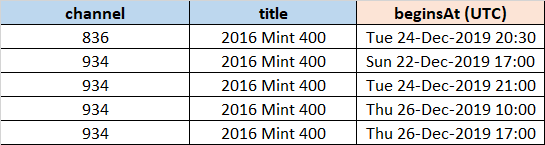
There should only be one recording made for each of these
With the “Sport” tag on these and using current version of Plex Media Server, there should be no tvdb matching at end of recording and the episode will remain labelled as per the EPG allowing the check for already being in the library to work
There is a channel in my HDHomeRun line-up which is broadcasted since the beginning of December.
It has no representation in the EPG, so the channel cannot be mapped in Plex:
I am using HDHomeRun Expand (DVB-C, Germany, zip code: 16548).
The channel name is: VOXup (which is different from VOX).
HDHomeRun channel mapping is 5079,
I chose " Kabel Deutschland Germany Digital" as EPG which is more accurat than the Brandenburg (which is missing “Kabel 1” and others, for example) one.
The logo is:
The actual program content is listed here:
How can I help any further to enable the EPG provider to add this channel to the EPG?
Thanks for your post. I have all the airings for next 2 weeks for channel 30.1 30.1 : QUEST-E WSDI (WSDI Quest) - could you give me some specifics please.
You mention a number of separate issues. So would like specifics for each
- Generic descriptions
- Show not matching station website
With regards to generic descriptions, I am aware of this and currently we are not always displaying episode descriptions - but I would need to see actual examples so I can investigate the specific case and add that to the open issue that we have on that
For the case of wrong show being in the guide, please give me airing time (I presume it is UTC -5 hours), series title, episode title in the guide and what It should be. If you can also give me a url for the channel guide for the day and also screenshot as some web pages are restricted to US only - but I will able to pass the link with the screenshot to our provider
Thanks for the reply. I think the most important issue, is that the shows listed in the guide are not what is actually being aired.
Here is a link to the channels schedule, and from what I can tell has been accurate from the past 7+ days. https://www.questtv.com/schedule
Examples of this mismatch are happening daily, but to pick a future date for you to investigate December 18, 2019. (Schedule history is not listed on channel’s website).
| 12/18/2019 | Plex Guide | Channel Website Schedule |
| 12:00am | Most Daring | Auction Kings / Auction Kings |
| 1:00am | Auction Kings / Auction Kings | Most Daring |
| 2:00am | Unsoled History | Storm Chasers |
| 3:00am | Modern Marvels | Storm Chasers |
| 4:00am | Modern Marvels | IRT Deadliest Roads |
| 5:00am | Dual Survival | Dual Survival |
| 6:00am | Most Daring | Most Daring |
| 7:00am | IRT Deadliest Roads | Most Daring |
| 8:00am | American Loggers | Most Daring |
| 9:00am | Auction Kings / Auction Kings | Modern Marvels |
| 10:00am | Unsoled History | Modern Marvels |
| 11:00am | Modern Marvels | Modern Marvels |
| 12:00pm | Modern Marvels | Auction Kings / Auction Kings |
| 1:00pm | Dual Survival | Mega Builders |
| 2:00pm | How Booze Built America | Mega Builders |
| 3:00pm | How Booze Built America | Mega Movers |
| 4:00pm | How Booze Built America | Mega Movers |
| 5:00pm | Auction Kings / Auction Kings | Factory Made / Factory Made |
| 6:00pm | Unsoled History | Modern Marvels |
| 7:00pm | Modern Marvels | Modern Marvels |
| 8:00pm | Modern Marvels | Modern Marvels |
| 9:00pm | Dual Survival | Ice Road Truckers |
| 10:00pm | American Loggers | Ice Road Truckers |
| 11:00pm | IRT Deadliest Roads | Ice Road Truckers |
For the second issue, it is not listing the Season or Episode numbers and therefore not matching to existing content in Plex library.
It appears I’m still recording dupes for programs that lack S/E information. I will tag you in the thread that talks about endless dupe recordings. It’s not restricted to airings with rogue “new” marker.
My dvr is running the latest 1.18.3.2129
I have some red bull episodes more than a half dozen times each. Probably other shows affected as well, but since red bull is always marked new it’s in my face.
When do you want me to generate logs, considering they contain maybe a couple hours worth of data?
May be the automatic nightly EPG refresh is not working. I have channel 30.1 airings for that lineup for the 18th December ET timezone below and it does agree with Schedule | Quest Television Network for the 18th December ET timezone
If you have the server logs with debug logging enabled, download them and i can check if they go back in time to the overnight EPG refresh time period.
Do an manual EPG refresh now through Server Setting and selecting DVR and Live TV and then refresh guide. You should get what I have below

With regards to this
For the second issue, it is not listing the Season or Episode numbers and therefore not matching to existing content in Plex library.
Again I need specifics from the guide and from the library - what is already recorded and not being matched
You can see from the above 18th December extract that we do have season and episode numbers for most. May be some of these are wrong
I don’t need verbose logging - just debug.
Capture logs say 5 minutes after it starts recording “Red Bull Signature Series” episodes on channel 836 or 934 that are already in the library. Also getting me media info xml for the episode that is in the library
For others I would need to do a similar investigation to what I did for 836 and 934 and Red Bull Signature Series. So need specifics to investigate
Somehow the red bulls have all disappeared, go figure, but a rick & morty episode (last sundays new episode) I’ve recorded four times in the last five days is set to record again tonight. I’ll grab logs then.
The episode numbers should be correct now for Holby City. Please do a full EPG refresh to pick the correction

As mentioned in my previous reply here, if this does not resolve the issue of missed recording, then would need server logs - taken 5 minutes after expected recording start and also details of what is in the library already for the series
I sent logs via private message. The manual refresh has reflected the changes in the guide and now episodes are including the Season and Episode number.
Thank you!
It does now seem to be working correctly. I had manually renames previous recordings so that the next episode would record. Following that recording I checked on the status of next week’s episode and it is scheduled to record. Thanks for your assistance @sa2000
