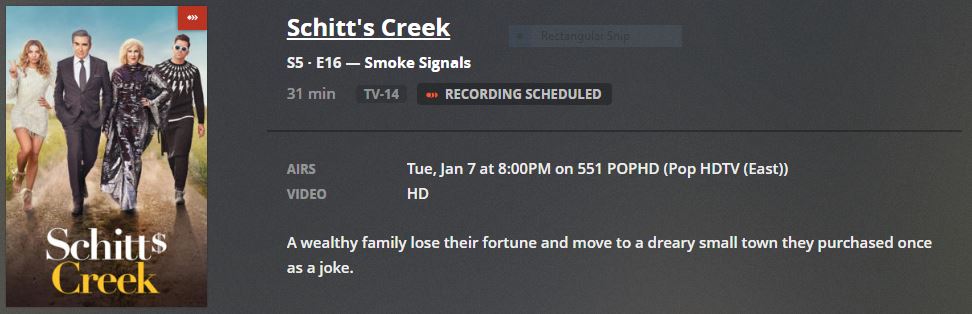
EPG Issue: The Young and the Restless is still messed up for me in 19002 with Verizon Fios Digital Philadelphia. On Monday’s, and this has happened for a few weeks the EPG flags the episode as new, but the air date is listed as the previous Thursday-Friday (e.g. 12/19/19—12-20-2019 for Today, Monday Dec 23rd). The remainder of the week (Tues-Fri) has the correct air dates.
The net result then is that I have no way to record Monday’s show, as Plex thinks it did it already last week.
In the application log, the only errors are from Plex Transcoder.exe…
Name der fehlerhaften Anwendung: Plex Transcoder.exe, Version: 0.0.0.0, Zeitstempel: 0x00000000
Name des fehlerhaften Moduls: msvcrt.dll, Version: 7.0.9600.17415, Zeitstempel: 0x54504b2e
Ausnahmecode: 0xc0000005
Fehleroffset: 0x0000c312
ID des fehlerhaften Prozesses: 0x2b8
Startzeit der fehlerhaften Anwendung: 0x01d5b82c5fee0d15
Pfad der fehlerhaften Anwendung: D:\Plex\Plex Transcoder.exe
Pfad des fehlerhaften Moduls: C:\Windows\SYSTEM32\msvcrt.dll
Berichtskennung: cbd16c50-241f-11ea-815b-b0c7459f0e8b
Vollständiger Name des fehlerhaften Pakets:
Anwendungs-ID, die relativ zum fehlerhaften Paket ist:
…
Of course, the error offset, the process id, the starting times and the report ids are changing, but the error itself is the same… If you get me a special Plex Transcoder.exe which writes logs about what it is doing when… you are free to do so.
It always happens on the thumbnail creation of DVR recordings.
In the system event log, I have a couple of Plex Update Service errors:
Der Dienst “Plex Update Service” wurde unerwartet beendet. Dies ist bereits 1 Mal vorgekommen. Folgende Korrekturmaßnahmen werden in 10000 Millisekunden durchgeführt: Restart the service.
… which means that the Plex Update service has been stopped unexpectedly and has been restarted.
Not that it’s helps you, but mine recorded fine today and the EPG looks good thru the rest of the week. Have you manually refreshed EPG? Also if you remove the mislabeled episode, scan the library, rename the episode appropriately and copy it back you should be okay ( that’s the exercise I was doing). DVR schedule does take a bit to recognize and adjust the schedule so it records.
DVR—Grande ClearSource Dallas Digital
Channel 925 FXXHD
December 28 10:30 - 10:35 AM
The SimpsonsS31·E14—The Longest Daycare new
Definitely not new and definitely not S31E14…You’re going to have a lot of angry people in 4 weeks who record this without realizing and then correspondingly do not record the real new episode.
DVR—Grande ClearSource Dallas Digital
Channel 848 - Cartoon network
Another issue that is annoyingly causing never ending rerecords.
Infinity Train
12/31/18—The Cat’s Car; The Unfinished Car
1/1 : 1100-1130
Mao Mao, Heroes of Pure Heart
12/31/18—No Shortcuts; Sick Mao
1/2 : 0600-0630
Apple & Onion
12/31/18—Fun Proof; Whale Spotting
1/2 : 1830-1900
Almost every single thirty minute block of 15 minute episodes is combined. They are not combined on other guide providers I look at. Both episode names are clearly listed. Plex cannot handle this situation at all. I record every single episode that airs no matter how many times they air. This is not just a case with those three shows either. If I look in the schedule there are many combined episode pairs. All of whom when I look elsewhere are correctly split.
Ok, so just like an ancient “special” was not S31E14 this weeks new episode is not S31E15…How does a guide provider mess up something so long running and stable as the simpsons? Is there zero validation going on with other sources? A simple lookup against tvdb would show bizarre nonsensical errors like this.
While it seems the episode numbers have been fixed enough to record without any issue they are still wrong. Today’s EPG episode is labeled as 87 when it should be 85. Records fine but the subsequent metadata is wrong.
Every week having 2-4 TV episodes with the wrong episode number are popuated in the DVR guide. This results in incorrect naming of the TV recording. Typically the episodes are +1 from the actual episode number, which results in the following episode not recording.
Best current example both season and episode are shown in DVR incorrectly is TV show Chicago P.D. scheduled to be shown on 4.1 NBC (Milwaukee, WI area) on Wednesday 1/8/2020 at 9:00 P.M. CST. The DVR guide shows Season 10 and Episode 2. There are only 7 seasons of Chicago P.D. not 10, and this is episode 10 according to thetvdb.com. https://www.thetvdb.com/series/chicago-pd/seasons/official/7.
I have tried refreshing the episode guide, deleted the devices and guide, and reinstalled with the same results – incorrect season and episode for this show.
Since incorrect episodes happen 2-4 times a week in the EPG guide, and the information is correct in thetvdb.com site, is there an explanation why the incorrect episode ends up in the DVR guide?
sa2000 – hoping you can clarify whether I understand correctly. My understanding is that Plex DVR guide is populated with information from thetvdb.com, guessing using an API to their database. Is that correct?
If my understanding is correct, any thoughts on why the web site shows the correct information but the DVR guide download regularly populates with the wrong episode? One week a show episode will be correct, then the next the episode might be +1. I’m seeing this happen across many different TV shows (all current TV shows). Based on other postings in the forum, the issue isn’t isolated to my area or channels.
Thanks for taking the time to clarify. Is there any value continuing to report episode issues- since they happen multiple times each week?
Have to wonder if the Plex team has given any consideration to using a more reliable EPG provider. There seems to be many users frustrated by inaccurate DVR guide info - that eventually result in the next episode not being recorded. I find myself babysitting Plex to verify season/episodes are correct in EPG guide so as not to miss any recordings - hoping to eliminate auditing the guide.
Previously used DVR software program for 10+ years and never experienced guide episode issues.
As paying customers disappointing that DVR guide has as many issues as there seem to be.
They had a reliable guide and abandoned it back in June. I agree, it’s just too much effort trying to babysit the PLEX product. Unfortunately it is buyer beware as you cant get your money back! We’ve got stations missing in the DFW market that have been reported weeks ago and as you point out, you never know if the data will cause a missed and/or errant recording.
Fox broadcast has now changed their schedule, to mimic titantv. Funny the original broadcaster is the last to change. The time slots in Plex are now correct as well after the last full refresh.
However, the simpsons episode still has incorrect S/E data. It says S31E15 when it should be S31E11…the other cartoons in the lineup appear correct.