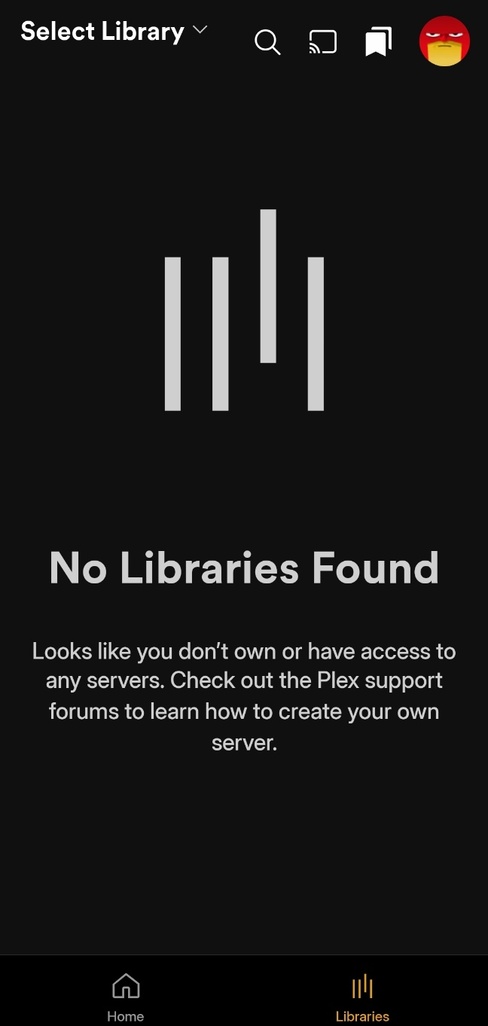
After updating the Plex app to version 2025.15.0, the library does not appear on Android devices. I’ve tested this on various Android devices, and it’s the same for all accounts, including the admin account. Even when I long press the library tab, none of my movie and show libraries are displayed, so I cannot add them to favorites. This issue is immediately resolved when rolling back to an older version of the Android app. Additionally, there are no such issues with the iOS, macOS, Windows, Web, or TIZEN apps.
Additionally, when running the Plex app on an Android device, the server console displays the following message.
Here is the experience of another user related to this issue. I am a Korean user, and considering the console log, this might have been the problem.
I had the same problem, and none of the fixes mentioned here worked. Turns out the problem was very simple. My (android) phone’s name had a special character in it (i.e. “é”). Changing it to “e” worked immediately.
Yes, this was exactly the cause of the problem. As soon as I changed the name of my device from “기훈’s A52s” to “hoon’s A52s,” everything started working perfectly. All libraries are displayed correctly.
Plex Team, if you let me know that you are aware of this issue and will fix it in the next release, I will close this issue.
I’m not sure. As far as I know, Korean can be represented using the UTF-8 character set, but it typically uses EUC-KR by default.
Since the previous version of the app worked well and the issue arose with this update, I believe the Plex Team will be able to figure out what changes caused the problem. Thank you!
I’m not sure which version I was using before. However, when I downgraded to this version, all libraries appear correctly regardless of the device name. The issue occurred with the 2025.15.0 version of the app.
Another user suggested this today in my main post. 2 of my 5 libraries did have an “é” in their name. I corrected all the names to be A-Z,0-9 only (even no space), rebooted PMS and now things are back working.
My 5 cents: I noticed this Saturday that I had no music in the car… didn’t really paid attention because the car has its own bugs, but on Sunday it was the same and I started looking into it.
No libraries on Plex web app (app.plex.tv), no libraries on Plexamp and no libraries on Plex app (both Androird)
On Monday, everything back to normal… and I didn’t touch a single setting on my server.
I’m suspecting it has something to do with the new streaming model, they probably locked all users until the verification of the Pass could be implemented but I also had 2 libraries with an “é” in the name…
Yeah this has been an absolute disaster of an update. My Plex app continues to recognize my library just fine, but Plexamp—a separate app that I did not want, because I wanted to keep my music together with my TV and movies, but am now being forced to use—will not recognize libraries. For the love of god please roll this change back. All the improvements that I’m being pitched with the music experience on Plexamp are worthless if I can’t access the music in the first place!
You’re a lifesaver, I was having the exact same issue. On my phone, it worked fine, but my tablet had “á” in the name as I had never bothered to change the default name, and my server showed as offline in the Android app. Interestingly enough, I have a friend that shared his server with me, and his server showed up normally. I have now changed the tablet’s name and my server works as well.