So I think this depends on what you did with your USB drive. One, is it set as adaptive storage (Replaces internal storage) or just as a removable drive. Regardless of where it’s set, you should just be able to go into the Plex client and see where it shows the data is stored. By default, it will show Internal (system storage location) but this could be your USB adaptive storage. You will then have one more option to move the storage to Internal (User accessible location). However, if you have the USB drive showing, that means you are using just as additional storage and you could place the database there as well.
I thought it was just me, I couldn’t view the non-adopted SD card like I used to, I was going to try to put the database backup back on there. When I used any file explorer apps it could see it but it told me the file explorer only had read only access when I tried to rename or delete files on the card that way.
So just to be clear, i enable shield file access, it shows the username and password, I got to it on a windows 10 PC and it shows the internal share but no SD card like it did previously. I’m not sure if it’s Plex that interfaces with the “access files on my shield” it but I do know that feature wouldn’t even load for me while the Plex service wasn’t setup during my troubleshooting and when I searched some people found they couldn’t use it if plex wasn’t installed properly a couple major nvidia experience updates ago
I think I am seeing the same thing as well on the test build. I removed my drive as adaptive storage and formatted it as external storage. I now see it as well as I see the option under the plex server to move the database to it, if I want. I am going put 1973 back on to see if anything changes.
I think it is using the USB as additional storage because it shows in my storage options as “shared,” but I am also having the problem the other user is having where Windows can see the “internal” of my Shield in File Explorer, but I cannot access the USB drive.
Here’s a screenshot:
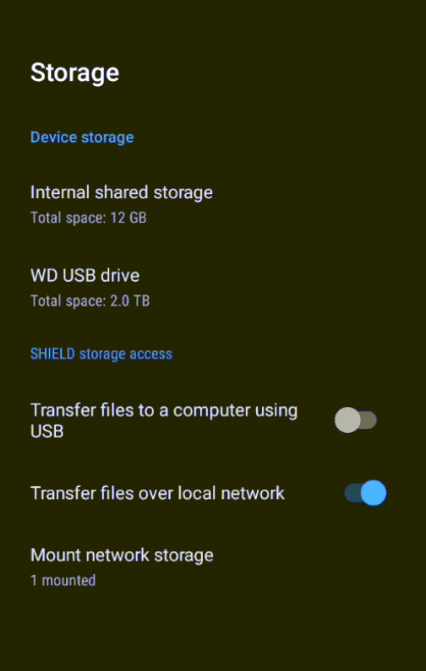
In your case, the 2TB drive has been set up as adaptive storage. This has replaced your 16GB internal storage on your device and you will only see the Internal folder when you view this through windows. You are also not going to see a whole lot in that internal storage due to most of it has been encrypted (including your plex database) if you have not moved it to Internal (User accessible storage)
With this new build, it works now! Thank you  But i need to set up a brand new library, i lost everything!
Ah, I see. Thanks for that input.
Back to this… I just installed a clean install of 1973… as in removed all Plex updates and installed that on the top. Set up the Plex server and checked to see what options I had for the storage… I had the USB drive. I then went into Transfer files over local network and made sure that was on and running and now I DO see internal as well as SanDisk USB drive (External storage) in windows explorer.
I think there is a bug here in the new version where it does NOT show this external USB drive anymore in windows explorer network location.
I’ll take a look tomorrow…
The joys of SDK version bumps.
Depending how you set it up there are backups in the internal storage under Internal>Plex Server>Database Backups so you could go back a day or so. If that’s gone though it’s gone for good. I had my plex moved to the SD card but the actual backups always stored in internal storage I found. Usually about 4 days worth. If you find it, it’s not hard to put back
1 Like
Have you done anything with these backups that are placed out there. I mean at this point, if you just had that database backup but no metadata to go with it… wouldn’t it be pretty worthless? Sure I could see if your database messed up and had nothing to do with metadata, this would work quite well to restore the database. I think most people are looking for a database/metadata backup… Like a one button backup/restore option from Plex 
Yeah I’ve done restores a couple times and it works but a one button backup and restore would be awesome!
yeah you lose the metadata but that’s replaceable but for me it’s more annoying losing all the markings for what episodes and series I’ve watched across the entire plex server.
Once the database is back you basically have exactly where you left off episode wise minus the pictures and episode description (so metadata like you said) then I click “Refresh all metadata” and it rebuilds all the pictures and episode descriptions
I have a pretty huge library which is about 40GB+ metadata so a refresh will take about 1 day to rebuild from scratch. It’s not like you can’t use it, it just will be filling in over time
If you can put up with no pictures for approx 1 day your back to where you were the day before the crash
I’m running 2021 and still unable to map my external USB drive in Win 10
1 Like
The plex programmer responded a couple posts back and said he would look at fixing that part tomorrow
He only fixed the changing the storage source in plex itself to a USB or SD card but not the mapping part for file share for attached storage so hopefully it will work again tomorrow
Sounds good, Thanks for the reply!
Just installed v 1.18.2.2021 and things seem to be working…it just took an an unusually long time to download and install from Google Play. Definitely over 20 minutes.
I’m having the exact same problem described here with 1.18.1.2019, but running on a Synology NAS. Is there any plan to release a fix for this? Plex firmware page still shows 1.18.1.2019-c186313fe as the latest available driver for Synology.
same here, rollback from 1.18.1.2019-c186313fe to 1.18.1.1973-0f4abfbcc fixed the problem
I just upgraded my Plex from 1.17.0.1709 to the latest stable version for Windows on the download page (1.18.1.2019) and ran into the same problem. I see this is a known issue and apparently has been pulled, so why is this showing as the current stable version to download still, a full day after it was apparently pulled? I read a reply that said to fix I should upgrade to a beta release (1.18.2.2015), although I try and avoid betas as previously they’ve caused me lots of problems with bugs, I tried it anyway as even the stable version seems to be too buggy to run. However, even after upgrading to that when I try and login my user accounts except one called Paul (which has limited rights) are gone, and when I login to that one it says my view is empty. If I try to switch to another user it says Plex server unavailable. what can I do to recover from this? Not impressed that such a massive bug could get to the stable release, how did this happen as this is why I avoid betas nowadays?
Hi all,
sorry, but when checking https://www.plex.tv/de/media-server-downloads/?langr=1#plex-media-server the latest version of Plex Server that I can find is 1.18.1.2019-c186313fe, which I installed just a few hours ago and which is not working.
Where do I find v1.18.2.202(or higher)?
