Plex Constantly Loses Remote Access

Was about to go on a rant regarding my various connectivity issues, but then I found this thread. I have the same issues as everyone else here. My setup hasn’t changed, but been updating PMS regularly, and I am now on 1.13.8.5395

ASUS RT-AC68U router. No magic tricks or custom settings. Been solid for a long time. Port forward unchanged for years.

  1. Remote access randomly working/not working with “unknown IP” displayed when it’s not working
  2. Plex server “not found” on local network, but suddenly appears before it drops off again
  3. Connection to Plex randomly timing out from wireless devices, but seem to work ok from wired devices.

Been going on for a while…
Plex - You have a problem. Please fix. This is a serious issue. I didn’t upload logs as I believe you have plenty already. If not, let me know. Happy to help out.

Thanks

I read in another thread that you have to either disable remote access and enable or reboot. My remote access works fine after disable/enable.

It is possible that some of your issues were due to the plex.tv problems i mentioned earlier here and it appears that I did not the other issue - but you can see reference to it here and here

If there are still issues then they need to be investigated and as a start that would need server logs with debug enabled before last re-launch of Plex Media Server.

So enable debug logging - see https://support.plex.tv/articles/201643703-reporting-issues-with-plex-media-server/

Restart the server anyway to make sure we have fresh logs created and chance of seeing the start up sequence in the logs

Open the Server setting page for remote access and if it is unavailable, take a screenshot - you can mask part of your public IP address (not all of it please) and try a disable - re-enable once and then if it is still not working - click on retry (once)

Wait a couple of minutes and take screenshot as before and downlolad logs zip
See https://support.plex.tv/articles/200250417-plex-media-server-log-files/

Attach logs zip and screenshots and I will have a look

What version did you update from ?
Would like to see logs covering the time when it goes unavailable
see response above on diagnostics

I also have to intermittently disable and re-enable remote access.

Thanks for the feedback. I will make sure to gather logs for you as soon as I return from a business trip. I did enable debugging and reboot yesterday, and also disabled/enabled remote access. Right now, everything seems to work…

I have ton of screenshots I can provide for you once I return from my trip.

Thanks. Appreciate the feedback.

Quick update…my server hasn’t lost connection for 18 days now. The key (for me, at least) seems to be having changed the network interface. Since I’ve set that to the actual interface instead of “automatic”, I’ve had no trouble.

Is this what you changed?

Plex

Yes. My server only has one interface and I selected that. (Sorry for saying “automatic”, I’m at work and mis-remembered the setting.)

Hi

I’m guessing i am having the same problem, but cant be sure …

What i can be sure of is the following:

Server running on Ubuntu 18.04
Plex Version 1.13.4.5271

The server is now telling me to upgrade to 1.13.8.5395 (only available manually), so I download and install it with no errors reported.

The problem I see is that after the upgrade the server disappears and never comes back, unless I download to the original version (1.13.4.5271).

Happy to supply logs and try the upgrade again if it helps with diagnosing … but for me this has been going on all versions for a while, i’m just glad i kept the working install package !!

The only problem I am aware of with this symptom, a problem that was identified yesterday, is for servers that have a WAN IP address and not on local network

Yup that’ll be me then.

My server is hosted remotely on a VPS (that I host).

The bug arises when you disable remote access. I can send you a binrary of version 1.13.4.5271 to allow you to regain access and re-enable remote access and after that you can upgrade back to 1.13.8.5395.

Let me know which download binary you use from the list https://plex.tv/downloads

There is a hack we can do which should regain access.
Need to edit the Preferences.xml
See support article for location of file
https://support.plex.tv/articles/202915258-where-is-the-plex-media-server-data-directory-located/

The item we need to carefully edit without corrupting the file is
PublishServerOnPlexOnlineKey
changing the value from 0 to 1

So shutdown Plex Media Server
Make the change
Re-launch Plex Media Server

Let me know what happens and if there is still a problem, let me have logs and screenshots

1 Like

Thanks for the reply, thank seems to have resolved the issue - updated and its back online, fingers crossed.

Cheers

So, after a week or so with smooth sailing, things acted up again yesterday. Again, no changes to anything on my end, the family just reported that Plex was slow, servers couldn’t be found and nothing worked. This was from within my own network.

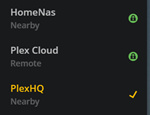
What I am seeing are errors like these;

image

Then, after a few minutes, they come back;

image

…and I lose one again;

image

I don’t care about Plex Cloud, not actively using it, but it’s the same with the other two. This was just a screenshot I was able to grab yesterday.

Netflix, HBO, Steam, Youtube and the likes are working fine when this happens - verified from wireless and wired devices. No packet loss or connectivity issues.

I then restart everything, but it takes ages for the servers to actually come back consistently.
What is interesting, is that different interfaces will report different results;

  1. If I access the Mac server (PlexHQ) it will report that HomeNas is ready but PlexHQ cannot be reached
  2. Accessing my test server on my NAS (HomeNas) and I see the opposite.

It’s like something is weird with the discovery engine?
I know everything sort of points to my network, but I see a ton of people reporting more or less the same issue(s), and from my experience, where there is smoke …and so forth.

Also, as pointed out earlier, the network itself is working (seemingly) just fine. As I am troubleshooting this, my son is gaming online, the wife is on Netflix and my daughter is making the most of our Spotify subscription…

So, what logs are you looking for?
I have downloaded logs from both if my servers, but I guess certain logs are more interesting that others?

Version 1.13.8.5395

The default zip file that gets downloaded when you go to Settings / Server / Help / Troubleshooting and Download Logs.

Plex Media Server Logs_2018-10-10_06-56-29.7z (1.9 MB)

Logs attached. How can I send you the password for the zip?

Private Message

Same problem here, running 1.13.8.5395.
Anyone know a version number that works for downgrade?
This is just getting annoying. Tried all suggestions earlier.

I went down to 1.12… and still had the issue so I dont know if it will change anything