Have you tried 1.14.0.5468 ? Your servers appear to be on very old versions
I just rolled it back yesterday, before that I had the latest version. im looking into the router settings but it all looks just as it should.
with more than one server you would need to either use uPnP automatic port mapping or ensure you have different WAN/Public Port in a port forward for each of the servers but the router needs to allow you to specify a different local port - port 32400 for each server and of course would need to ensure the local IP is dhcp reserved / static outside dhcp range
if you like to upgrade back to 1.14.0.5468 and check the port forwards and get logs, i would be happy to look at them. And would like to see what you have setup in the router for both servers
I recently updated PMS to v1.14.0.5468, and I’m still having these remote access errors. I was hoping this version would solve that issue as advertised, but alas. I have Tautulli set up to notify me when I lose remote access, and this is just from last night:

It still loses remote access randomly, sometimes in spurts, and it always comes back at 51 minutes on the hour (must be a scheduled task). Any chance that v1.14.0.5470 has resolved this?
Please could you provide logs covering these periods. See
https://support.plex.tv/articles/201643703-reporting-issues-with-plex-media-server/
https://support.plex.tv/articles/200250417-plex-media-server-log-files/
What is the interval between the Tautulli checks? We do have a timing issue within Plex Media Server which can arise when Tautulli makes these tests and the more checks are made the more likely of hitting this - normally - obscure rare bug.
See long discussion on the subject here
I didn’t have debog logging enabled at the time; I’ll turn it on and see if the issue replicates.
I’m not sure where to check for Tautulli update frequency…
Been having the same trouble since adding a new router Asus RT-AC68u to the mix and also running PIA VPN which didnt matter when it was just through the Huawei HG659 modem. Seems like I have had one problem after another, however achieving remote access now is simply confounding me. I thought this might be resolved if i upgraded my plex account, but then thought why would i pay for a service if the free version doesnt even work properly. It doesnt appear that anyone has a solution and PLEX remains silent.
I just updated to the latest version, which was supposed to fix the remote access bug, and now I can’t connect remotely AT ALL. It’s totally broken.
If I access my external IP (the one plex sees in server settings) in the specified port, from outside my LAN, it works fine. Clearly the port is open (set in the router, server on static IP, has been working for years), but no one using app.plex.tv can access my server… Whats even more annoying, is the remote access setting keeps disabling itself!
This has gone from a nuisance in the last few builds, to a full on major issue. Who is QA testing these server-breaking patches?
I’m so disgusted, I’m ready to just walk away from Plex. I will never recommend Plex again, at least not until they quit breaking things that worked fine for years, for seemingly no reason.
I seemed to have no issues with remote access up till the 1.14.0.5470 update, now Tautulli is reporting every few minutes that Plex Remote Access is down however when I test things still seem to be working as expected.
When I log into Plex and check the Remote Access Settings I see that Plex thinks itself is down.
I was having this issue with uPnP. I could disable/enable but it wouldn’t fix it. Tried turning off uPnP and turning it back on. Restarting the router. Nothing helped. I had to manually forward a port to get it working again. That worked for a while, then stopped working. If I click “Retry” it starts working again.
PMS: 1.14.0.5470
Windows 10
Plex Media Server Logs_2018-11-28_09-45-28.zip (2.8 MB)
The developer showed where to look on that long forum thread I linked
Thanks for the logs. The logs cover the period when you had a manual port (32400) selected and a port forward in place. I can see remote connections from a device coming in at these times on Nov 28th: 02:01 am, 05:25 to 05:26 am, 07:11 am and 07:32am.
But the log is showing that plex.tv info held for your server was not set at 07:58 when you checked out the remote access status and decided to re-try the connection. This re-instated the information held at plex.tv
Throughout the log between 23:53 the night before and 07:58 there is nothing logged about updating plex.tv info. So the issue may have arisen before that and the device that was successfully connectivity to the server remotely at the times I mentioned was probably using some cached info to get to the server.
The logs also show some device on the local network that is giving some invalid data following the periodic ssdp searches that Plex Media Server, There is excessive activity being logged - but there is no indication that it had a bearing on the problem. I would like to know what the actual device is - it has resulted in repeated actions like this -
Nov 28, 2018 09:45:21.135 [46120] DEBUG - NetworkServiceBrowser: found 0 SSDP devices via http://(null):49152/wps_device.xml
Nov 28, 2018 09:45:21.135 [46120] DEBUG - NetworkServiceBrowser: Parsing SSDP schema for http://(null):49152/wps_device.xml
Nov 28, 2018 09:45:21.135 [46120] DEBUG - HTTP requesting GET http://(null):49152/wps_device.xml
Nov 28, 2018 09:45:21.135 [46120] ERROR - Error issuing curl_easy_perform(handle): 6
Nov 28, 2018 09:45:21.135 [46120] WARN - HTTP error requesting GET http://(null):49152/wps_device.xml (0, No error) (Could not resolve host: (null))
This is probably unrelated but it would be good to find the device and also an understanding as to why we are using (null) for the IP address. If you have time, I would like to see a wireshark capture run on the server and pcap file and server logs for same period sent to me by private message
Back to the remote access issue.
Need to establish how plex.tv lost that server info
We can increase the number of log files - see LogNumFiles here https://support.plex.tv/articles/201105343-advanced-hidden-server-settings/
and say run with value of 20
and next time this arises to also capture the response from
https://plex.tv/pms/resources.xml?includeHttps=1&includeRelay=1&X-Plex-Token=xxxxxxxx before you retry the remote access settings connection
For the token see https://support.plex.tv/articles/204059436-finding-an-authentication-token-x-plex-token/
This should be copied to text file and zipped and sent to me by private message
Next is to try manually on device through cellular, say to http://wan--ip:32400/web and see if gets through - if it is just the plex.tv data that is wrong then it should work
Then re-establish remote access and get the logs
I see that at 07:58 a connectivity test to your server failed to get through the public IP address and public port 32400.
After re-establishing in remote access
So I recently updated to PMS v1.14.0.5470, and I kept having this Remote Access issue. I decided to go into my router and check port forwarding. uPnP was activated, but there was no port forwarding rule for my Plex server.
I manually created the rule (I did not manually specify the public port in the PMS settings, I just used the values already present), and now my remote access is consistent. I’m thinking perhaps my FIOS modem/router updated its software, and borked that particular rule (my other rules were still present and active).
If you have a port forward in the router to forward a public tcp port to 32400 for the server, then you need to tick manually specify port in server settings for remote access and enter the public port number and save the changes
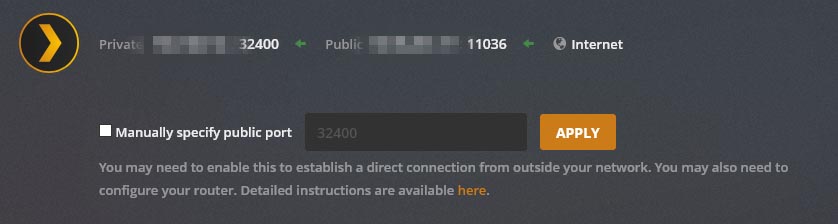
I have no idea what logs you need and I have no idea how to add them to this post, i’m still having the same issue with the remote access dropping every day.
There are two types of port forwarding - one is automatic using uPnP and picks a random port and this port may change from time to time and the other type is fixed and you set it up yourself as a Port Forward
What you are doing is mixing the two together.
So if you have a port forward in the router that you had setup and is not a uPnP port forwarding - then tick the box for Manually Specify Port and enter the public port in that rule as the specified port number
Ah, I see what you mean. I’ll do that, in order to eliminate any possibility of PMS altering that public port.
I’m currently running PMS at two different locations, one account. Been lurking this forum post and still having this issue. I’m using manual port forwarding.
One option I’d like to try turning off is GDM, but how would that affect local clients within the LAN of each server?
Will the local clients try going out to the internet, and back in? Or will I still be able to directly play content on the LAN?
I would not expect GDM to make a difference.
Have you posted debug logs anywhere for your issue?
The Plex client apps would ask plex.tv for the connection route to your servers - with servers claimed and signed in, they notify plex.tv of the routes
